PowerFlex How to understand the MDM Cluster
Summary: This Article explains the details of an MDM cluster in a PowerFlex solution.
This article applies to
This article does not apply to
This article is not tied to any specific product.
Not all product versions are identified in this article.
Instructions
MDM cluster
The MDM is the monitoring and configuration agent of PowerFlex and is used mainly for management. A multi-MDM environment consists of one primary MDM, while the others function as secondary or tiebreaker.
The MDM is used for management which consists of migration, rebuilds, and all system-related functions. No I/Os run through the MDM.
To support high availability, three or five instances of MDM run on different servers. In a multi-MDM environment, one MDM is given the primary role, and the others act as secondary or tiebreaker MDMs.
The MDM cluster consists of a combination of primary MDM, secondary MDMs, and tiebreaker MDMs. There is also the standby MDM which is not a part of the cluster.
- MDM: An MDM is any server with the MDM package installed and it can be given a manager or a tiebreaker (default) role, during installation. This role cannot be changed later without reinstalling the MDM. MDMs have a unique MDM ID, and can be given unique names. Before the MDM can be part of the cluster, it must be promoted to a standby MDM.
- Standby MDM and tiebreaker: An MDM and a tiebreaker can be added to a system as a standby. Once added, the standby MDM or tiebreaker is attached, or locked, to that specific system. A standby MDM can be called on to assume the position of a manager MDM or tiebreaker MDM according to how it is installed, when it is promoted to be a cluster member.
- Manager MDM: An MDM that can act as a primary or a secondary in the cluster. Manager MDMs have a unique system ID, and can be given unique names. A manager can be a standby or a member of the cluster.
- Tiebreaker MDM: An MDM whose sole role is to help determine which MDM is the primary. A tiebreaker can be a standby or a member of the cluster. A tiebreaker MDM is not a manager. In a three-node cluster, there is one tiebreaker; in a five-node cluster, there are two tiebreakers. This ensures that there are always an odd number of MDMs in a cluster, which guarantees that there is always a majority in electing the primary MDM.
The following terms are relevant to the MDM cluster, specifically:
- Primary MDM: The MDM in the cluster that controls the SDSs and SDCs. The primary MDM contains and updates the MDM repository, the database that stores the SDS configuration, and how data is distributed between the SDSs in the system. This repository is constantly replicated to the secondary MDMs, so they can take over with no delay. Every MDM cluster has one primary MDM.
- Secondary MDM: An MDM in the cluster that is ready to take over the primary MDM role if necessary. In a three-node cluster, there is one secondary MDM, thus allowing for a single point of failure. In a five-node cluster, there are two secondary MDMs, thus allowing for two points of failure. This increased resiliency is a major benefit to enabling the five-node cluster.
- Replica: An MDM that contains a replica of the MDM repository. This includes the primary MDM and any secondary MDMs in the MDM cluster.
The following table describes the available cluster modes:
| Cluster mode | Members | Description |
|---|---|---|
| Three-node (default) |
|
Three-node cluster has two copies of the repository, thus can withstand one MDM cluster failure. |
| Five-node |
|
Five-node cluster has three copies of the repository, thus can withstand two MDM cluster failure. |
| Single-node | Primary MDM | Single-node cluster has only one copy of the repository, thus it cannot withstand failure. It is not recommended to use single-node in production systems. |
In addition to the cluster members, you can prepare standby managers and tiebreaker nodes, for a total of thirteen cluster and standby MDMs.
The MDM cluster IP address limit is 16 IP addresses, which include all cluster members (primary, secondary, standby primary, and standby secondary).
The following figure illustrates a five-node MDM cluster:
Figure 1. Five-node MDM cluster
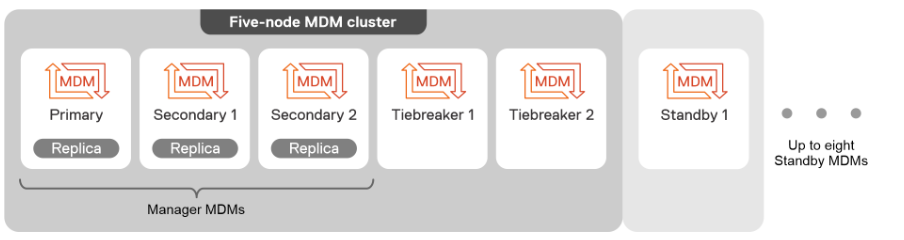
All members of the MDM cluster have the same MDM package installed on them.
Before a server makes its way into the MDM cluster, a server must:
- Install the MDM package on the server.
During the installation, you determine if the server will be a manager or a tiebreaker (default).
- Promote the server to standby status, either as a manager or as a tiebreaker according to how it was installed.
- Add the standby server to the MDM cluster. A manager, once entered into the cluster, can take on the primary or secondary state.
MDM cluster creation is done automatically when deploying a system with any of the automated deployment tools.
Affected Products
PowerFlex appliance Intelligent Catalog SoftwareProducts
PowerFlex rack, VxFlex Ready Nodes, PowerFlex Appliance, PowerFlex custom node, ScaleIO, PowerFlex appliance R650, PowerFlex appliance R6525, PowerFlex appliance R660, PowerFlex appliance R6625, Powerflex appliance R750, PowerFlex appliance R760
, PowerFlex appliance R7625, PowerFlex custom node, PowerFlex custom node R650, PowerFlex custom node R6525, PowerFlex custom node R660, PowerFlex custom node R6625, PowerFlex custom node R750, PowerFlex custom node R760, PowerFlex custom node R7625, PowerFlex rack connectivity, PowerFlex rack HW, PowerFlex rack RCM Software, PowerFlex Software, VxFlex Ready Node, VxFlex Ready Node R640, VxFlex Ready Node R740xd, PowerFlex appliance R640, PowerFlex appliance R740XD, PowerFlex appliance R7525, PowerFlex appliance R840, VxFlex Ready Node R840
...
Article Properties
Article Number: 000249312
Article Type: How To
Last Modified: 16 Nov 2024
Version: 1
Find answers to your questions from other Dell users
Support Services
Check if your device is covered by Support Services.