PowerProtect Data Manager: How to Restrict UI Access to Limited Hosts
Summary: This article introduces how to restrict the PowerProtect Data Manager UI access to limited hosts using script /usr/local/brs/puppet/scripts/ui_host.sh.
This article applies to
This article does not apply to
This article is not tied to any specific product.
Not all product versions are identified in this article.
Instructions
To restrict PowerProtect Data Manager UI access to limited hosts, you can use the script
/usr/local/brs/puppet/scripts/ui_host.sh on PowerProtect Data Manager appliance.
admin@dpswq029:/usr/local/brs/puppet/scripts> ./ui_host.sh
Setting UI access hosts. Support multiple hosts, separate by comma. For example: 192.168.10.1,192.168.10.2
And network. For example: 192.168.20.0/24
Empty input will clean the current settings.
Change UI access hosts:
If there are existing hosts configured and you want to add more hosts, include the original hosts in the input. Otherwise, the original hosts are removed.
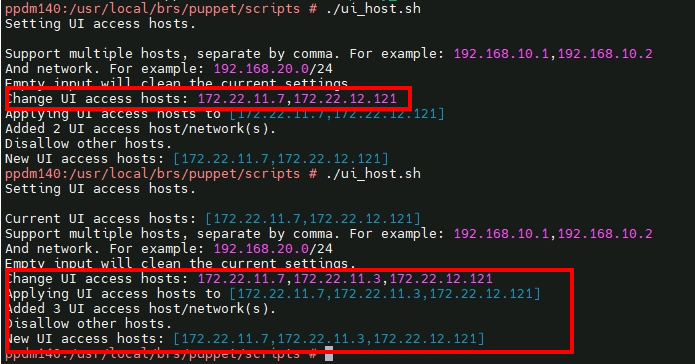
To unlimit the existing hosts, rerun this script with an empty input.
Affected Products
PowerProtect Data ManagerArticle Properties
Article Number: 000255810
Article Type: How To
Last Modified: 16 Dec 2024
Version: 2
Find answers to your questions from other Dell users
Support Services
Check if your device is covered by Support Services.