PowerFlex 無法進行節點升級錯誤,因為「遠端共用掛載失敗」
Summary: 本文提供逐步程序,以修正從 PFMP 4.x 執行節點升級時發生的節點升級問題,此問題是由於 NFS pod/容器無法上傳和升級 iDRAC 主控台硬體韌體的問題所造成。
This article applies to
This article does not apply to
This article is not tied to any specific product.
Not all product versions are identified in this article.
Instructions
修正 PFMP 的 NFS 容器無法與節點的 iDRAC 通訊造成節點升級問題的程序。
步驟:
1) 從任何 MVM 執行下列命令,以檢查 NFS 容器執行的 MVM。
kubectl get pods -n powerflex -o wide | grep -i nfs
2) 登入正在執行 NFS 容器的 MVM,並執行下列命令,確保所有節點狀況良好且處於就緒狀態。
kubectl get nodes

3) 開啟與正在執行 NFS 容器的 MVM 的 SSH 工作階段,並執行以下命令,使 MVM 處於維護模式。
kubectl label node <mvm hostname> cmo.maintenance.mode=true
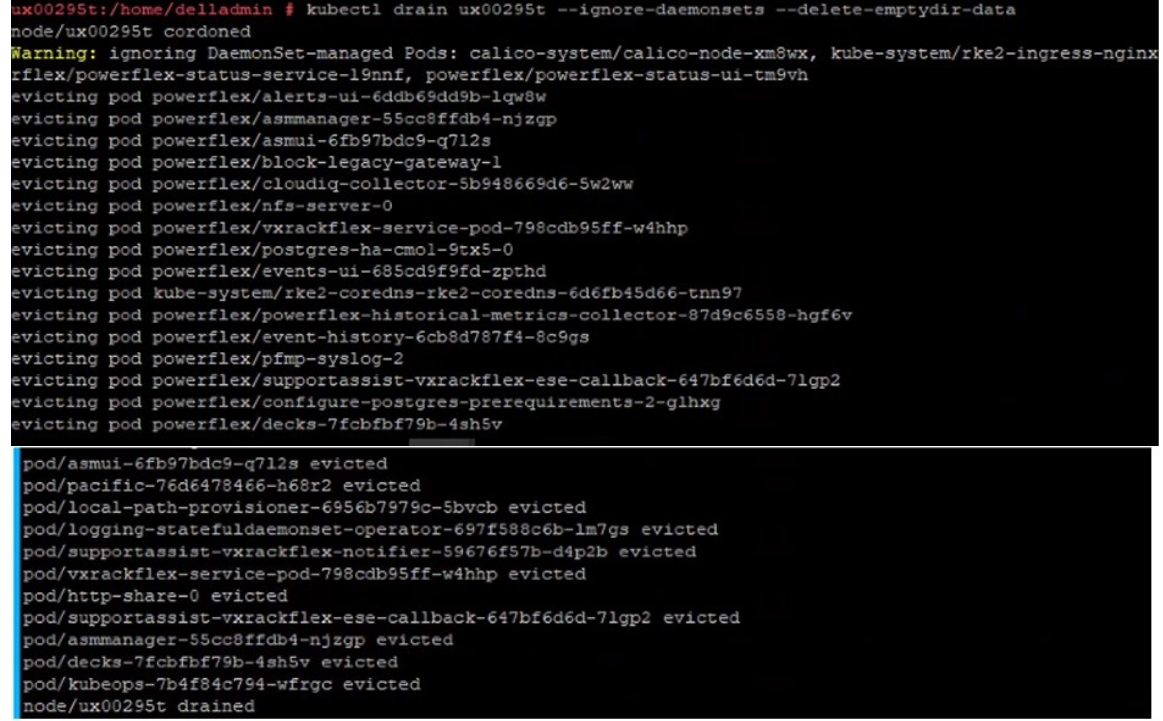
4) 執行以下命令以排空節點。
kubectl drain <mvm hostname> --ignore-daemonsets --delete-emptydir-data
5) 執行以下命令,以驗證 NFS 容器是否正在另一個節點上執行。
kubectl get pods -n powerflex -o wide | grep -i nfs
6) 執行以下命令,將節點重新開機。
sudo reboot
7) SSH 至另一個 MVM,並執行下列命令來監控您已重新開機的節點,直到其狀態為「就緒」為止
watch kubectl get nodes
8) 當 MVM 連線時,SSH 至 MVM 並執行下列命令,以解除警戒並把 MVM 從維護模式移除。
kubectl uncordon mvm-hostname ; kubectl label node mvm-hostname cmo.maintenance.mode-

Affected Products
PowerFlex rack, PowerFlex appliance R650, PowerFlex appliance R640Products
VxFlex Ready Nodes, PowerFlex custom node, PowerFlex appliance R6525, PowerFlex appliance R660, PowerFlex appliance R6625, Powerflex appliance R750, PowerFlex appliance R760, PowerFlex appliance R7625, PowerFlex appliance R740XD
, PowerFlex appliance R7525, PowerFlex appliance R840
...
Article Properties
Article Number: 000262385
Article Type: How To
Last Modified: 06 Jan 2025
Version: 1
Find answers to your questions from other Dell users
Support Services
Check if your device is covered by Support Services.