PowerFlex 无法执行节点升级错误,因为“mount of remote share failed”(远程共享装载失败)
Summary: 本文提供了分步过程,用于修复从 PFMP 4.x 执行节点升级时发生的节点升级问题,该问题是由于 NFS Pod/容器无法在 iDRAC 控制台上上传和升级硬件固件所致。
This article applies to
This article does not apply to
This article is not tied to any specific product.
Not all product versions are identified in this article.
Instructions
由于 PFMP 的 NFS 容器无法与节点的 iDRAC 通信,解决节点升级问题的步骤。
步骤:
1) 从任何 MVM 运行以下命令,以检查 NFS 容器正在运行哪个 MVM。
kubectl get pods -n powerflex -o wide | grep -i nfs
2) 登录到运行 NFS 容器的 MVM,并运行以下命令,以确保所有节点都运行状况良好且处于就绪状态。
kubectl get nodes

3) 打开与运行 NFS 容器的 MVM 的 SSH 会话,并运行以下命令以将 MVM 置于维护模式。
kubectl label node <mvm hostname> cmo.maintenance.mode=true
4) 运行以下命令以清空节点。
kubectl drain <mvm hostname> --ignore-daemonsets --delete-emptydir-data
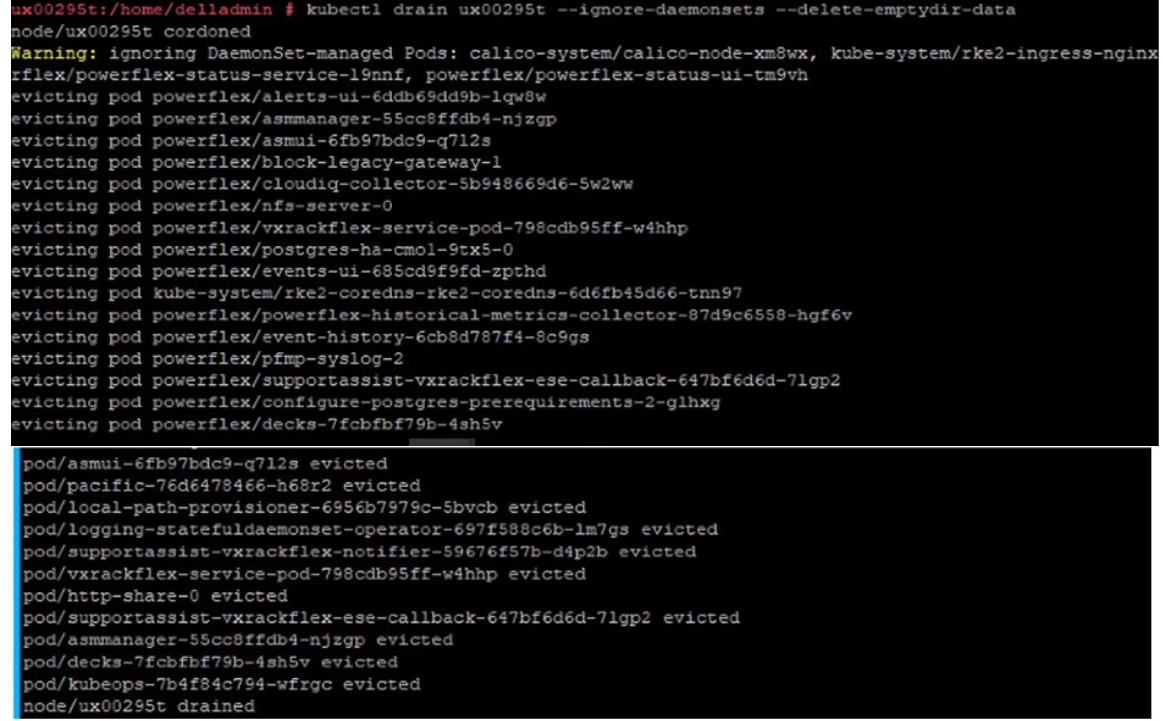
5) 运行以下命令以验证 NFS 容器是否正在另一个节点上运行。
kubectl get pods -n powerflex -o wide | grep -i nfs
6) 通过运行以下命令重新启动节点。
sudo reboot
7) 通过 SSH 连接到另一个 MVM 并运行以下命令以监视已重新启动的节点,直至其达到“就绪”状态
watch kubectl get nodes
8) 当 MVM 联机时,通过 SSH 连接到 MVM 并运行以下命令以取消隔离并将 MVM 从维护模式中删除。
kubectl uncordon mvm-hostname ; kubectl label node mvm-hostname cmo.maintenance.mode-

Affected Products
PowerFlex rack, PowerFlex appliance R650, PowerFlex appliance R640Products
VxFlex Ready Nodes, PowerFlex custom node, PowerFlex appliance R6525, PowerFlex appliance R660, PowerFlex appliance R6625, Powerflex appliance R750, PowerFlex appliance R760, PowerFlex appliance R7625, PowerFlex appliance R740XD
, PowerFlex appliance R7525, PowerFlex appliance R840
...
Article Properties
Article Number: 000262385
Article Type: How To
Last Modified: 06 Jan 2025
Version: 1
Find answers to your questions from other Dell users
Support Services
Check if your device is covered by Support Services.