Avamar: Dezaktywacja proxy zmienia vc_id dzięki wielu integracjom vCenter
Summary: W tym artykule wyjaśniono, w jaki sposób dezaktywacja serwera proxy na serwerze Avamar z wieloma zintegrowanymi systemami vCenter zmienia vc_id.
This article applies to
This article does not apply to
This article is not tied to any specific product.
Not all product versions are identified in this article.
Symptoms
W tym artykule użyto skryptu goav. Użyj tego artykułu Avamar: Narzędzie GoAV , aby uzyskać więcej informacji
W tym scenariuszu serwer Avamar (av-server) ma dwa vCenter:
- vcenter01.lab.com
- vcenter02.lab.com
Każdy system vCenter zawiera kilka serwerów proxy. W tym artykule użyto av-proxy-08.lab.com proxy.
1. Połącz się z serwerem Avamar jako administrator i wyświetl listę serwerów proxy:
./goav proxy show
admin@av-server:~/>: ./goav proxy show
===========================================================
GoAv    :        1.91
Avamar  :        19.10
Date    :        27 Dec 2024 10:02 EST
===========================================================
COMMAND :  ./goav proxy show
NOTE: This is not an official tool
===========================================================
+---------------------------+------------+-------------------------------+------------------------------------------+-----------+---------------+------------------------+
|           name            | domainFqdn |          vcenterHost          |                    id                    | activated | autoDsMapping |     clientVersion      |
+---------------------------+------------+-------------------------------+------------------------------------------+-----------+---------------+------------------------+
| av-proxy-01.lab.com       | /clients   | vcenter01.lab.com             | 451e50d90593232b55ead709d7c150c222c73357 | true      | false         | 19.10.100-166          |
| av-proxy-02.lab.com       | /clients   | vcenter02.lab.com             | 4c521927efd418d29ea054b983aa98cdaba0164f | true      | false         | 19.10.100-135_HF338865 |
| av-proxy-03.lab.com       | /clients   | vcenter01.lab.com             | bbf88da2fca1f51234b86348f02bd5530229e734 | true      | false         | 19.7.100-82_HF338743   |
| av-proxy-04.lab.com       | /clients   | vcenter01.lab.com             | 22a31e18f995a442a2dc745a28ffff3ee82b627b | true      | false         | 19.9.100-78            |
| av-proxy-05.lab.com       | /clients   | vcenter01.lab.com             | 90c3058d07f43532d41ea4fc82d07be6f5eecdbb | true      | false         | 19.10.100-166          |
| av-proxy-06.lab.com       | /clients   | vcenter02.lab.com             | 907da738167186a952d78850c366ba6efbed578f | true      | false         | 19.10.100-135_HF338865 |
| av-proxy-07.lab.com       | /clients   | vcenter02.lab.com             | f685ef4e7497eadf67e8e683898c9996ffffde11 | true      | false         | 19.10.100-135_HF338865 |
| av-proxy-08.lab.com       | /clients   | vcenter01.lab.com             | 170fecda603b533247db21c1c5f536f6d2bf4c1b | true      | false         | 19.4.100-116           |
+---------------------------+------------+-------------------------------+------------------------------------------+-----------+---------------+------------------------+
admin@av-server:~/>:
2. Sprawdź identyfikator klienta (cid) dwóch systemów vCenter:
psql -p 5555 mcdb -c 'select mgmt_client.cid, clients.descr, mgmt_client.uuid from mgmt_client, clients where mgmt_client.cid=clients.cid;'
admin@av-server:~/>: psql -p 5555 mcdb -c 'select mgmt_client.cid, clients.descr, mgmt_client.uuid from mgmt_client, clients where mgmt_client.cid=clients.cid;'
                   cid                    |                            descr                             |                 uuid
------------------------------------------+--------------------------------------------------------------+--------------------------------------
 70556d54b3eb4831d3e1a75742b9973fc930c1ca | /vcenter01.lab.com/vcenter01.lab.com | 1e414dc1-3107-4f05-8159-5a5beaf8f9ab
 1e1825c377e14943e6c0ec7921ceb4efc21a1934 | /vcenter02.lab.com/vcenter02.lab.com | 0ed1532e-13d2-41cb-b437-cdd244af42f8
(2 rows)
admin@av-server:~/>:
3. Sprawdź proxy cid i odpowiedni vCenter cid. Serwer proxy av-proxy-08.lab.com należy do vCenter vcenter01.lab.com:
psql -p 5555 mcdb -c 'select * from proxy_mgmt_mapping order by vc_cid asc ;'
admin@av-server:~/>: psql -p 5555 mcdb -c 'select * from proxy_mgmt_mapping order by vc_cid asc ;'
                proxy_cid                 |                  vc_cid
------------------------------------------+------------------------------------------
 4c521927efd418d29ea054b983aa98cdaba0164f | 1e1825c377e14943e6c0ec7921ceb4efc21a1934
 907da738167186a952d78850c366ba6efbed578f | 1e1825c377e14943e6c0ec7921ceb4efc21a1934
 f685ef4e7497eadf67e8e683898c9996ffffde11 | 1e1825c377e14943e6c0ec7921ceb4efc21a1934
 170fecda603b533247db21c1c5f536f6d2bf4c1b | 70556d54b3eb4831d3e1a75742b9973fc930c1ca --> Testing this proxy
 bbf88da2fca1f51234b86348f02bd5530229e734 | 70556d54b3eb4831d3e1a75742b9973fc930c1ca
 451e50d90593232b55ead709d7c150c222c73357 | 70556d54b3eb4831d3e1a75742b9973fc930c1ca
 22a31e18f995a442a2dc745a28ffff3ee82b627b | 70556d54b3eb4831d3e1a75742b9973fc930c1ca
 90c3058d07f43532d41ea4fc82d07be6f5eecdbb | 70556d54b3eb4831d3e1a75742b9973fc930c1ca
(8 rows)
admin@av-server:~/>:
4. Uruchom konsolę administratora Avamar (Java GUI)
Uwaga: Tego zachowania nie można odtworzyć przy użyciu interfejsu użytkownika Avamar (AUI), ponieważ nie pozwala on na dezaktywację serwera proxy.
5. Przejdź do karty >Policy > Clients i edytuj serwer proxy av-proxy-08.
- Clear: Aktywowane, Zezwalaj na tworzenie kopii zapasowych inicjowanych przez klienta, Zezwalaj na wybór plików w kopiach zapasowych inicjowanych przez klienta
- Sprawdzić: Wyłącz wszystkie kopie zapasowe
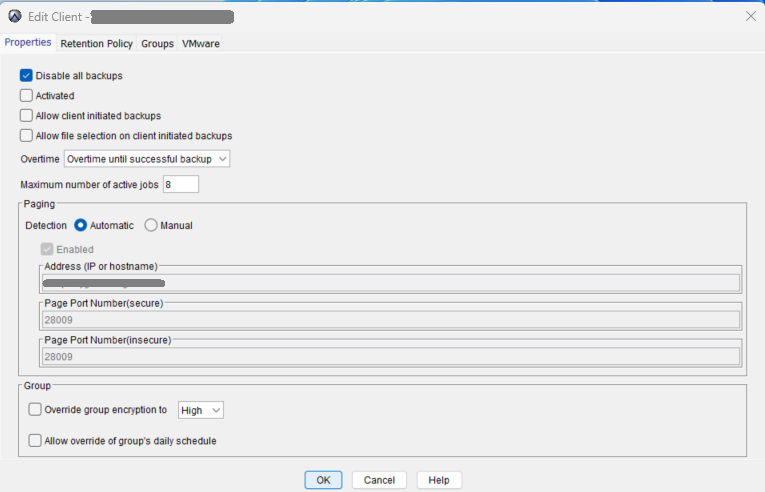
6. Kliknij przycisk OK i wróć do interfejsu wiersza poleceń (CLI).
7. Sprawdź, czy serwer proxy av-proxy-08 przełącza vc_cid z "70556d54b3eb4831d3e1a75742b9973fc930c1ca" na "1e1825c377e14943e6c0ec7921ceb4efc21a1934"
psql -p 5555 mcdb -c 'select * from proxy_mgmt_mapping order by vc_cid asc ;'
admin@av-server:~/>: psql -p 5555 mcdb -c 'select * from proxy_mgmt_mapping order by vc_cid asc ;'
                proxy_cid                 |                  vc_cid
------------------------------------------+------------------------------------------
 170fecda603b533247db21c1c5f536f6d2bf4c1b | 1e1825c377e14943e6c0ec7921ceb4efc21a1934 --> Proxy vc_cid changed after de-activate it
 907da738167186a952d78850c366ba6efbed578f | 1e1825c377e14943e6c0ec7921ceb4efc21a1934
 f685ef4e7497eadf67e8e683898c9996ffffde11 | 1e1825c377e14943e6c0ec7921ceb4efc21a1934
 4c521927efd418d29ea054b983aa98cdaba0164f | 1e1825c377e14943e6c0ec7921ceb4efc21a1934
 bbf88da2fca1f51234b86348f02bd5530229e734 | 70556d54b3eb4831d3e1a75742b9973fc930c1ca
 22a31e18f995a442a2dc745a28ffff3ee82b627b | 70556d54b3eb4831d3e1a75742b9973fc930c1ca
 90c3058d07f43532d41ea4fc82d07be6f5eecdbb | 70556d54b3eb4831d3e1a75742b9973fc930c1ca
 451e50d90593232b55ead709d7c150c222c73357 | 70556d54b3eb4831d3e1a75742b9973fc930c1ca
(8 rows)
admin@av-server:~/>:
8 - Zaloguj się do av-proxy-08 jako administrator i przełącz się na root
9. Ponownie zarejestruj serwer proxy av-proxy-08:
./initproxyappliance.sh --start
Przykład:
av-proxy-08:/usr/local/avamarclient/etc # ./initproxyappliance.sh --start
=== Client Registration and Activation ===
This script will register and activate the client with the Administrator server.
Enter the Administrator server address (DNS text name or numeric IP address, DNS name preferred): 192.168.1.110
Enter the Avamar server domain [/clients]:
avagent.d Info: Stopping Avamar Client Agent (avagent)...
avagent.d Info: Client Agent stopped.
avagent Info <5008>: Logging to /usr/local/avamarclient/var/avagent.log
avagent Error <7531>: Unable to register /clients/av-proxy-08 with Administrator 192.168.1.110:28001
 'vCenter id(s) changed from [1e1825c377e14943e6c0ec7921ceb4efc21a1934] to [70556d54b3eb4831d3e1a75742b9973fc930c1ca]' (203)
avagent.d Info: Client activation error.
avagent Info <5008>: Logging to /usr/local/avamarclient/var/avagent.log
avagent Info <5417>: daemonized as process id 2410
avagent.d Info: Client Agent started.
Registration Failed.
Updating rpms from /extra...
Mounting CDROM...
mount: /mnt/cdrom: no medium found on /dev/sr0.
Updating rpms from /mnt/cdrom...
Public key[/mnt/cdrom/avpkgkey.pub] not exist
Verify the list of gpg public keys in RPM DB
----------------
gpg-pubkey-39db7c82-5847eb1f --> gpg(SuSE Package Signing Key <build@suse.de>)
gpg-pubkey-50a3dd1c-50f35137 --> gpg(SuSE Package Signing Key (reserve key) <build@suse.de>)
gpg-pubkey-b37b98a9-4be01a1a --> gpg(SUSE PTF Signing Key <support@suse.com>)
gpg-pubkey-7c601e3e-5d26445f --> gpg(DellEMC Avamar (https://support.emc.com) <avamar.certificate.support@emc.com>)
gpg-pubkey-cbf00d5c-54de52e3 --> gpg(RSA Security LLC - SA RPM Signer (2015 key for SA) <RSASupport@emc.com>)
gpg-pubkey-ec551f03-53619141 --> gpg(Oracle OSS group (Open Source Software group) <build@oss.oracle.com>)
----------------
Patching OS...
No security patch found on /mnt/cdrom
Checking if this script has been updated...
Nope.
av-proxy-08:/usr/local/avamarclient/etc #
10 — Proces ponownej rejestracji nie powiódł się z powodu błędu:
avagent Error <7531>: Unable to register /clients/av-proxy-08 with Administrator 192.168.1.110:28001
 'vCenter id(s) changed from [1e1825c377e14943e6c0ec7921ceb4efc21a1934] to [70556d54b3eb4831d3e1a75742b9973fc930c1ca]' (203)
11. Wróć do konsoli Administration> Account Management, wybierz serwer proxy av-proxy-08 i usuń go.
12 — Po usunięciu przejdź do serwera proxy av-proxy-08 i zarejestruj go ponownie:
./initproxyappliance.sh --start
Przykład:
av-proxy-08:/usr/local/avamarclient/etc # ./initproxyappliance.sh --start
Please press a key now if you want to re-register this proxy with Avamar Administrator. Continuing in 10 seconds...
Please press a key now if you want to re-register this proxy with Avamar Administrator. Continuing in 9 seconds...
=== Client Registration and Activation ===
This script will register and activate the client with the Administrator server.
Enter the Administrator server address (DNS text name or numeric IP address, DNS name preferred): 192.168.1.110
Enter the Avamar server domain [/clients]:
avagent.d Info: Stopping Avamar Client Agent (avagent)...
avagent.d Info: Client Agent stopped.
avagent Info <5008>: Logging to /usr/local/avamarclient/var/avagent.log
avagent.d Info: Client activated successfully.
avagent Info <5008>: Logging to /usr/local/avamarclient/var/avagent.log
avagent Info <5417>: daemonized as process id 2746
avagent.d Info: Client Agent started.
Registration Complete.
Initialize Avamar Services, Please wait...
Do you want this proxy to be managed by PDM(Proxy Deploy Manager) in AVE [192.168.1.110][Y/N]?N
av-proxy-08:/usr/local/avamarclient/etc #
13 - Rejestracja kończy się pomyślnie.
14. Serwer Avamar tworzy nowy identyfikator cid dla serwera proxy av-proxy-08 i ustawia prawidłowe vc_id:
psql -p 5555 mcdb -c 'select * from proxy_mgmt_mapping order by vc_cid asc ;'
admin@av-server:~/>: psql -p 5555 mcdb -c 'select * from proxy_mgmt_mapping order by vc_cid asc ;'
                proxy_cid                 |                  vc_cid
------------------------------------------+------------------------------------------
 4c521927efd418d29ea054b983aa98cdaba0164f | 1e1825c377e14943e6c0ec7921ceb4efc21a1934
 907da738167186a952d78850c366ba6efbed578f | 1e1825c377e14943e6c0ec7921ceb4efc21a1934
 f685ef4e7497eadf67e8e683898c9996ffffde11 | 1e1825c377e14943e6c0ec7921ceb4efc21a1934
 bbf88da2fca1f51234b86348f02bd5530229e734 | 70556d54b3eb4831d3e1a75742b9973fc930c1ca
 0bf1203540d3136125f44c102556c1d201c22d25 | 70556d54b3eb4831d3e1a75742b9973fc930c1ca --> this is the proxy av-proxy-08
 451e50d90593232b55ead709d7c150c222c73357 | 70556d54b3eb4831d3e1a75742b9973fc930c1ca
 22a31e18f995a442a2dc745a28ffff3ee82b627b | 70556d54b3eb4831d3e1a75742b9973fc930c1ca
 90c3058d07f43532d41ea4fc82d07be6f5eecdbb | 70556d54b3eb4831d3e1a75742b9973fc930c1ca
(8 rows)
admin@av-server:~/>:
./goav proxy show
admin@av-server:~/>: ./goav proxy show
===========================================================
GoAv    :        1.91
Avamar  :        19.10
Date    :        27 Dec 2024 10:25 EST
===========================================================
COMMAND :  ./goav proxy show
NOTE: This is not an official tool
===========================================================
+---------------------------+------------+-------------------------------+------------------------------------------+-----------+---------------+------------------------+
|           name            | domainFqdn |          vcenterHost          |                    id                    | activated | autoDsMapping |     clientVersion      |
+---------------------------+------------+-------------------------------+------------------------------------------+-----------+---------------+------------------------+
| av-proxy-01.lab.com       | /clients   | vcenter01.lab.com             | 451e50d90593232b55ead709d7c150c222c73357 | true      | false         | 19.10.100-166          |
| av-proxy-02.lab.com       | /clients   | vcenter02.lab.com             | 4c521927efd418d29ea054b983aa98cdaba0164f | true      | false         | 19.10.100-135_HF338865 |
| av-proxy-03.lab.com       | /clients   | vcenter01.lab.com             | bbf88da2fca1f51234b86348f02bd5530229e734 | true      | false         | 19.7.100-82_HF338743   |
| av-proxy-04.lab.com       | /clients   | vcenter01.lab.com             | 22a31e18f995a442a2dc745a28ffff3ee82b627b | true      | false         | 19.9.100-78            |
| av-proxy-05.lab.com       | /clients   | vcenter01.lab.com             | 90c3058d07f43532d41ea4fc82d07be6f5eecdbb | true      | false         | 19.10.100-166          |
| av-proxy-06.lab.com       | /clients   | vcenter02.lab.com             | 907da738167186a952d78850c366ba6efbed578f | true      | false         | 19.10.100-135_HF338865 |
| av-proxy-08.lab.com       | /clients   | vcenter01.lab.com             | 0bf1203540d3136125f44c102556c1d201c22d25 | true      | false         | 19.4.100-116           |
| av-proxy-07.lab.com       | /clients   | vcenter02.lab.com             | f685ef4e7497eadf67e8e683898c9996ffffde11 | true      | false         | 19.10.100-135_HF338865 |
+---------------------------+------------+-------------------------------+------------------------------------------+-----------+---------------+------------------------+
admin@av-server:~/>:
Cause
Pomimo tego, że jest to nietypowe, dział inżynieryjny nie naprawia już ani nie aktualizuje konsoli administratora Avamar (Java GUI).
Resolution
Pod żadnym pozorem nie wyłączaj serwera proxy z poziomu konsoli administratora Avamar. Zaleca się korzystanie z AUI w miarę możliwości.
Affected Products
Avamar, Avamar Client for VMware, Avamar ServerArticle Properties
Article Number: 000265232
Article Type: Solution
Last Modified: 02 Dec 2025
Version: 4
Find answers to your questions from other Dell users
Support Services
Check if your device is covered by Support Services.