Dell Unity: 블록 크기 확인 방법(사용자 수정 가능)
Summary: 특정 애플리케이션에 맞게 스토리지 리소스를 구성하는 데 사용되는 블록 크기를 식별하는 방법 사용되는 블록 크기는 특정 드라이브 유형에 따라 다릅니다.
This article applies to
This article does not apply to
This article is not tied to any specific product.
Not all product versions are identified in this article.
Instructions
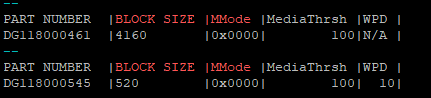
SSD(Solid State Drive)는 520바이트의 블록 크기를 사용합니다.
SAS(Serial Attached SCSI)는 4160바이트의 블록 크기를 사용하며, 이는 (8)개의 520바이트 블록과 같습니다.
Unity CLI에서 블록 크기를 확인하려면 다음 명령을 실행합니다.
svc_diag -s sas | grep -A 1 "BLOCK SIZE |MMode"
예시 출력:
Affected Products
Dell EMC UnityArticle Properties
Article Number: 000268474
Article Type: How To
Last Modified: 17 Jan 2025
Version: 1
Find answers to your questions from other Dell users
Support Services
Check if your device is covered by Support Services.