XPS 13 9350 Laptop is Trying to Use the Wrong Camera Driver
Summary: The following article provides information about a camera driver issue on your XPS 13 9350 laptop. The Infrared (IR) camera driver is installed instead of the Mobile Industry Processor Interface (MIPI) driver and causing problems. ...
This article applies to
This article does not apply to
This article is not tied to any specific product.
Not all product versions are identified in this article.
Symptoms
Features like Windows Hello do not work with the wrong camera driver installed
You can experience the following camera issues with your XPS 13 9350 laptop. Applications which use the camera, such as Windows Hello report the following error:
We couldn’t find a camera compatible with Windows Hello Face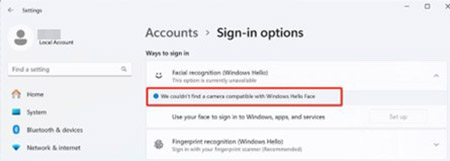
Cause
The wrong camera driver version is shown in Device Manager: v63.22000.16989.1

Resolution
Note: You must have administrator rights on your laptop to make any operating system changes or update any software.
Update your cameras driver to Intel 2D Imaging/Vision/USB Bridge Driver for Camera, version 80.26100.5.18, A02 or later. Use the instructions in the following link to download and install the Intel-2D-Imaging-Vision-USB-Bridge-Driver-for-Camera_M0P8J_WIN64_80.26100.5.18_A02.exe file on your laptop:
- Dell Knowledge Base Article: How to Download and Install Dell Drivers
Affected Products
XPS 13 9350Article Properties
Article Number: 000269433
Article Type: Solution
Last Modified: 29 Apr 2025
Version: 3
Find answers to your questions from other Dell users
Support Services
Check if your device is covered by Support Services.