CloudLink:瀏覽 CloudLink Center UI
Summary: 本主題提供如何瀏覽 CloudLink Center UI 的相關資訊。
This article applies to
This article does not apply to
This article is not tied to any specific product.
Not all product versions are identified in this article.
Instructions
下列螢幕擷取畫面顯示 CloudLink Center,並識別主要導覽功能:

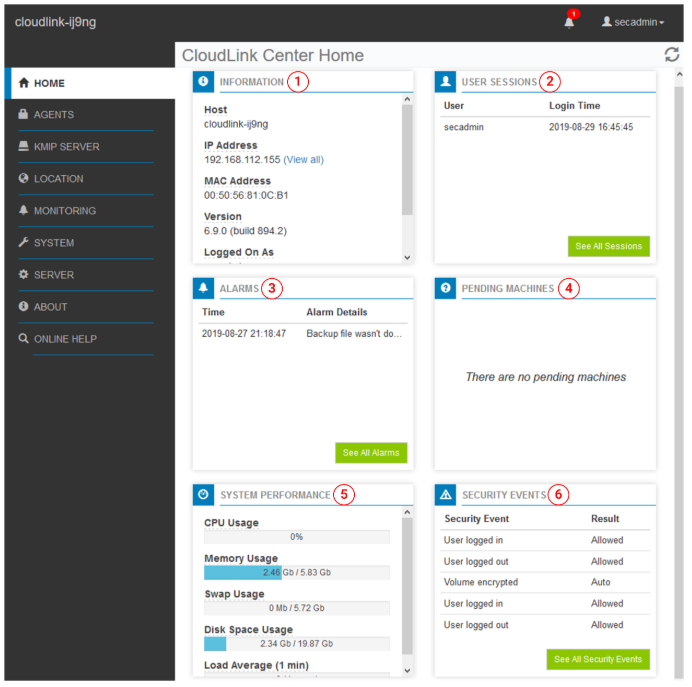
以下螢幕截圖顯示了主頁,並包含以下面板:
正在透過 CloudLink Center UI。
- 1 - CloudLink Center 伺服器
識別您登入的 CloudLink Center 伺服器
- 2 - 內容面板
列出可以在「編輯」面板中選擇的頁面。
- 3 - 編輯面板
顯示在內容面板中選擇的頁面
- 4 - 手動鎖定
表示 CloudLink 存放庫已鎖定。
解除鎖定 CloudLink Center 存放庫後,「手動鎖定」圖示隨即消失。如需更多資訊,請參閱 CloudLink 管理指南的 「管理 CloudLink 存放庫 」一節。
解除鎖定 CloudLink Center 存放庫後,「手動鎖定」圖示隨即消失。如需更多資訊,請參閱 CloudLink 管理指南的 「管理 CloudLink 存放庫 」一節。
- 5 - 警報通知
顯示包含當前警報數量的標記(如果有
) 警報表示您應該注意的狀態或條件。按一下警報通知圖示以檢視警報。如需更多資訊,請參閱 CloudLink 系統管理指南的檢視 CloudLink 中心警報一節。
) 警報表示您應該注意的狀態或條件。按一下警報通知圖示以檢視警報。如需更多資訊,請參閱 CloudLink 系統管理指南的檢視 CloudLink 中心警報一節。
- 6 - 使用者名稱選單
顯示您的使用者名稱
您可以從此功能表登出 CloudLink Center。
您可以從此功能表登出 CloudLink Center。
注意:每位 CloudLink Center 使用者都會被指派一個角色來決定使用者的權限。如果您發現有些 CloudLink Center 功能無法使用,請聯絡您的
secadmin 使用者。
以下螢幕截圖顯示了主頁,並包含以下面板:
Dell CloudLink Center 首頁
- 1 - 資訊
提供執行 CloudLink Center 的伺服器的相關連線資訊。
- 2 - 使用者工作階段
列出登入 CloudLink Center 的使用者,包括使用者登入的時間和上次執行的動作。
如需更多資訊,請參閱 CloudLink 系統管理指南的 在 CloudLink Center 檢視使用者工作階段一節。
如需更多資訊,請參閱 CloudLink 系統管理指南的 在 CloudLink Center 檢視使用者工作階段一節。
- 3 - 警報
列出處於活動
狀態的警報 警報表示您必須注意的狀態或狀況。如需更多資訊,請參閱 CloudLink 管理指南的 檢視和管理警報一節。
狀態的警報 警報表示您必須注意的狀態或狀況。如需更多資訊,請參閱 CloudLink 管理指南的 檢視和管理警報一節。
- 4 - 待處理的電腦
列出等待您接受或拒絕啟動
的機器 如需更多資訊,請參閱 CloudLink 管理指南的 接受或拒絕 CloudLink Center 中待處理的電腦一節。
的機器 如需更多資訊,請參閱 CloudLink 管理指南的 接受或拒絕 CloudLink Center 中待處理的電腦一節。
- 5 - 系統效能
提供託管 CloudLink Center 之伺服器的相關資訊,包括 CPU 和記憶體使用量、可用磁碟空間等。
- 6 - 安全事件
提供使用者登入、存放庫解除鎖定嘗試失敗、機器註冊、CloudLink Center 存放庫變更、保護使用者動作,以及加密金鑰活動等相關資訊。如需更多資訊,請參閱 CloudLink 管理指南的 監控 CloudLink Center 一節。
Additional Information
如需詳細資訊,請參閱手冊:Dell CloudLink 8.1.1 管理指南 |Dell US
Affected Products
CloudLink SecureVM, PowerFlex rack, ScaleIOArticle Properties
Article Number: 000271839
Article Type: How To
Last Modified: 07 Feb 2025
Version: 2
Find answers to your questions from other Dell users
Support Services
Check if your device is covered by Support Services.