CloudLink:浏览 CloudLink Center UI
Summary: 本主题提供了有关如何在 CloudLink Center UI 中导航的信息。
This article applies to
This article does not apply to
This article is not tied to any specific product.
Not all product versions are identified in this article.
Instructions
以下屏幕截图显示了 CloudLink Center 并标识了主要导航功能:

以下屏幕截图显示了主页,并包括以下面板:
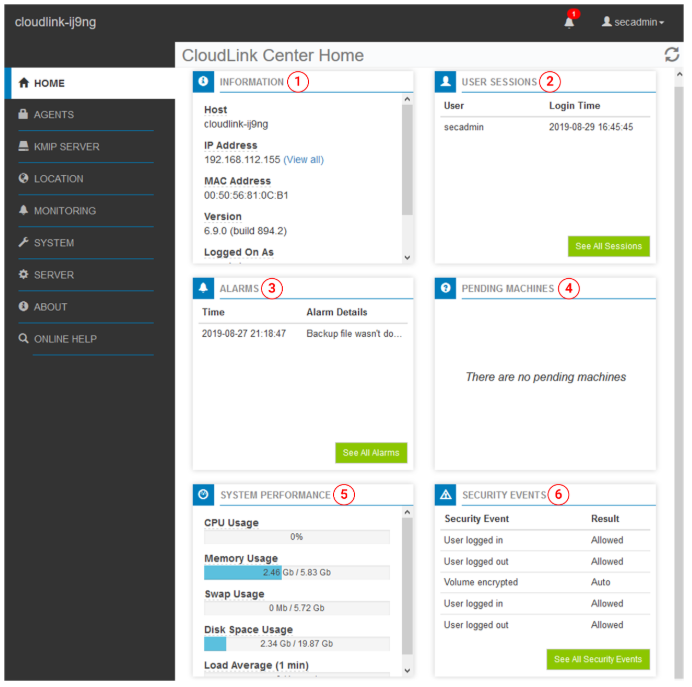
浏览 CloudLink Center UI。
- 1 — CloudLink Center 服务器
标识您登录的 CloudLink Center 服务器
- 2 - 内容面板
列出您可以在“编辑”面板中选择的页面。
- 3 - 编辑面板
显示在“内容”面板中选择的页面
- 4 - 手动锁定
指示 CloudLink 存储区已锁定。
当 CloudLink Center 存储区解锁时,手动锁定图标会消失。有关详细信息,请参阅 CloudLink 管理指南的 管理 CloudLink 存储区 部分。
当 CloudLink Center 存储区解锁时,手动锁定图标会消失。有关详细信息,请参阅 CloudLink 管理指南的 管理 CloudLink 存储区 部分。
- 5 - 警报通知
显示一个标牌,其中包含当前警报的数量(如果有
)警报表示您应该注意的状态或状况。单击警报通知图标以查看警报。有关详细信息,请参阅 CloudLink 管理指南的查看 CloudLink 中心警报部分。
)警报表示您应该注意的状态或状况。单击警报通知图标以查看警报。有关详细信息,请参阅 CloudLink 管理指南的查看 CloudLink 中心警报部分。
- 6 - 用户名菜单
显示您的用户名
您可以从此菜单注销 CloudLink Center。
您可以从此菜单注销 CloudLink Center。
提醒:每个 CloudLink Center 用户都分配有一个角色,用于确定用户的权限。如果您注意到一些 CloudLink Center 功能不可用,请联系您的
secadmin 用户身份登录。
以下屏幕截图显示了主页,并包括以下面板:
Dell CloudLink Center 主页
- 1 - 信息
提供有关运行 CloudLink Center 的服务器的连接信息。
- 2 - 用户会话
列出登录到 CloudLink Center 的用户,包括用户登录时间和上次作的时间。
有关详细信息,请参阅 CloudLink 管理指南的 在 CloudLink Center 中查看用户会话部分。
有关详细信息,请参阅 CloudLink 管理指南的 在 CloudLink Center 中查看用户会话部分。
- 3 - 警报
列出处于活动
状态的警报警报表示您必须了解的状态或状况。有关详细信息,请参阅 CloudLink 管理指南的 查看和管理警报部分。
状态的警报警报表示您必须了解的状态或状况。有关详细信息,请参阅 CloudLink 管理指南的 查看和管理警报部分。
- 4 — 待处理计算机
列出正在等待您接受或拒绝启动
的计算机。有关更多信息,请参阅 CloudLink 管理指南的在 CloudLink Center 中接受或拒绝挂起的计算机部分。
的计算机。有关更多信息,请参阅 CloudLink 管理指南的在 CloudLink Center 中接受或拒绝挂起的计算机部分。
- 5 - 系统性能
提供有关托管 CloudLink Center 的服务器的信息,包括 CPU 和内存使用情况、可用磁盘空间等。
- 6 — 安全事件
提供有关用户登录、失败的存储区解锁尝试、计算机注册、CloudLink Center 存储区更改、安全用户作和加密密钥活动的信息。有关详细信息,请参阅 CloudLink 管理指南的 监控 CloudLink 中心部分。
Additional Information
有关更多信息,请参阅戴尔 CloudLink 8.1.1 管理指南 |戴尔美国
Affected Products
CloudLink SecureVM, PowerFlex rack, ScaleIOArticle Properties
Article Number: 000271839
Article Type: How To
Last Modified: 07 Feb 2025
Version: 2
Find answers to your questions from other Dell users
Support Services
Check if your device is covered by Support Services.