PowerFlex Installing and configuring Oracle Linux KVM on PowerFlex
Summary: This reference architecture guide describes installing and configuring Oracle Linux KVM on the Dell PowerFlex platform.
This article applies to
This article does not apply to
This article is not tied to any specific product.
Not all product versions are identified in this article.
Instructions
For full Documentation, see Deploying Oracle Real Application Clusters | Installing and configuring Oracle Linux KVM on Dell PowerFlex | Dell Technologies Info Hub
Deploying Oracle Real Application Clusters
Logical architecture
This section provides an architecture overview and the steps to follow in setting up a 3-node Oracle Real Application Clusters (RAC) database using the Oracle Linux Virtualization Manager on a two-layer PowerFlex setup. This is provided only as an example to illustrate how PowerFlex can enable a business to run an Oracle Linux KVM environment with Oracle RAC. The sizing of the ASM disk groups and the database are arbitrary. Best practices are included, however, and apply to any deployment of this type in production.
The following figure shows a logical view of the 3-node setup:
Figure 28: Logical architecture
Network architecture
In the two-layer PowerFlex system, the SDC is installed on the compute-only host (Oracle Linux KVM), while the MDM and SDS components are installed on backend, storage-only nodes. The SDS aggregates and serves raw local storage in each node and shares that storage as part of the PowerFlex cluster. A single Storage Pool is created using all the disks on each node within the Protection Domains, volumes are then provisioned from the Storage Pool and presented to the compute hosts, which Oracle Linux Virtualization Manager uses as storage domains. From the storage domain, respective size disks are carved out to meet the Oracle RAC ASM disk group database requirements, including volumes for data, redo logging, voting disk, and the flash recovery area. The volumes are mapped and shared between the virtual machines and then consumed by ASM to create the groups. While the Oracle Grid and database software are installed independently on each VM, the Oracle RAC database itself is built on ASM and thus made available to all the nodes.
The following networks and VLANs were used in the lab for this Oracle Linux KVM solution:
Table 3. PowerFlex networking details at host level
| Network name | Description |
|---|---|
| Bond0 (p2p1, p3p1) | Management and VM Traffic |
| Bond1 (p3p2, p2p2) | PowerFlex data traffic (SDS and SDC) |
Table 4. Oracle Linux KVM networking details at VM level
| Network name | VLAN | Description |
|---|---|---|
| ovirtmgmt | 105 | Management Network |
| Privatevlan106 | 106 | Private vlan for Oracle private interconnect |
| VM_Network | 100 | Client Oracle network |
VLAN tagging
Oracle Linux Virtualization Manager supports adding multiple logical networks to physical NICs on the Oracle Linux KVM node, including those with VLAN tagging. As VLANs are an essential component of the PowerFlex architecture, the steps for adding a new logical network with VLAN tagging for the Oracle interconnect are included here.
-
Go to Network -> Networks screen in Oracle Linux Virtualization Manager and click New in Figure 29.
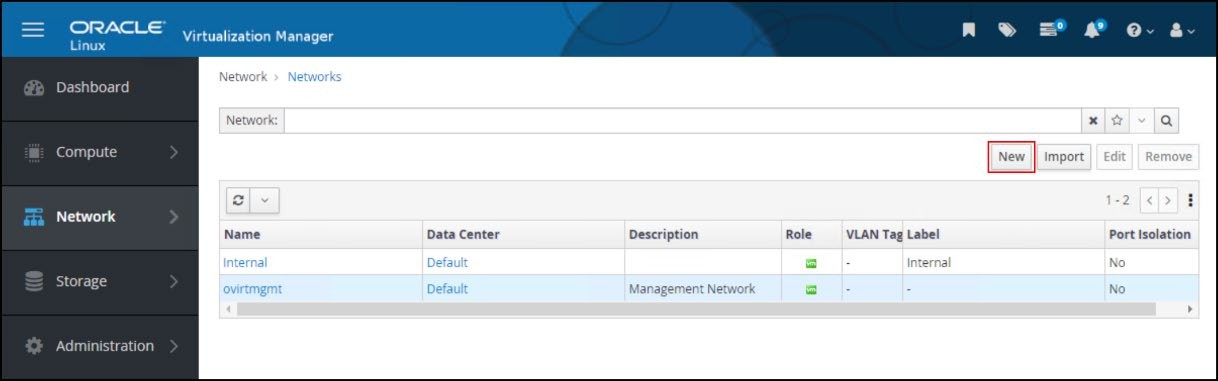
Figure 29. Logical networksEnter the following information in Figure 30:
- Name
- Description
- Network label
- Check the box for Enable VLAN tagging and add the VLAN value
Leave the Cluster as default (it attaches automatically), and the vNIC Profiles (the name defaults to the network name).

Figure 30. New logical network -
Once created, go to Network -> Networks and click the newly created hyperlink for the vlan-106 network.
-
Click the Hosts tab, highlight one of the unattached hosts, and click Setup Host Networks in Figure 31.
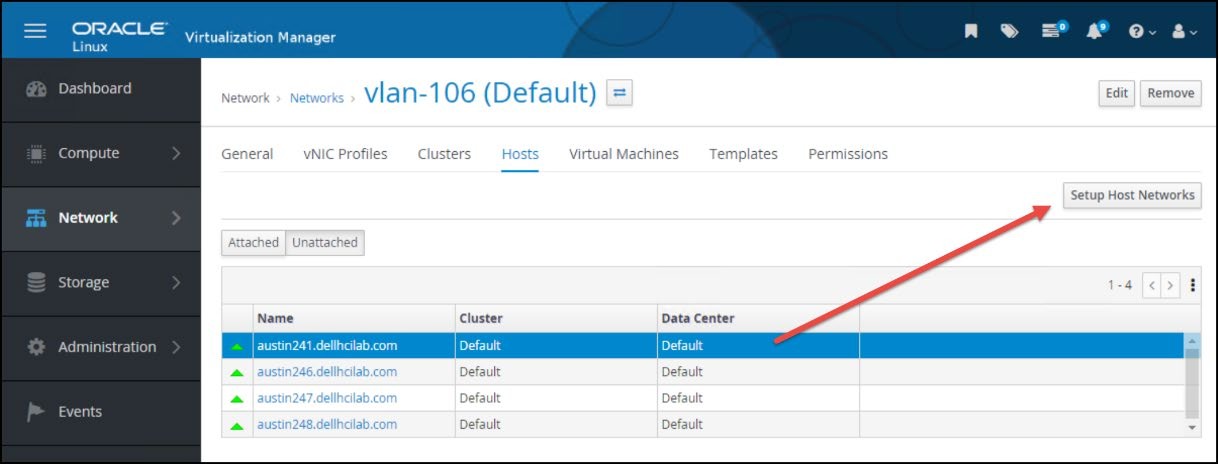
Figure 31. vlan-106 host assignment -
The Setup Host Networks dialog appears. The new logical network appears on the right side. Click the network and drag it to the appropriate physical NIC as shown in Figure 32. As here, more than one logical network can be assigned to an interface.

Figure 32. Assign a logical network to interface -
Next, click the pencil icon in the corner of the logical network. This allows the user to assign an IP address (if wanted). Choose the appropriate Boot Protocol, add an address if required, and click OK in Figure 33. Oracle Linux Virtualization Manager then configures the network on the host.

Figure 33. Assign boot protocol and IPThe logical network is created and configured in Figure 34.

Figure 34. IP assigned
Oracle RAC configuration
The following section provides details on setting up Oracle Linux KVM and installing a 3-node Oracle RAC 21c database.
Hardware and software configuration details
The following table describes the hardware and software components of the infrastructure used for the solution. Both the PowerFlex (storage-only) nodes and those used for Oracle Linux KVM (compute-only) are the same:
Table 5. Hardware and software configuration
| Components | Source domain |
|---|---|
| Server model | Dell R650 |
| Number of compute-only nodes | 3 |
| Number of storage-only nodes | 4 |
| CPU | Intel® Xeon® Gold 6336Y CPU @ 2.40 GHz |
| Components | Source domain |
|---|---|
| Sockets and cores | Two socket 24 cores |
| Hyperthreading | Enabled |
| Memory | 512 GB per host |
| Storage | 2 x 447.13 GB (SATA SSD) 10 x 1490.42 GB (SAS SSD) |
| PCIe | Mellanox ConnectX-5 EN 25 GbE SFP28 Adapter (two ports) |
| NVDIMM | 2 x 16 GB, 2933 MT/s NVDIMM-N DDR-4 |
| PowerFlex | R4_6 |
| PowerFlex Manager | Version 4.6.0 |
| Oracle Linux Virtualization Manager | 4.5.4-1.0.31.el8 |
| Oracle Linux | Release 8 Update 9 |
| Oracle Database version | 21.3.0.0.0 |
| VM OS - Oracle Linux | Release 8 Update 9 |
| Number of VMs | 3 |
| VM configuration | 16 vCPU, 24 GB Memory |
| VM nodes | austin170, austin171, austin172 |
| Database name | orcl |
| Instance names | orcl1, orcl2, orcl3 |
| ASM disk groups | CONFIG, DATA, REDO, FRA |
Host configuration
Concurrent to installing the Oracle Linux Virtualization Manager on its own host, users must prepare the Oracle Linux KVM hosts which will also serve as the PowerFlex compute nodes.
Take the following steps to install an Oracle Linux KVM host for the Oracle RAC environment:
- Install Oracle Linux 8.9 OS on each of the compute hosts.
- Configure management networking for each host. Assign an IP address to each host.
- Configure networking to support SDC connectivity to the PowerFlex.
- Perform the following commands on each of the hosts, to prepare the host for receiving commands from oVirt Engine:
 dnf config-manager --enable ol8_baseos_latest dnf install oracle-ovirt-release-45-el8 -y
dnf clean all
dnf repolist
Oracle Linux Virtualization Manager
To install Oracle Linux Virtualization Manager, perform the following steps:
- Create the VM and install the Oracle Linux 8.9 OS using the Virtualization Host Base Environment. Choosing a different base can lead to issues with the implementation. This base does not come with a UI but Gnome Desktop can be added postinstall if wanted.
- Install the oVirt Engine package and install the engine by performing the following commands:
dnf config-manager --enable ol8_baseos_latest dnf install oracle-ovirt-release-45-el8 -y dnf clean all
dnf repolist
dnf install ovirt-engine
- Perform the engine-setup to install Oracle Linux Virtualization Manager.
engine-setup
- Once installation completes, the user is provided with a web URL, which is the FQDN of the host, to access the virtualization manager.
Storage domains for ASM
The following table provides details of storage domains created from PowerFlex and mapped to the Oracle Linux KVM required for Oracle ASM disks. PowerFlex volumes must be sized in factors of 8.
Table 6. Storage domains used for the Oracle RAC database
| Storage domain | Size | Description |
|---|---|---|
| Oracle_Homes | 504 GB | To be used for OS file system for VM and the Oracle software |
| ORA_CONFIG | 56 GB | To be used for CONFIG ASM disk group |
| ORA_REDO_1 | 56 GB | To be used for REDO ASM disk group |
| ORA_REDO_2 | 56 GB | To be used for REDO ASM disk group |
| ORA_REDO_3 | 56 GB | To be used for REDO ASM disk group |
| ORA_DATA_1 | 504 GB | To be used for DATA ASM disk group |
| ORA_DATA_2 | 504 GB | To be used for DATA ASM disk group |
| ORA_DATA_3 | 504 GB | To be used for DATA ASM disk group |
| ORA_FRA_1 | 504 GB | To be used for FRA ASM disk group |
| ORA_FRA_2 | 504 GB | To be used for FRA ASM disk group |
| ORA_FRA_3 | 504 GB | To be used for FRA ASM disk group |
VM configuration
The following steps were used in this configuration to set up the 3-node Oracle RAC database with Oracle Linux Virtualization Manager running on PowerFlex:
-
Create VMs, one VM per host. Install Oracle Linux 8.9 OS.
- Create 3 x 100 GB virtual disks, from Oracle_Homes, to be used for OS installation for the VM file system, one for each VM.
- These disks are to be made "bootable"

Figure 35. Disk being made bootable for OS Installation -
Install Oracle Linux 8.9 OS on each VM and assign IPs for each VM. The installation can be a Base Environment of Server with GUI or Server.
-
Create the necessary disks from the storage domain required for ASM disk groups DATA, OCR, MGMT REDO, and FRA.
Table 7. ASM disks from storage domains
ASM disk groups Size From storage domain CONFIG 1 x ~50 GB ORA_CONFIG OCR 3 x ~50 GB ORA_REDO_1, ORA_REDO_2, ORA_REDO_3 DATA 3 x ~500 GB ORA_DATA_1, ORA_ DATA _2, ORA_ DATA _3 FRA 3 x ~500 GB ORA_FRA_1, ORA_ FRA _2, ORA_ FRA _3 -
Attach the ASM disks to all the VMs by making them shareable.

Figure 36. ASM disks being made shareable for Oracle RAC database installation -
There are three interfaces to choose from:
- IDE
Standard interface connecting to storage devices. In terms of performance, it is slightly slower than VirtIO or VirtIO-SCSI - VirtIO
A para-virtualized driver offers increased I/O performance over emulated devices, for example IDE, by optimizing the coordination and communication between the virtual machine and the hypervisor. - VirtIO-SCSI
A newer para-virtualized SCSI controller device. This driver offers similar functionality to virtIO devices with some additional enhancements such as improved scalability, a standard command set, and SCSI device passthrough. Specifically, it supports adding hundreds of devices and the naming of those devices using the standard SCSI device naming scheme.
Note: The configuration in the lab used VirtIO-SCSI devices since it is recommended for better I/O performance. - IDE
-
Dell Technologies recommends selecting high-performance optimization for Virtual Machines (VMs). By doing so, the VMs run with performance metrics as close to bare metal as possible. When high performance is chosen, the VM is configured with a set of automatic and recommended manual settings for maximum efficiency.
Note: For additional information about high performance settings, see Configuring High- Performance Virtual Machines.
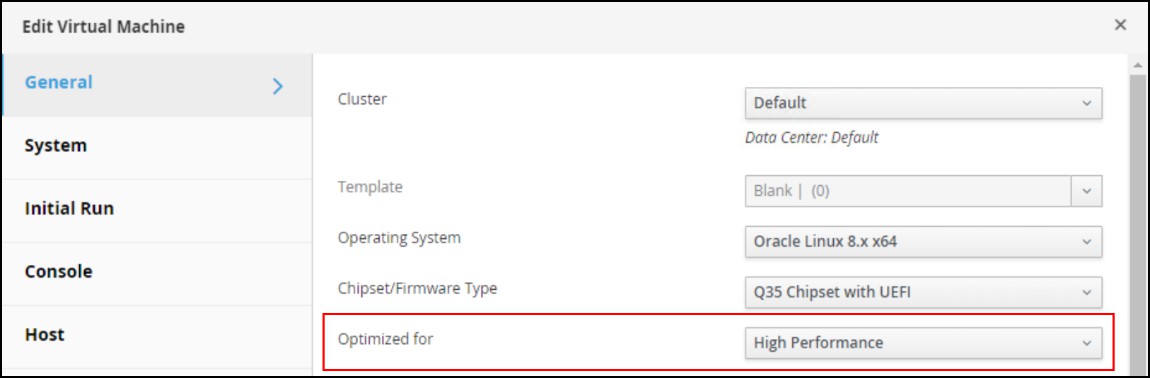
Figure 37. Virtual Machines configuration displaying high performance -
Configure additional networks, such as interconnect for Oracle RAC.

Figure 38. Additional networking for Oracle interconnect -
Disable headless mode for each VM for optimization. Users can configure a VM in headless mode when it is not necessary to access the VM using a graphical console. By disabling headless mode, the VM runs without graphical and video devices. This is useful in situations where the host has limited resources.

Figure 39. Disabling headless mode for VM -
Run the VM on a specific host in the cluster so that the Oracle RAC VMs are spread across hosts in the Oracle Linux KVM cluster and to adhere to CPU pinning requirements.
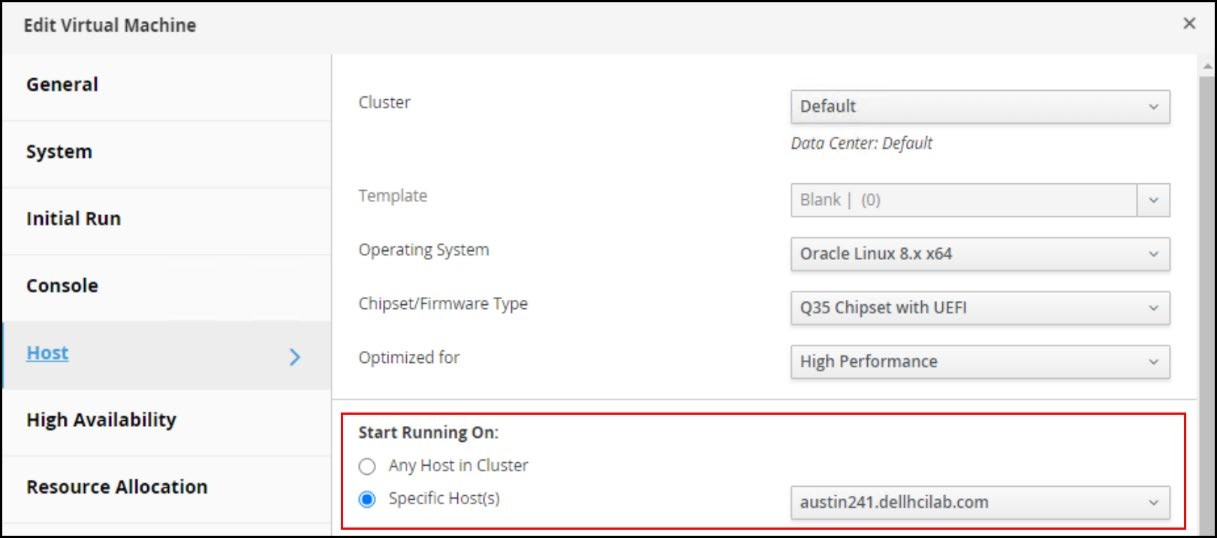
Figure 40. Selection for VM to run on a specific host in the cluster -
Install Oracle Grid Infrastructure and Database 21c software and create the database.
Best practices
The following are some best practices when running Oracle RAC on ASM with PowerFlex and Oracle Linux KVM.
- If possible, use different ASM disk groups for each database function. The groups should use external redundancy. This provides for greater flexibility.
- DATA for data
- REDO for redo logs
- FRA for archive logs
- CONFIG for voting disk
- Use multiple storage domains for each ASM disk group with a single, shared virtual disk in each that consumes the space. This makes it easier to increase or decrease ASM disk groups and provide more concurrencies.
- On each VM, the shareable disks must be owned by oracle with a permission mode of 0660.
- Members of an ASM disk group should be of similar capacity. If devices are initially sized large, each capacity increment to the ASM disk group must be as large.
- Oracle ASM best practice is to add multiple devices together to increase the ASM disk group capacity rather than adding one device at a time. This method spreads ASM extents during rebalance to avoid hot spots. Use a device size that allows for ASM capacity increments, in which multiple devices are added to the ASM disk group together. Each device should have the same size as its original device.
Affected Products
PowerFlex rack, ScaleIOArticle Properties
Article Number: 000273103
Article Type: How To
Last Modified: 21 Jan 2025
Version: 1
Find answers to your questions from other Dell users
Support Services
Check if your device is covered by Support Services.