Windows January 2025 Update 后 BIOS 更新错误或更新卡住
Summary: 本文提供有关运行 Windows 2025 年 1 月更新或更高版本的计算机上 BIOS 更新错误或卡住的信息。
This article applies to
This article does not apply to
This article is not tied to any specific product.
Not all product versions are identified in this article.
Symptoms
受影响的平台:
- Alienware Aurora R12
- Alienware Aurora R13
- Alienware Aurora Ryzen 版本 R14
- Alienware Aurora R15
- Alienware Aurora R15 AMD
- Alienware Aurora R16
- Alienware Area 51m R2
- Alienware m15 R3
- Alienware m15 R4
- Alienware m17 R3
- Alienware m17 R4
- Alienware x14
- Alienware x15 R1
- Alienware x15 R2
- Alienware x17 R1
- Alienware x17 R2
- XPS 8950
- XPS 8960
- Inspiron 灵越 15 3510
- Inspiron 灵越 15 3521
- Inspiron 3502
提醒:其他平台可能会受到影响,列出的平台是当前已确定的平台。
受影响的操作系统:
- Windows 11 24H2 26100.2894 或更高版本
- Windows 11 22H1 和 23H2 22621.4751 和 22631.4751 或更高版本
- Windows 10 22H2 19044.5371 和 19045.5371 或更高版本
计算机可能无法更新 BIOS,或者 BIOS 更新可能卡在 SupportAssist 中。从 Microsoft 安装一月更新后出现此问题。
- Windows 11 24H2 KB5050009(作系统内部版本 26100.2894)或更高版本
- Windows 11 23H2 KB5050021(作系统内部版本 22621.4751 和 22631.4751)或更高版本
- Windows 10 22H2 KB5049981(作系统内部版本 19044.5371 和 19045.5371)或更高版本

在计算机上安装最新 BIOS 时可能会出现以下症状:
- SupportAssist 中的错误:安装过程中出现问题,我们无法完成安装
Error : Driver Version Fail !显示消息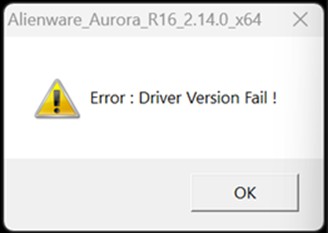
- BIOS 更新保持循环
Cause
来自 Microsoft 的安全增强功能会阻止 BIOS 更新。
Resolution
所有受影响的 BIOS 版本都已从 SupportAssist、Dell Update 或 Alienware Update 降级。
已发布所有 BIOS 更新以解决此问题,请从计算机产品页面驱动程序和下载下载最新的 BIOS。
| 营销型号名称 | BIOS 版本 |
|---|---|
| Alienware Aurora R12 | 1.1.29 |
| Alienware Aurora R13 | 1.24.0 |
| Alienware Aurora Ryzen 版本 R14 | 2.22.0 |
| Alienware Aurora R15 | 1.19.0 |
| Alienware Aurora R15 AMD | 1.17.0 |
| Alienware Aurora R16 | 2.15.0 |
| Alienware Area 51m R2 | 1.31.0 |
| Alienware m15 R3 | 1.31.0 |
| Alienware m15 R4 | 1.27.0 |
| Alienware m17 R3 | 1.31.0 |
| Alienware m17 R4 | 1.27.0 |
| Alienware x14 | 1.24.0 |
| Alienware x15 R1 | 1.27.0 |
| Alienware x15 R2 | 1.25.0 |
| Alienware x17 R1 | 1.27.0 |
| Alienware x17 R2 | 1.25.0 |
| XPS 8950 | 1.24.0 |
| XPS 8960 | 2.14.0 |
| Inspiron 灵越 15 3510 | 1.24.1 |
| Inspiron 灵越 15 3521 | 1.19.1 |
| Inspiron 3502 | 1.21.1 |
从作系统更新 BIOS
- 执行 BIOS 刷新文件并按照屏幕上的说明进行作
使用 U 盘更新 BIOS:
- 将可执行文件复制到外部存储(USB 闪存盘)
- 保持 USB 连接并 重新启动 计算机
- 按 F12 键进入 一次性启动设置 (请参阅 从 F12 一次性启动菜单刷新 BIOS)
Affected Products
Alienware Area-51m R2, Alienware Aurora R12, Alienware Aurora R13, Alienware Aurora Ryzen Edition R14, Alienware Aurora R15 AMD, Alienware Aurora R15, Alienware Aurora R16, Alienware M15 R3, Alienware m15 R4, Alienware M17 R3, Alienware m17 R4
, Alienware x14, Alienware x15 R1, Alienware x15 R2, Alienware x17 R1, Alienware x17 R2, Inspiron 3502, Inspiron 15 3510, Inspiron 15 3521, XPS 8950, XPS 8960
...
Article Properties
Article Number: 000275742
Article Type: Solution
Last Modified: 29 Apr 2025
Version: 9
Find answers to your questions from other Dell users
Support Services
Check if your device is covered by Support Services.