PowerFlex 4.x RCM-upgrade op HCI RG mislukt met fout: Kan VIB's niet installeren

Summary: RCM-upgrade mislukt tijdens de installatie van VMware VIB omdat de vereiste bestanden niet langer in de RCM/IC-bundel zitten.

This article applies to This article does not apply to This article is not tied to any specific product. Not all product versions are identified in this article.

Symptoms

RCM-upgrade mislukt. RCM-upgrade mislukt tijdens process_firmware_update:

Meld u aan bij de thin-deployer pod en ga naar deployment.log van de depoyment_ID/Job_ID
ERROR [2025-01-31T07:52:00.660421] 677128: service_deployment.rb:6081:in `process_firmware_update': Encountered an error during firmware update: RuntimeError: env --unset=RUBYOPT --unset=GEM_HOME --unset=RUBYLIB --unset=GEM_PATH --unset=BUNDLE_BIN_PATH RUBYLIB=/opt/service/lib:/opt/asm-deployer/lib:/opt/puppetlabs/puppet/lib:/opt/dependencies/dell-asm-util/lib PATH=/usr/local/sbin:/usr/local/bin:/usr/sbin:/usr/bin:/sbin:/bin:/opt/puppetlabs/puppet/bin:/opt/puppetlabs/bin puppet asm process_node --debug --trace --filename /opt/Dell/ASM/deployments/Job-2b551cc3-f546-4765-9eee-6416de02b254-0-0/resources/rackserver-cxjswf3.yaml --run_type apply --statedir /opt/Dell/ASM/deployments/Job-2b551cc3-f546-4765-9eee-6416de02b254-0-0/resources --always-override rackserver-cxjswf3 failed; output in /opt/Dell/ASM/deployments/Job-2b551cc3-f546-4765-9eee-6416de02b254-0-0/rackserver-abcdef3.out

ERROR [2025-01-31T07:56:00.831433] 677128: service_deployment.rb:7229:in `finalize_firmware_update': Failed to update the server!
INFO  [2025-01-31T07:56:00.831570] 677128: service_deployment.rb:7234:in `finalize_firmware_update': Firmware update status: Error
ERROR [2025-01-31T07:56:00.875669] 677128: service_deployment.rb:675:in `process': Firmware update failed for Job-2b551cc3-f546-4765-9eee-6416de02b254-0-0
ERROR [2025-01-31T07:56:00.875864] 677128: service_deployment.rb:676:in `process': ["/opt/asm-deployer/lib/asm/service_deployment.rb:7238:in `finalize_firmware_update'", "/opt/asm-deployer/lib/asm/service_deployment.rb:6095:in `process_firmware_update'", "/opt/asm-deployer/lib/asm/service_deployment.rb:526:in `process'", "/opt/asm-deployer/lib/asm.rb:385:in `block in process_deployment'", "org/jruby/RubyArray.java:2025:in `each_slice'", "/opt/asm-deployer/lib/asm.rb:366:in `block in process_deployment'", "/opt/dependencies/dell-asm-util/lib/asm/util.rb:22:in `block in execute_async'"]
INFO  [2025-01-31T07:56:00.876253] 677128: service_deployment.rb:678:in `process': Status: Error

Van de .out bestand van de ESXi-host, is de installatie mislukt tijdens het installeren van de volgende componenten:

/opt/Dell/ASM/deployments/<JOB_ID>/rackserver-service_tag.out<>
** /opt/Dell/ASM/deployments/Job-2b551cc3-f546-4765-9eee-6416de02b254-0-0/rackserver-abcdef3.out **
Error: Failed to install VIB for
["https://10.92.113.140:443/httpshare/download/8aaa801394ba0c920194ba1b53b00004/vibs70/INT_bootbank_i40en_2.5.2.0-1OEM.700.1.0.15843807.vib__;!!LpKI!glu2235RWNPqShl_xs0gxErxlqUao3Xy5zb_dK_dKz6ireUNS8hD7XuE_BEHR6rXQHNZg5cpfSE5oolHSF-bVBu-6WY7ee0a$ [10[.]92[.]113[.]140]",
"https://10.92.113.140:443/httpshare/download/8aaa801394ba0c920194ba1b53b00004/vibs70/DEL_bootbank_dcism_5.3.0.0.3289-DEL.700.0.0.15843807.vib__;!!LpKI!glu2235RWNPqShl_xs0gxErxlqUao3Xy5zb_dK_dKz6ireUNS8hD7XuE_BEHR6rXQHNZg5cpfSE5oolHSF-bVBu-6RyLpejW$ [10[.]92[.]113[.]140]",
"https://10.92.113.140:443/httpshare/download/8aaa801394ba0c920194ba1b53b00004/vibs70/VMware_locker_tools-light_12.2.6.22229486-22348808.vib__;!!LpKI!glu2235RWNPqShl_xs0gxErxlqUao3Xy5zb_dK_dKz6ireUNS8hD7XuE_BEHR6rXQHNZg5cpfSE5oolHSF-bVBu-6SW0V3E0$ [10[.]92[.]113[.]140]",
"https://10.92.113.140:443/httpshare/download/8aaa801394ba0c920194ba1b53b00004/vibs70/INT_bootbank_ixgben_1.15.1.0-1OEM.700.1.0.15843807.vib__;!!LpKI!glu2235RWNPqShl_xs0gxErxlqUao3Xy5zb_dK_dKz6ireUNS8hD7XuE_BEHR6rXQHNZg5cpfSE5oolHSF-bVBu-6dkiwDeX$ [10[.]92[.]113[.]140]",
"https://10.92.113.140:443/httpshare/download/8aaa801394ba0c920194ba1b53b00004/vibs70/INT_bootbank_i40en_2.5.2.0-1OEM.700.1.0.15843807.vib__;!!LpKI!glu2235RWNPqShl_xs0gxErxlqUao3Xy5zb_dK_dKz6ireUNS8hD7XuE_BEHR6rXQHNZg5cpfSE5oolHSF-bVBu-6WY7ee0a$ [10[.]92[.]113[.]140]",
"https://10.92.113.140:443/httpshare/download/8aaa801394ba0c920194ba1b53b00004/vibs70/DEL_bootbank_dcism_5.3.0.0.3289-DEL.700.0.0.15843807.vib__;!!LpKI!glu2235RWNPqShl_xs0gxErxlqUao3Xy5zb_dK_dKz6ireUNS8hD7XuE_BEHR6rXQHNZg5cpfSE5oolHSF-bVBu-6RyLpejW$ [10[.]92[.]113[.]140]",
"https://10.92.113.140:443/httpshare/download/8aaa801394ba0c920194ba1b53b00004/vibs70/INT_bootbank_ixgben_1.15.1.0-1OEM.700.1.0.15843807.vib__;!!LpKI!glu2235RWNPqShl_xs0gxErxlqUao3Xy5zb_dK_dKz6ireUNS8hD7XuE_BEHR6rXQHNZg5cpfSE5oolHSF-bVBu-6dkiwDeX$ [10[.]92[.]113[.]140]"]: Error RbVmomi::Fault:VimEsxCLICLIFault: EsxCLI.CLIFault.summary

Error: Fault error message: [" [VibFormatError]", " ('<http.client.HTTPResponse object at 0xe3d7cbf310>', \"Not a valid ar file (magic=b'')\")", "  
filename = https://10.92.113.140:443/httpshare/download/8aaa801394ba0c920194ba1b53b00004/vibs70/VMware_locker_tools-light_12.2.6.22229486-22348808.vib__;!!LpKI!glu2235RWNPqShl_xs0gxErxlqUao3Xy5zb_dK_dKz6ireUNS8hD7XuE_BEHR6rXQHNZg5cpfSE5oolHSF-bVBu-6SW0V3E0$ [10[.]92[.]113[.]140]", " Please refer to the log file for more details."]

Debug: Host Maintenance mode = true

Warning: Host is in maintenance mode. Exiting Maintenance mode...

Error: Failed to install VIBs
/opt/puppetlabs/puppet/lib/ruby/vendor_ruby/puppet/util/errors.rb:157:in `fail'

Cause

Het probleem komt voort uit het feit dat het bestand VMware_locker_tools-light_12.2.6.22229486-22348808.VIB 0 bytes is in het RCM/IC-bestand omdat DELL deze bestanden niet langer levert. Ze zijn echter wel beschikbaar in het VMware Patch-depot, maar zijn overgeslagen tijdens het updateproces. 

Resolution

Een van de volgende tijdelijke oplossingen kan helpen.

  1. Het VIB-bestand uploaden met behulp van een SCU (Single Component Upgrade):
    1. Pak VMware_locker_tools-light_12.2.6.22229486-22348808.VIB uit het VMware-patchdepot uit .
    2. Schakel Single Component Upgrade (SCU) in.
      Meld u aan bij een van de MVM-knooppunten en voer het volgende uit:
      kubectl patch hr asmmanager -p '{"spec":{"values":{"appConfig": {"modify_compliance":"true"}}}}' -n powerflex --type=merge
    3. Ga naar PFMP UI → Compliance versie → Selecteer de RCM-bundel → softwarebundel → Selecteer ESXi x.x softwarebundel en klik op View → Selecteer VMware Tools VIB voor Windows- en Linux-gast in de lijst met componenten en klik op Modify.
      Upload het bestand VMware_locker_tools-light_12.2.6.22229486-22348808.VIB en vermeld onder 'Nieuwe bundelversie' de volgende versie: 12.2.6.22229486-22348808. De versie hier zou hetzelfde zijn als wat je ziet onder 'Bundelversie'. Klik op Doorgaan:
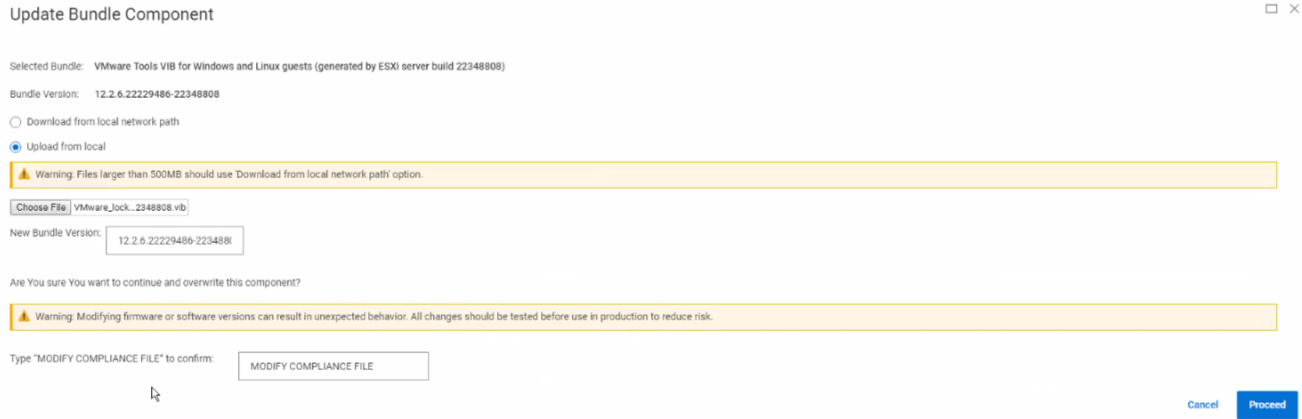
      OPMERKING: U ziet dit onderdeel met de tag 'Gewijzigd'.


    4. Voer de RCM/IC-upgrade uit.
       
  2. VMware Tools VIB handmatig installeren:
    1. Installeer handmatig de VIB die is uitgepakt uit de offline update ZIP-bundel die is gedownload van Broadcom:
      # esxcli software vib install -v /<path_to_the_depot>/VMware_locker_tools-light_12.2.6.22229486-22348808.vib
      Installation Result
         Message: Operation finished successfully.
         Reboot Required: false
         VIBs Installed: VMware_locker_tools-light_12.2.6.22229486-22348808
         VIBs Removed: VMware_locker_tools-light_12.3.5.22544099-22545121
         VIBs Skipped:
    2. Voer de inventarisatie voor de bovenstaande ESXi-host uit op het tabblad 'Resource'.
    3. Controleer de naleving. De geïnstalleerde VIB is gemarkeerd als compatibel en overgeslagen tijdens het upgradeproces.
    4. Voer de RCM/IC-upgrade uit.
       
  3. Probeer de RCM-upgrade opnieuw uit te voeren.  De tweede poging zou succesvol moeten zijn.

Additional Information

Versies waarop dit van toepassing is

PFMP 4.x

Opgelost in versie

PFMP 4.6.1 

Affected Products

PowerFlex rack RCM Software
Article Properties
Article Number: 000283204
Article Type: Solution
Last Modified: 02 Jun 2025
Version:  2
Find answers to your questions from other Dell users
Support Services
Check if your device is covered by Support Services.