HCI RG 上的 PowerFlex 4.x RCM 升级失败,并显示错误:无法安装 VIB
Summary: 在 VMware VIB 安装期间,RCM 升级失败,因为所需的文件不再位于 RCM/IC 捆绑包中。
This article applies to
This article does not apply to
This article is not tied to any specific product.
Not all product versions are identified in this article.
Symptoms
RCM 升级失败。RCM 升级在 process_firmware_update 期间失败:
登录到 thin-deployer pod 并转到depoyment_ID/Job_ID deployment.log
|
从 .out 文件,则在安装以下组件时安装失败:
/opt/Dell/ASM/deployments/<JOB_ID>/rackserver-service_tag.out<>
|
Cause
此问题源于以下事实:文件 VMware_locker_tools-light_12.2.6.22229486-22348808.VIB 在 RCM/IC 文件中为 0 字节,因为戴尔不再提供这些文件。但是,它们在 VMware 修补程序仓库中可用,但在更新过程中被跳过。
Resolution
以下任何解决方法可能会有所帮助。
- 使用单组件升级 (SCU) 上传 VIB 文件:
- 从 VMware 修补程序库解压 VMware_locker_tools-light_12.2.6.22229486-22348808.VIB 。
- 启用单组件升级 (SCU)。
登录到任何 MVM 节点并运行以下命令:kubectl patch hr asmmanager -p '{"spec":{"values":{"appConfig": {"modify_compliance":"true"}}}}' -n powerflex --type=merge - 转至 PFMP UI →合规性版本 → 选择 RCM 捆绑包→软件捆绑包→然后选择“ESXi x.x Software Bundle”,然后单击“View → 从组件列表中选择”VMware Tools VIB for Windows and Linux guest“,然后单击”Modify
”。上传 VMware_locker_tools-light_12.2.6.22229486-22348808.VIB 文件 ,并在“新捆绑版本”下提及以下版本 12.2.6.22229486-22348808。此处的版本与您在“捆绑包版本”下看到的版本相同。单击 Proceed:
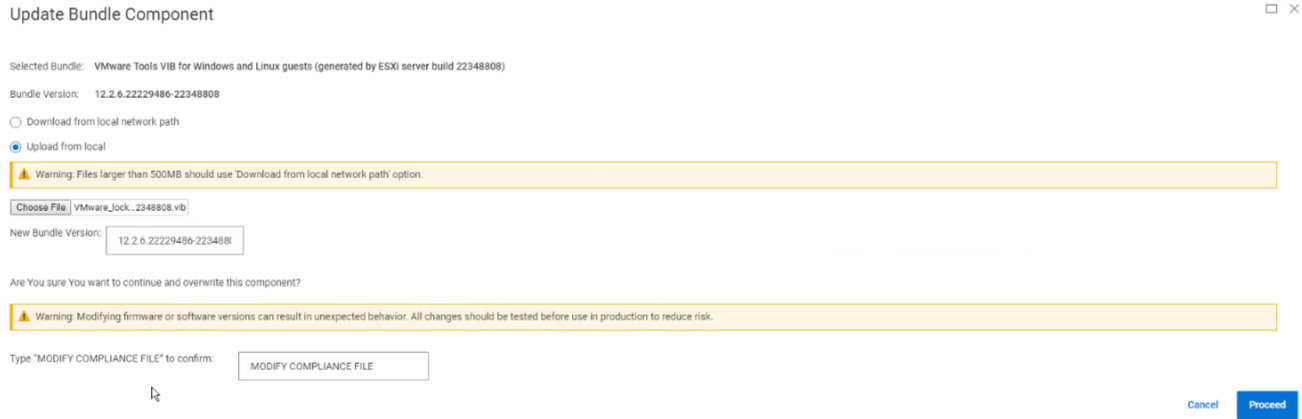 提醒:您会看到此组件带有“Modified”标记。
- 执行 RCM/IC 升级。
- 手动安装 VMware Tools VIB:
- 手动安装从从 Broadcom 下载的离线更新 ZIP 捆绑包中提取的 VIB:
# esxcli software vib install -v /<path_to_the_depot>/VMware_locker_tools-light_12.2.6.22229486-22348808.vib Installation Result Message: Operation finished successfully. Reboot Required: false VIBs Installed: VMware_locker_tools-light_12.2.6.22229486-22348808 VIBs Removed: VMware_locker_tools-light_12.3.5.22544099-22545121 VIBs Skipped: - 从“资源”选项卡运行上述 ESXi 主机的资源清册。
- 检查合规性。已安装的 VIB 标记为合规,并在升级过程中被跳过。
- 执行 RCM/IC 升级。
- 手动安装从从 Broadcom 下载的离线更新 ZIP 捆绑包中提取的 VIB:
- 重试 RCM 升级。 第二次尝试应该会成功。
Additional Information
受影响的版本
PFMP 4.x
已修复问题的版本
PFMP 4.6.1
Affected Products
PowerFlex rack RCM SoftwareArticle Properties
Article Number: 000283204
Article Type: Solution
Last Modified: 02 Jun 2025
Version: 2
Find answers to your questions from other Dell users
Support Services
Check if your device is covered by Support Services.