Dell Unity:儲存裝置無法連線至 VMware Hypervisor,錯誤代碼:0x5c00007
Summary: 資料存放區建立工作最多只能完成 87%,在 ESXi 叢集中不會顯示資料存放區,而且我們無法手動掛接 NFS 資料存放區。
This article applies to
This article does not apply to
This article is not tied to any specific product.
Not all product versions are identified in this article.
Symptoms
- 資料存放區在 ESXi 叢集中不可見。
- 無法手動掛接 NFS 資料存放區。
- NFS 資料存放區建立工作最多只能完成 87%。

- 在 Unity 上更新 vCenter 使用者名稱和密碼失敗,並顯示錯誤代碼 0x5c00007,而且工作最多只能完成 50%:
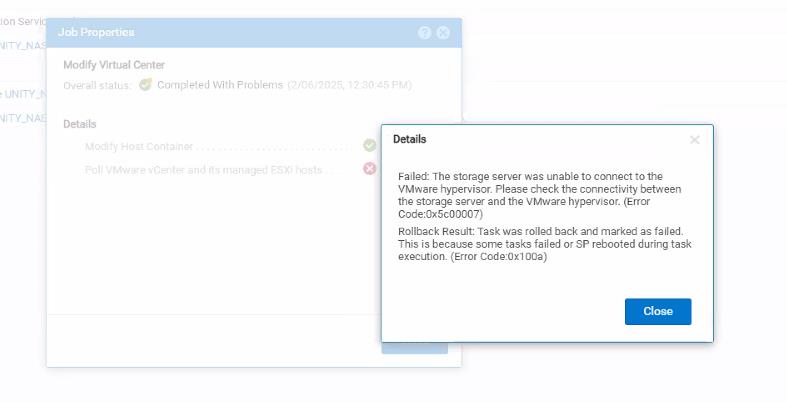
- 下方的工作狀態顯示已完成,但發生問題:

- 以下詳細資料並不表示它適用於此特定情況:
Environment details:
       Vcenter version : 7.0.3
       Unity OE version : 5.3.1.0.5.008
       Storage resource: NFS Datastore   <<<<New DS with no data written on this.
Cause
- 驗證 Unity 與 ESXi 主機和 vCenter 之間的網路連線能力
- 憑證問題:由於連線能力問題,Unity 無法取得 vCenter 憑證進行驗證。
- Unisphere 上未更新 vCenter 登入資料。
Resolution
- 查驗 Unity 與 ESXi 主機和 vCenter 之間的網路連線,以確保主機和儲存裝置能夠通訊。
- 憑證問題:由於連線能力問題,修正連線能力後,憑證驗證就不會發生問題。Unisphere > 存取 > VMware > 選取 vCenter > 修改動作 > 驗證憑證
- 要在 Unisphere 上更新的 vCenter 登入資料:Unisphere > 存取 > VMware > 選取 vCenter > 編輯 > 更新 vCenter 登入資料
- 重試建立和掛接資料存放區。
- 如果是未寫入資料的新 NFS 資料存放區,請刪除並重新建立。您應該會看到它完成到 100%。
- 如果是包含資料的現有資料存放區,請聯絡 Dell 技術支援部門。
Affected Products
Dell Unity Operating Environment (OE)Article Properties
Article Number: 000284876
Article Type: Solution
Last Modified: 19 Feb 2025
Version: 1
Find answers to your questions from other Dell users
Support Services
Check if your device is covered by Support Services.