尝试登录 ESXi 服务器会导致错误“No supported authentication methods available (server sent: publickey)”
Summary: 本文提供了有关从 ESXi 角度对 SSH 问题进行故障处理的详细指南。但是,此处讨论的概念和解决方案也适用于其他基于 Linux 的作系统,因此此信息对于更广泛的环境很有价值。
This article applies to
This article does not apply to
This article is not tied to any specific product.
Not all product versions are identified in this article.
Symptoms
尝试通过 SSH 登录到 ESXi 服务器会导致错误“No supported authentication methods available (server sent: publickey)”,如下所示:
尝试从其他 ESXi 服务器登录时,显示以下错误:
Cause
服务器拒绝 SSH 会话,因为 sshd_config 文件中的“challengeresponseauthentication”参数设置为“no”,并且服务器未正确配置为非对称身份验证(RSA 公钥和私钥身份验证)。
因此,尝试使用 Putty 连接到服务器会导致错误“No supported authentication methods available (server sent: publickey)。
当用户尝试从另一个 ESXi 主机建立 SSH 连接时,观察到类似的行为。在这种情况下,用户会收到错误“Load key '/.ssh/id_rsa': error in libcrypto”,但不会要求输入密码,并且连接会失败。
如果服务器未正确配置为非对称身份验证,但“ChallengeResponseAuthentication”参数设置为“yes”,则用户会收到一条错误消息,但随后会提示输入其密码。正确输入密码后,即可成功建立连接。
Resolution
使用 DCUI 连接到目标服务器控制台,然后在 /etc/ssh/sshd_config 配置文件中将 challengeresponseauthentication 编辑为 yes 。
ChallengeResponseAuthentication
ChallengeResponseAuthentication 设置指定是否允许对 SSH 连接进行质询-响应身份验证。启用此选项后,SSH 服务器要求客户端先响应质询,然后才允许它们进行身份验证。它在某些 SSH 服务器实现中 默认 处于启用状态,但出于安全原因,它可能会在某些系统上被禁用,例如在 Red Hat 中,如 Red Hat 文章 336773
ChallengeResponseAuthentication 是 KbdInteractiveAuthentication 的已弃用别名。参考:OpenSSH:发行说明
Additional Information
更多详情:
-
设置 challengeresponseauthentication 和 passwordauthentication 的组合会生成一个略有不同的提示:
ChallengeResponseAuthentication 设置为 No,PasswordAuthentication 设置为 Yes:

ChallengeResponseAuthentication 设置为 No,PasswordAuthentication 设置为 Yes,或者两者都设置为 Yes:

更多故障处理步骤:
-
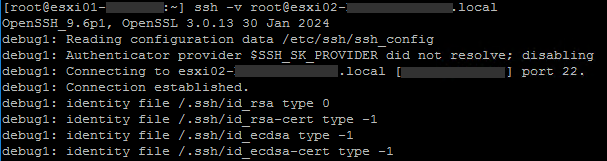
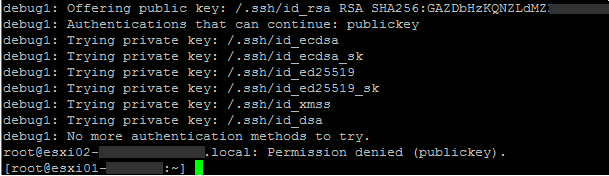
在客户端,在 ssh 命令中使用 -v 选项打印有关 ssh 进度的调试消息。多个 -v 选项会增加详细程度(最大值为 3):
…
-
在目标服务器中,增加 LogLevel
LogLevel
给出在记录 来自 sshd(8) - 有关错误的更多详细信息,请查看目标服务器中的 /var/run/log/auth.log。
Affected Products
VMware ESXi 6.5.X, VMware ESXi 6.7.X, VMware ESXi 6.x, VMware ESXi 7.x, VMware ESXi 8.xArticle Properties
Article Number: 000286315
Article Type: Solution
Last Modified: 08 Apr 2025
Version: 2
Find answers to your questions from other Dell users
Support Services
Check if your device is covered by Support Services.