Avamar: AUI Does Not Show Exception Jobs Results on Activities
Summary: This article explains a behavior when using Avamar User Interface (AUI) to check exception jobs and it returns an empty result.
This article applies to
This article does not apply to
This article is not tied to any specific product.
Not all product versions are identified in this article.
Symptoms
This behavior occurs in Avamar 19.10.0-166 (19.10 SP1) with Management Console Service (MCS) hotfix 338869. This behavior can occur in previous versions as well.
- Log in to Avamar AUI > Dashboard
- On the upper right corner, there is the Activities panel.
- On the Activities panel, change the Duration field from Last 24 hours to Last 30 days and it shows several exceptional jobs.
- Click Exceptional

- AUI shows "No Activities"

Cause
This behavior is under investigation.
Resolution
As a temporary workaround, use the Avamar Administrator console (Java user interface).
-
Log in to the Avamar Administrator console
-
On the Launcher window, click "Succeeded with Exception" for the Activities panel.

-
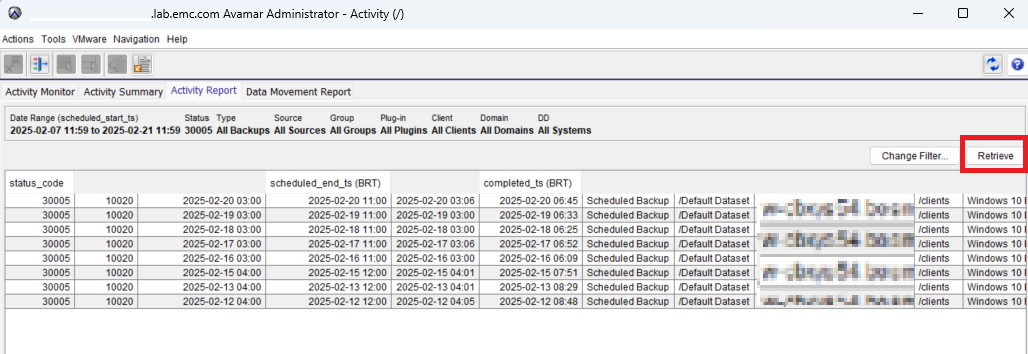
The Activity window opens on the Activity Report tab.
-
Click the Retrieve button.
-
It shows the exception jobs with status code 30005.
Affected Products
Avamar, Avamar ServerArticle Properties
Article Number: 000288009
Article Type: Solution
Last Modified: 25 Feb 2025
Version: 2
Find answers to your questions from other Dell users
Support Services
Check if your device is covered by Support Services.