Certaines vidéos AVI ne peuvent pas être lues par les applications de lecteur vidéo natives Windows telles que l’application Media Player
Summary: Les informations sur Windows Media Player ne peuvent pas lire le fichier vidéo AVI (Audio Video Interleave) codé en MJPEG et affichent le code d’erreur « 0xC00D6D60 ».
This article applies to
This article does not apply to
This article is not tied to any specific product.
Not all product versions are identified in this article.
Symptoms
Si vous essayez de lire un fichier vidéo AVI codé en MJPEG, un code d’erreur « 0xC00D6D60 » s’affiche.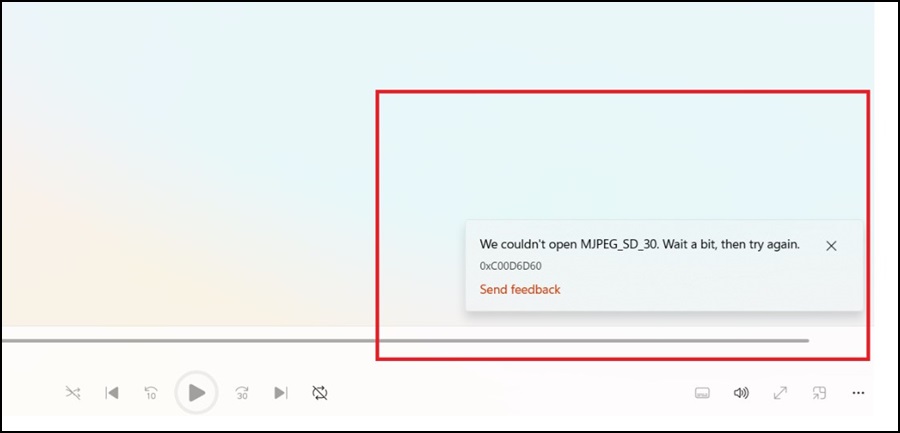
Cause
Le pilote MJPEG Microsoft génère l’erreur si le processeur graphique (GPU) NVIDA n’est pas le processeur graphique principal d’un ordinateur portable hybride Microsoft.
Resolution
Pilote vidéo
Une solution de contournement à ce problème consiste à utiliser l’application Power DVD pour lire des vidéos de codec MJPEG.
Un nouveau pilote vidéo avec le correctif de ce problème devrait sortir vers le 17 juin 2025 (sous réserve de modifications).
Affected Products
Dell Latitude 3480/3488, Latitude 5401, Latitude 5411, Latitude 5421, Latitude 5431, Latitude 5440, Latitude 5450, Latitude 5480/5488, Latitude 5490, Latitude 5501, Latitude 5511, Latitude 5580, Latitude 5590, Precision 3470, Precision 3490
, Precision 5480, Precision 5490, Precision 3520, Precision 3530, Precision 3541, Precision 3550, Precision 3551, Precision 7530, Precision 7540, Precision 7550, Precision 7560, Precision 7670, Precision 7680, Precision 7730, Precision 7740, Precision 7750, Precision 7760, Precision 7770, Precision 7780
...
Article Properties
Article Number: 000288160
Article Type: Solution
Last Modified: 27 May 2025
Version: 3
Find answers to your questions from other Dell users
Support Services
Check if your device is covered by Support Services.