PowerProtect Data Manager - PowerScale/Isilon 使用者與 PPDM NAS 搭配使用的權限
Summary: 設定 PPDM NAS 備份以及「系統」存取和「非系統」存取區域的正確權限
This article applies to
This article does not apply to
This article is not tied to any specific product.
Not all product versions are identified in this article.
Instructions
設定 PowerProtect Data Manager 以備份 PowerScale、Isilon NAS 備份時,您必須將 PowerScale 的正確權限和特權設定給要使用的 NAS 使用者,如下所示:
若為「系統」存取區域:
按照第 13 頁中的 指南 進行操作,並在「訪問許可權、成員身份和角色」和「角色」中創建新角色:

○ PowerScale 使用者必須具備下列權限才能執行探索、備份及還原:
特權
ISI_PRIV_LOGIN_CONSOLE (唯讀)
ISI_PRIV_LOGIN_PAPI (唯讀)
ISI_PRIV_AUTH (唯讀)
ISI_PRIV_AUTH_ZONES (唯讀)
ISI_PRIV_NETWORK (唯讀)
ISI_PRIV_NFS (讀取寫入)
ISI_PRIV_SMB (讀取寫入)
ISI_PRIV_SNAPSHOT (讀取寫入)
ISI_PRIV_SYNCIQ (讀取寫入)
除了這些權限之外,請將用於備份的 PowerProtect Data Manager 使用者新增至角色「BackupAdmins」,該角色亦具有備份及還原權限。這個角色包含:
ISI_PRIV_IFS_BACKUP (唯讀)
ISI_PRIV_IFS_RESTORE (唯讀)
使用「user mapping」測試使用者權限時,應會傳回:

若為「非系統」存取區域:
對於「非系統」存取區域,則會套用相同的程序,但由於 PowerProtect Data Manager 並非系統存取區域,因此 無法 套用少數權限。
- 建立您的 PowerProtect Data Manager 角色,如系統的區域。
- 將使用者添加到其中,並向其添加以下許可權:
ISI_PRIV_LOGIN_PAPI (唯讀)
ISI_PRIV_AUTH (唯讀)
ISI_PRIV_NFS (讀取寫入)
ISI_PRIV_SMB (讀取寫入)
ISI_PRIV_IFS_BACKUP (唯讀)
ISI_PRIV_IFS_RESTORE (唯讀)
該存取區域的「測試對應」應傳回:
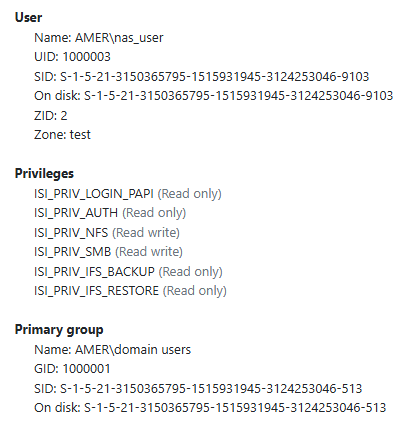
這些權限必須套用至您所有的「非系統」存取區域。
Affected Products
PowerProtect Data ManagerArticle Properties
Article Number: 000290981
Article Type: How To
Last Modified: 24 Jun 2025
Version: 2
Find answers to your questions from other Dell users
Support Services
Check if your device is covered by Support Services.