PowerFlex 4.x 无法添加或删除 LDAP 组
Summary: 从 PFxM 中删除 AD 后,Keycloak 无法删除缓存的 LDAP 组。
This article applies to
This article does not apply to
This article is not tied to any specific product.
Not all product versions are identified in this article.
Symptoms
情况说明
初始尝试添加组会导致错误:
Failed to add Remote group
Failed to find request group


根据 PowerFlex 4.X - 如何在 PFxM Keycloak 管理员控制台中应用 LDAP 组搜索筛选器,在 Keycloak LDAP 筛选器中填充组后 |Dell US ,然后从 PFxM 同步到 LDAP 提供程序,sso.stdout.log显示组同步不起作用:
2024-09-25T07:10:31.684769872Z stdout F 2024-09-25T07:10:31.684Z  INFO 1 --- [io-8083-exec-10] c.d.s.c.DirectoryServicesController      : Received sync user request
2024-09-25T07:10:31.685080784Z stdout F 2024-09-25T07:10:31.684Z  INFO 1 --- [pool-9-thread-1] c.d.s.managers.DirectoryServiceManager   : starting sync process for ldap groups
2024-09-25T07:10:31.69678586Z stdout F 2024-09-25T07:10:31.696Z  INFO 1 --- [pool-9-thread-1] com.dell.sso.clients.KeycloakClient      : Ldap group sync started
2024-09-25T07:10:31.710659167Z stdout F 2024-09-25T07:10:31.710Z ERROR 1 --- [pool-9-thread-1] com.dell.sso.clients.KeycloakClient      : Failed to sync groups: HTTP 500 Internal Server Error

2024-09-25T07:10:31.710959458Z stderr F Exception in thread "pool-9-thread-1" java.lang.RuntimeException: com.dell.sso.exceptions.KeycloakException: Failed to sync groups or sync users
删除 LDAP 提供程序后,数据库仍显示组(例如,下面显示四个组)
delladmin@mvm1:/>kubectl exec -it -c database -n powerflex $(kubectl get pods -n powerflex -l='postgres-operator.crunchydata.com/role=master, postgres-operator.crunchydata.com/instance-set' | grep Running | cut -d' ' -f1) -- psql -U postgres -d keycloak -c "SELECT COUNT(*) FROM keycloak_group;"
 count
-------
     4
(1 row)
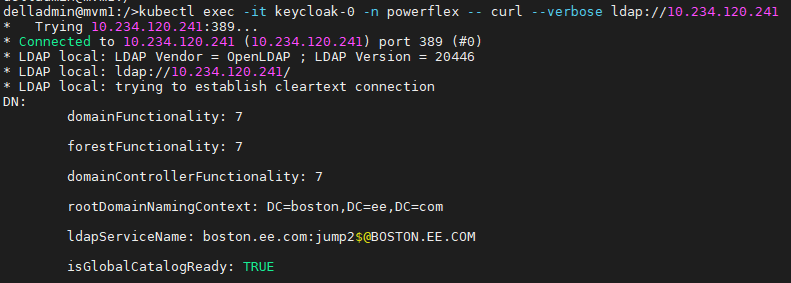
应使用以下命令确认从 PFMP 到 LDAP 的连接:
kubectl exec -it keycloak-0 -n powerflex -- curl --verbose ldap://
示例:
影响
无法添加或移除 LDAP 组。
Cause
|
移除 AD 时:
|
Resolution
使用 API 逐个删除每个组。
1) 检索 Keycloak 凭据。
kubectl get secrets -n powerflex keycloak-admin-credentials -o jsonpath='{.data.username}' | base64 --decode; echo -e
kubectl get secrets -n powerflex keycloak-admin-credentials -o jsonpath='{.data.password}' | base64 --decode; echo -e
2) 获取访问令牌(注意:将 4578ZZyT3f 替换为上述输出中的密码):
TOKEN=$(curl -X POST https://keycloak-http.powerflex/auth/realms/master/protocol/openid-connect/token -H 'Content-Type: application/x-www-form-urlencoded' -d 'scope=openid&grant_type=password&client_id=admin-cli&username=keycloak&password=4578ZZyT3f' | jq -r '.access_token'); echo $TOKEN
3) 使用 api 检查组(一次列出 10 个组)
curl -X GET "https://keycloak-http.powerflex/auth/admin/realms/powerflex/groups?first=0&max=10" -H "Authorization: Bearer $TOKEN" | jq
4) 一次删除一个组(用上面步骤 3 中的每个 ID 替换。
curl -X DELETE https://keycloak-http.powerflex/auth/admin/realms/powerflex/groups/"" -H "Authorization: Bearer $TOKEN"
或者,使用循环脚本一次删除一个group_id。
for group_id in $(curl -X GET "https://keycloak-http.powerflex/auth/admin/realms/powerflex/groups" -H "Authorization: Bearer $TOKEN" | jq -r '.[].id'); do curl -X DELETE "https://keycloak-http.powerflex/auth/admin/realms/powerflex/groups/$group_id" -H "Authorization: Bearer $TOKEN"; done
示例

受影响的版本
PFMP 4.x
已修复问题的版本
未来版本的keycloak将支持批量删除组。
Affected Products
PowerFlex rack, VxFlex Ready Nodes, PowerFlex custom node, PowerFlex appliance R650, PowerFlex appliance R6525, PowerFlex appliance R660, PowerFlex appliance R6625, Powerflex appliance R750, PowerFlex appliance R760, PowerFlex appliance R7625
, PowerFlex appliance R640, PowerFlex appliance R740XD, PowerFlex appliance R7525, PowerFlex appliance R840
...
Article Properties
Article Number: 000291045
Article Type: Solution
Last Modified: 04 Mar 2025
Version: 1
Find answers to your questions from other Dell users
Support Services
Check if your device is covered by Support Services.