PowerFlex 4.x 無法新增或移除 LDAP 群組
Summary: 從 PFxM 移除 AD 後,和 Keycloak 無法移除快取的 LDAP 群組。
This article applies to
This article does not apply to
This article is not tied to any specific product.
Not all product versions are identified in this article.
Symptoms
案例
初次嘗試新增群組時會導致錯誤:
Failed to add Remote group
Failed to find request group
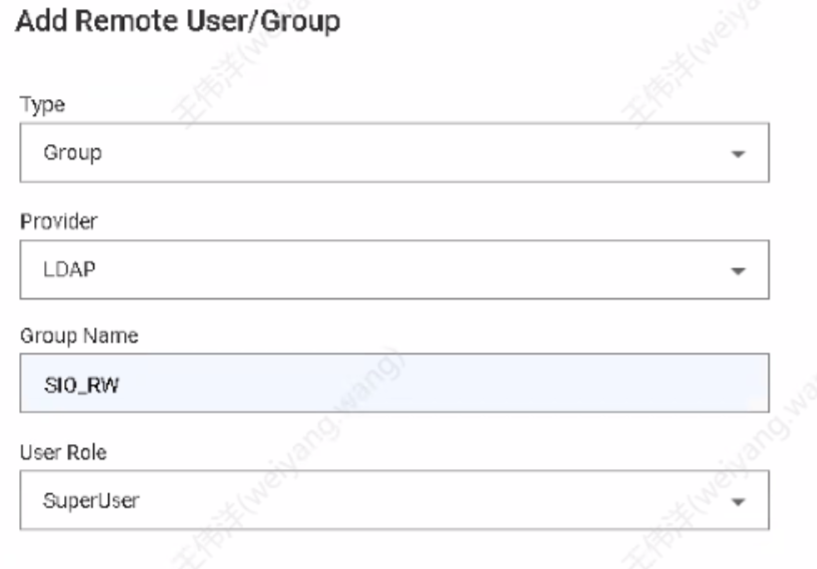
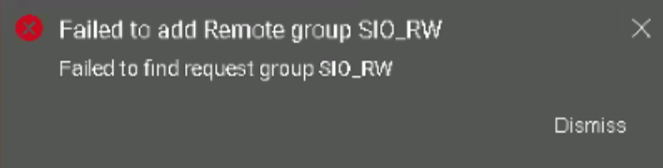
在 keycloak ldap 篩選器中填入群組後,根據 PowerFlex 4.X - 如何在 PFxM 中套用 LDAP 群組搜尋篩選器 Keycloak 管理主控台 |Dell US ,以及從 PFxM 同步至 LDAP 提供者時,sso.stdout.log顯示群組同步無法運作:
2024-09-25T07:10:31.684769872Z stdout F 2024-09-25T07:10:31.684Z  INFO 1 --- [io-8083-exec-10] c.d.s.c.DirectoryServicesController      : Received sync user request
2024-09-25T07:10:31.685080784Z stdout F 2024-09-25T07:10:31.684Z  INFO 1 --- [pool-9-thread-1] c.d.s.managers.DirectoryServiceManager   : starting sync process for ldap groups
2024-09-25T07:10:31.69678586Z stdout F 2024-09-25T07:10:31.696Z  INFO 1 --- [pool-9-thread-1] com.dell.sso.clients.KeycloakClient      : Ldap group sync started
2024-09-25T07:10:31.710659167Z stdout F 2024-09-25T07:10:31.710Z ERROR 1 --- [pool-9-thread-1] com.dell.sso.clients.KeycloakClient      : Failed to sync groups: HTTP 500 Internal Server Error

2024-09-25T07:10:31.710959458Z stderr F Exception in thread "pool-9-thread-1" java.lang.RuntimeException: com.dell.sso.exceptions.KeycloakException: Failed to sync groups or sync users
刪除LDAP提供程式後,資料庫仍顯示組(例如,下面顯示了四個組)
delladmin@mvm1:/>kubectl exec -it -c database -n powerflex $(kubectl get pods -n powerflex -l='postgres-operator.crunchydata.com/role=master, postgres-operator.crunchydata.com/instance-set' | grep Running | cut -d' ' -f1) -- psql -U postgres -d keycloak -c "SELECT COUNT(*) FROM keycloak_group;"
 count
-------
     4
(1 row)
應使用下列命令確認從 PFMP 到 ldap 的連線:
kubectl exec -it keycloak-0 -n powerflex -- curl --verbose ldap://
範例:

影響
無法新增或移除 LDAP 群組。
Cause
|
移除 AD 時:
|
Resolution
使用 API 逐一刪除每個群組。
1) 擷取 KeyCloak 登入資料。
kubectl get secrets -n powerflex keycloak-admin-credentials -o jsonpath='{.data.username}' | base64 --decode; echo -e
kubectl get secrets -n powerflex keycloak-admin-credentials -o jsonpath='{.data.password}' | base64 --decode; echo -e
2) 取得存取權杖 (注意:將 4578ZZyT3f 替換為上述輸出的密碼):
TOKEN=$(curl -X POST https://keycloak-http.powerflex/auth/realms/master/protocol/openid-connect/token -H 'Content-Type: application/x-www-form-urlencoded' -d 'scope=openid&grant_type=password&client_id=admin-cli&username=keycloak&password=4578ZZyT3f' | jq -r '.access_token'); echo $TOKEN
3) 檢查使用 api 的群組 (一次列出 10 個群組)
curl -X GET "https://keycloak-http.powerflex/auth/admin/realms/powerflex/groups?first=0&max=10" -H "Authorization: Bearer $TOKEN" | jq
4) 一次刪除一個群組 (替換為上述步驟 3 中的每個 id。
curl -X DELETE https://keycloak-http.powerflex/auth/admin/realms/powerflex/groups/"" -H "Authorization: Bearer $TOKEN"
或者,使用迴圈腳本一次刪除一個group_id。
for group_id in $(curl -X GET "https://keycloak-http.powerflex/auth/admin/realms/powerflex/groups" -H "Authorization: Bearer $TOKEN" | jq -r '.[].id'); do curl -X DELETE "https://keycloak-http.powerflex/auth/admin/realms/powerflex/groups/$group_id" -H "Authorization: Bearer $TOKEN"; done
範例

受影響的版本
PFMP 4.x
已修正問題的版本
未來版本的 keycloak 將支援大量刪除群組。
Affected Products
PowerFlex rack, VxFlex Ready Nodes, PowerFlex custom node, PowerFlex appliance R650, PowerFlex appliance R6525, PowerFlex appliance R660, PowerFlex appliance R6625, Powerflex appliance R750, PowerFlex appliance R760, PowerFlex appliance R7625
, PowerFlex appliance R640, PowerFlex appliance R740XD, PowerFlex appliance R7525, PowerFlex appliance R840
...
Article Properties
Article Number: 000291045
Article Type: Solution
Last Modified: 04 Mar 2025
Version: 1
Find answers to your questions from other Dell users
Support Services
Check if your device is covered by Support Services.