PowerStore: Next Synchronization Time property for replication may not reflect the correct time
Summary: The "Next Synchronization Time" property should indicate the next time PowerStoreOS replicates to the peer appliance based on the configured RPO. On PowerStoreOS version 4.0 or later, this property may not be properly updated. The result is an incorrect "Next Synchronization Time" value in the PowerStore UI. ...
This article applies to
This article does not apply to
This article is not tied to any specific product.
Not all product versions are identified in this article.
Symptoms
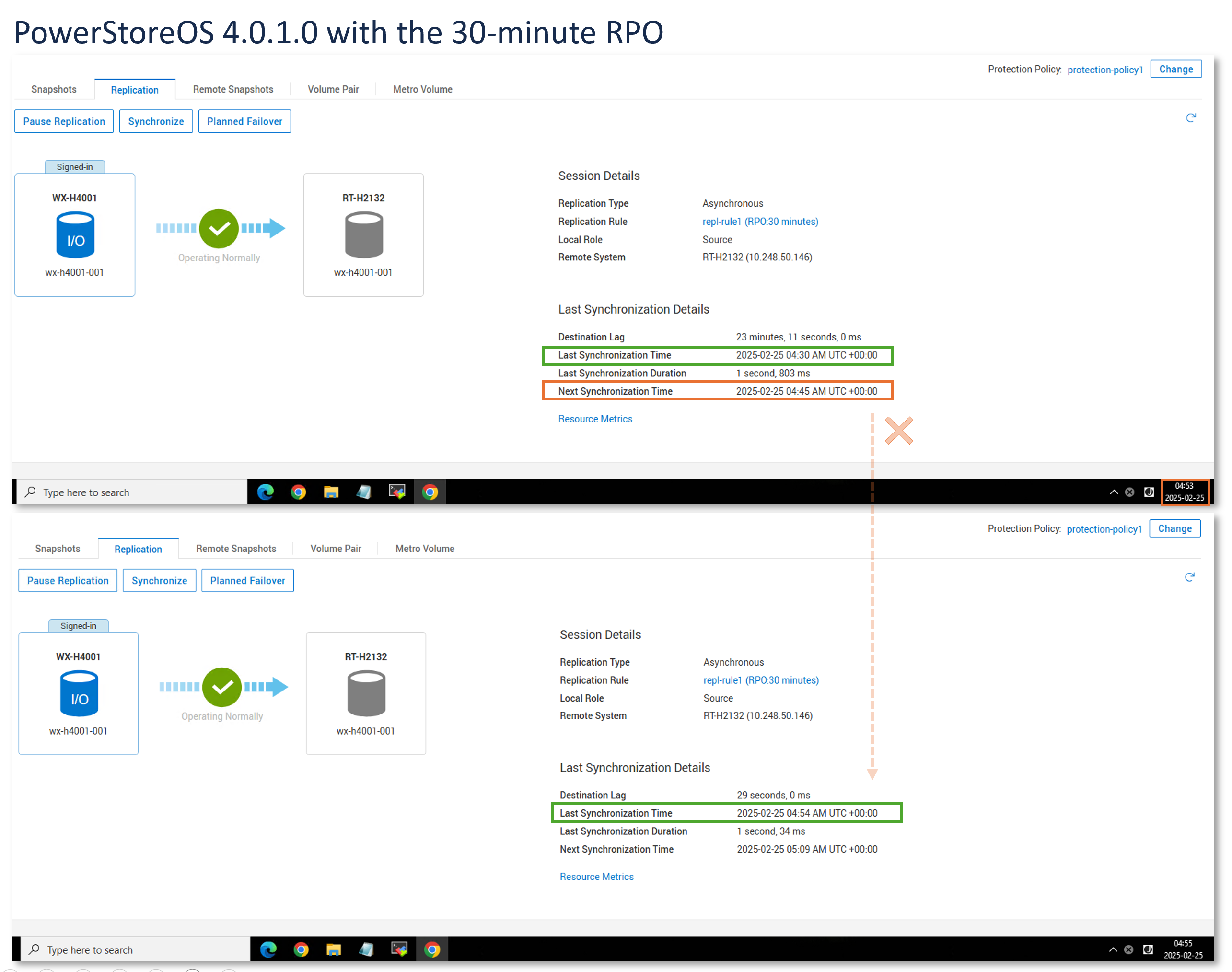
The "Next Synchronization Time" property may mismatch with the actual Replication sync frequency.
NOTE: This is a cosmetic issue that does not affect configured RPO settings, nor actual replication sync behavior.
This symptom is seen on PowerStoreOS version 4.0 (or later) when appliances are configured with an asynchronous replication environment.
If the customer is leveraging the 'Next Synchronization Time' to understand when the replication will be synchronized next, then they may become concerned when the sync does not start on time. However, that is not the case as the replication sync will eventually start.
Example:
Cause
The user defines a Recovery Point Objective (RPO) setting as part of a replication rule. RPO can be defined to 5 minutes, 15 minutes, 30 minutes, 1 hour, 6 hours,12 hours, or 24 hours.
The system internally decides the sync frequency based on the RPO setting.
- Prior to PowerStoreOS version 4.0, the sync frequency scheme used a factor of 50% of the RPO time.
- In version 4.0, to improve performance and scalability, this frequency was changed to 80% of the RPO time.
The logic that computes the "Next Synchronization Time" property does not use the same logic that drives the sync frequency scheme and was not adjusted or aligned accordingly. This result in a discrepancy in the displayed "Next Synchronization Time" property.
Resolution
The issue is scheduled to be addressed in PowerStoreOS v4.2.0.0
Workaround
None.
Affected Products
PowerStoreArticle Properties
Article Number: 000291162
Article Type: Solution
Last Modified: 14 Jun 2025
Version: 3
Find answers to your questions from other Dell users
Support Services
Check if your device is covered by Support Services.