Il computer Dell si riattiva dallo stato di ibernazione con la funzione Wake On Magic Packet disabilitata
Summary: Un computer Dell può riattivarsi dalla modalità di ibernazione utilizzando uno strumento Wake on LAN Magic Packet quando si prevede che il computer rimanga in modalità di ibernazione.
This article applies to
This article does not apply to
This article is not tied to any specific product.
Not all product versions are identified in this article.
Symptoms
Quando Wake On Magic Packet è impostato su Disabled in Device Manager, la scheda LAN in fibra 5G può riattivarsi da uno stato di sospensione (S4). Ciò si verifica anche con la modalità Deep sleep impostata su Enabled solo in S5.
Piattaforme interessate:
- Dell Pro Max Micro FCM2250
- Dell Pro Max Slim FCS1250
- Dell Pro Max Tower T2 FCT2250
- Dell Pro Micro QCM1250
- Dell Pro Micro Plus QBM1250
- Dell Pro Slim QCS1250
- Dell Pro Slim Plus QBS1250
- Dell Pro Tower QCT1250
- Dell Pro Tower Plus QBT1250
- Dell Slim ECS1250
Cause
Realtek avvisa che si tratta di un comportamento previsto. Le specifiche NDIS (Network Driver Interface Specification) Realtek non distinguono tra sospensione (S4) e arresto (S5).
La funzione Wake on LAN (WOL) deve essere controllata dall'impostazione Shutdown Wake On LAN in Gestione dispositivi. Non deve essere controllato da Wake on Magic Packet.
Resolution
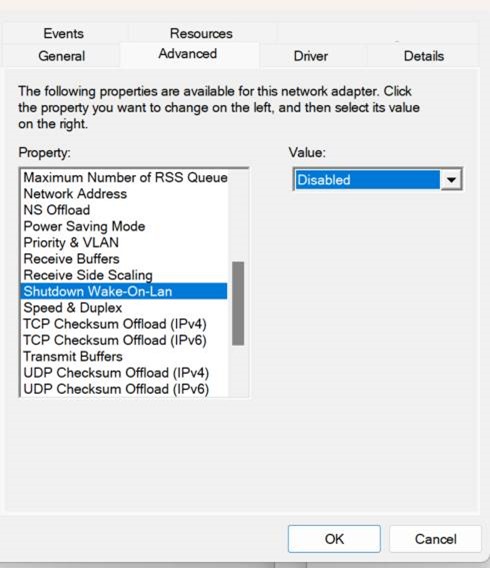
Utilizzare l'impostazione Shutdown Wake On Lan per controllare WOL per gli stati S4 e S5.
- Premere il tasto Windows + X, quindi cliccare su Gestione dispositivi.
- Espandere Schede di rete.
- Cliccare con il pulsante destro del mouse su Realtek PCIe 5GbE Family Controller , quindi selezionare Properties.
- Passare alla scheda Avanzate .
- Individuare Shutdown Wake-On-Lan nell'elenco Property .
- Impostare il valore su Disabilitato.
Affected Products
Dell Slim ECS1250, Dell Pro Max Micro FCM2250, Dell Pro Max Slim FCS1250, Dell Pro Max Tower T2 FCT2250, Dell Pro Micro Plus QBM1250, Dell Pro Slim Plus QBS1250, Dell Pro Tower Plus QBT1250, Dell Pro Micro QCM1250, Dell Pro Slim QCS1250
, Dell Pro Tower QCT1250
...
Article Properties
Article Number: 000296551
Article Type: Solution
Last Modified: 13 May 2025
Version: 2
Find answers to your questions from other Dell users
Support Services
Check if your device is covered by Support Services.