如何安装 Dell Client Device Manager
Summary: 本文提供有关安装 Dell Client Device Manager (DCDM) 的信息。
This article applies to
This article does not apply to
This article is not tied to any specific product.
Not all product versions are identified in this article.
Instructions
受影响的产品:
- Dell 客户端设备管理器
- 下载 并 解压:
- 以管理员身份运行命令提示符。
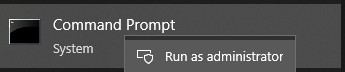
- 将目录 (cd) 切换到解压 DCDM 的位置。

- 根据您的需要,使用下面的参数或示例运行 PowerShell 脚本
powershell.exe -executionpolicy Bypass -windowstyle hidden -noninteractive -nologo -file "dcdm_deployment.ps1" -action -modules

| 参数 | 描述 |
|---|---|
| -help | 可选:显示参数说明 |
| -行动 | 必需 指定要执行的作(安装或卸载) |
| -模块 | 可选 指定要包含的模块。默认值(DCDMCS、DCDMU、DCDMS) |
| -logpath | 可选:默认值为 C:ProgramData\Dell\ClientDeviceManager。指定日志文件的路径 |
| -详细日志 | 可选:在控制台中启用日志显示(True 或 False) |
| -debuglevel | 可选默认值为 all。指定调试信息的级别 |
| -遥测同意 | 可选默认值为 true。表示遥测同意 |
| 模块 | 描述 | 模块取决于 |
|---|---|---|
| DCDMCS | Dell Client Device Manager Core Services(以前称为 Dell Core Service (DCS)) | 需要不适用核心组件 |
| DCDMS | Dell Client Device Manager Security(以前称为戴尔可信设备 (DTD)) | DCDMCS |
| DCDMU | Dell Client Device Manager Update(以前称为 Dell Command Update (DCU)) | DCDMCS、DCDMS |
示例:
安装或更新所有模块并发送 DCDMU 的遥测数据
powershell.exe -executionpolicy Bypass -windowstyle hidden -noninteractive -nologo -file "dcdm_deployment.ps1" -action "install"
在没有遥测的情况下安装或更新所有模块
powershell.exe -executionpolicy Bypass -windowstyle hidden -noninteractive -nologo -file "dcdm_deployment.ps1" -action "install" -telemetryconsent "false"
安装或更新戴尔客户端设备管理器 |安全性 (DCDMS)
powershell.exe -executionpolicy Bypass -windowstyle hidden -noninteractive -nologo -file "dcdm_deployment.ps1" -action "install" -modules "DCDMS"
卸载戴尔客户端设备管理器 |安全性 (DCDMS)
powershell.exe -executionpolicy Bypass -windowstyle hidden -noninteractive -nologo -file "dcdm_deployment.ps1" -action "uninstall" -modules "DCDMS"
卸载所有模块
powershell.exe -executionpolicy Bypass -windowstyle hidden -noninteractive -nologo -file "dcdm_deployment.ps1" -action "uninstall"
Affected Products
Dell Client Device ManagerArticle Properties
Article Number: 000299185
Article Type: How To
Last Modified: 22 May 2026
Version: 3
Find answers to your questions from other Dell users
Support Services
Check if your device is covered by Support Services.