Dell Laptop Cannot Sign in to a Microsoft Account in SupportAssist OS Recovery
Summary: Learn about a signing in issue with your Microsoft account in SupportAssist OS Recovery on a Dell laptop.
This article applies to
This article does not apply to
This article is not tied to any specific product.
Not all product versions are identified in this article.
Symptoms
Dell laptop may not be able to sign in to a Microsoft account. The issue occurs after the following steps are performed:
- Start the operating system with your Microsoft account.
- Turn on BitLocker.
- Save the recovery key to your Microsoft account.
- Restart the computer, tap F12 key repeatedly, and open SupportAssist OS Recovery.
- Connect to the Internet.
- Click the Disk Cloning option and sign in to your Microsoft count.
- The issue occurs, and you cannot sign in to your Microsoft account with the message that reads: Something went wrong.
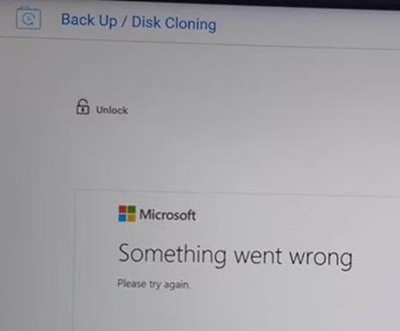
Affected Platforms:
- Dell 14 DC14255
- Dell 14 Plus 2-in-1 DB04250
- Dell 16 DC16255
- Dell 16 DC16256
- Dell 16 Plus 2-in-1 DB06250
- Dell 16 Premium DA16250
- Dell Pro 13 Plus PB13255
- Dell Pro 14 Essential PV14255
- Dell Pro 14 PC14255
- Dell Pro 14 Plus PB14255
- Dell Pro 16 PC16255
- Dell Pro 16 Plus PB16255
- Dell Pro Slim QCS1255
Cause
This is a browser compatible issue. The current browser engine (IE) within Service OS is not able to render the latest HTML based contents for few Microsoft website pages. Using Microsoft Edge or Google Chrome in SupportAssist OS Recovery fixes the issue.
Resolution
Updating to SupportAssist OS recovery version 5.5.14 or later on the following products resolves the issue. To download and install the application, refer to How to Download and Install Dell Drivers and Firmware.
- Dell 14 Plus 2-in-1 DB04250
- Dell 16 Plus 2-in-1 DB06250
- Dell 16 Premium DA16250
- Dell Pro 13 Plus PB13255
- Dell Pro 14 Essential PV14255
- Dell Pro 14 PC14255
- Dell Pro 14 Plus PB14255
- Dell Pro 16 PC16255
- Dell Pro 16 Plus PB16255
A new version of SupportAssist OS Recovery 5.5.15 is expected to be released in November 2025 to fix the issue for the following products.
- Dell 14 DC14255
- Dell 16 DC16255
- Dell 16 DC16256
- Dell Pro Slim QCS1255
As a workaround, follow these steps to recover from the issue.
- Turn on the computer, tap F12 key repeatedly, and open SupportAssist OS Recovery.
- Click the Disk Cloning option and select Enter key manually option to disable the BitLocker encryption.
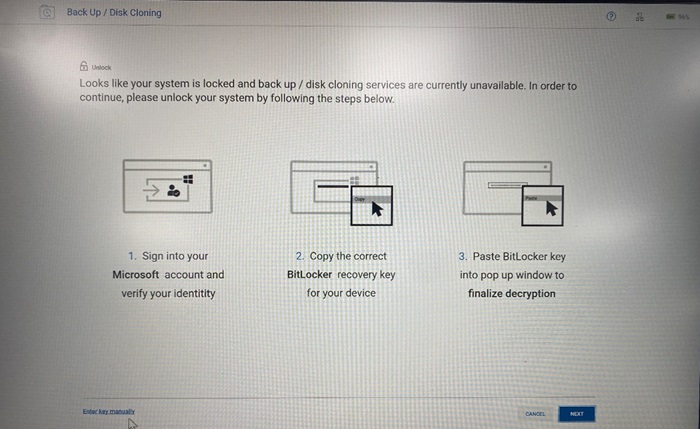
Affected Products
Dell 16 Premium DA16250, Dell 14 Plus 2-in-1 DB04250, Dell 16 Plus 2-in-1 DB06250, Dell 14 DC14255, Dell 16 DC16255, Dell 16 DC16256, Dell Pro 13 Plus PB13255, Dell Pro 14 Plus PB14255, Dell Pro 16 Plus PB16255, Dell Pro 14 PC14255
, Dell Pro 16 PC16255, Dell Pro 14 Essential PV14255, Dell Pro Slim QCS1255
...
Article Properties
Article Number: 000299800
Article Type: Solution
Last Modified: 01 Oct 2025
Version: 5
Find answers to your questions from other Dell users
Support Services
Check if your device is covered by Support Services.