PowerStore: vCenter connection cannot be disconnected or updated due to certificate chain
Summary: This issue may be encountered after changing the VMware Certificate Authority (VMCA) certificates with an intermediate Certificate Authority (CA) and Sub CA certificate. In this case, the user is unable to disconnect or update the vCenter connection even although the vCenter Connection functions well. ...
This article applies to
This article does not apply to
This article is not tied to any specific product.
Not all product versions are identified in this article.
Symptoms
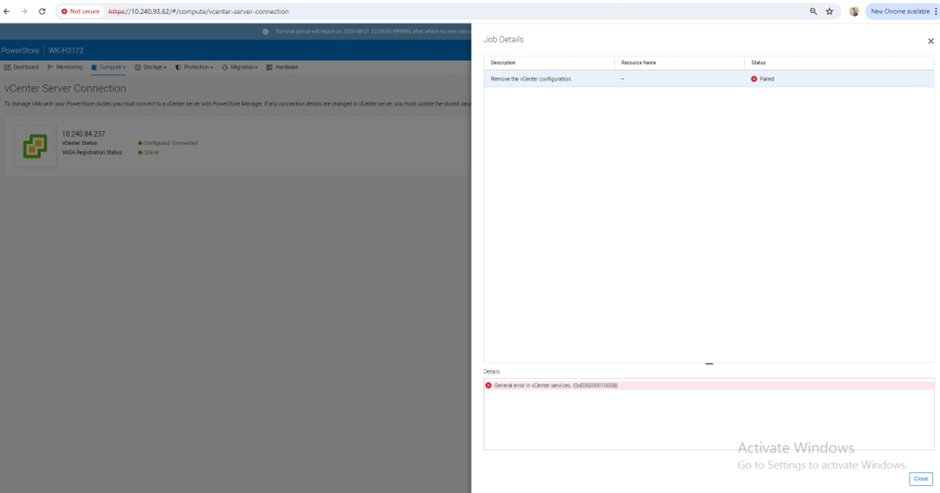
The error message General error in vCenter services. (0xE0503001000B) may appear during the following operations:
- Unable to terminate the vCenter connection.
- The vCenter connection cannot be updated.
The following PowerStore Manager screenshot of the vCenter Connection section shows the above error message:
Cause
A PowerStoreOS software issue in the Manage Certificate chain while handling the Delete vCenter command or the Update vCenter command.
Resolution
This issue is resolved in PowerStoreOS v4.2.0.0.
See article PowerStore: How to Prepare for a PowerStore Non-Disruptive Upgrade
Workaround:
Contact Dell Support for assistance. Reference this article for expedited service.
Affected Products
PowerStoreArticle Properties
Article Number: 000308873
Article Type: Solution
Last Modified: 31 Mar 2026
Version: 5
Find answers to your questions from other Dell users
Support Services
Check if your device is covered by Support Services.