섀시 침입 트립 안 됨 또는 재설정 로그 이벤트 뷰어
Summary: Dell Pro 14 Plus PB14255에서 커버를 제거하거나 섀시 침입 경고를 지운 후 이벤트 뷰어에 섀시 침입 오류가 표시되지 않습니다.
This article applies to
This article does not apply to
This article is not tied to any specific product.
Not all product versions are identified in this article.
Symptoms
커버를 제거한 후 Windows 이벤트 뷰어에 섀시 침입 트립 또는 재설정 오류가 표시되지 않습니다. 이 문제는 BIOS에서 섀시 침입 경고 지우기를 선택한 후에도 발생합니다.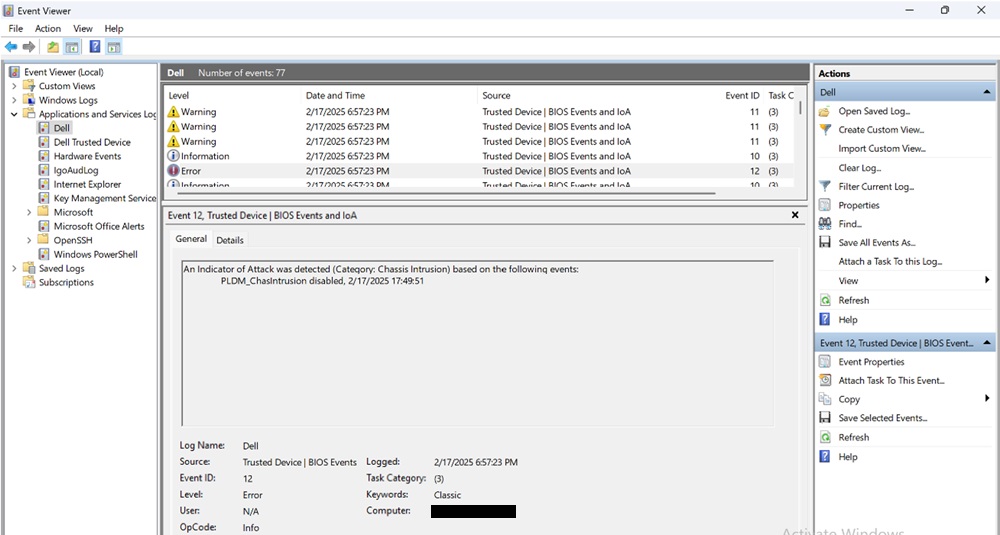
해당되는 플랫폼:
- Dell Pro 14 Plus PB14255
Cause
Dell Trusted Device 6.5에서 이 문제가 발생합니다.
Resolution
컴퓨터에서 BIOS 버전 7.0.3.0 이상으로 업데이트하면 문제가 해결됩니다. BIOS를 다운로드하고 설치하려면 Dell BIOS 및 UEFI 업데이트 다운로드 및 설치 가이드를 참조하십시오.
Affected Products
Dell Pro 14 Plus PB14255Article Properties
Article Number: 000309805
Article Type: Solution
Last Modified: 15 Sep 2025
Version: 2
Find answers to your questions from other Dell users
Support Services
Check if your device is covered by Support Services.