Cómo distinguir el brillo IPS y las fugas de luz en un monitor Dell
Summary: Obtenga información sobre cómo identificar las diferencias entre el brillo y la fuga de luz de conmutación en el mismo plano (IPS) en un monitor Dell mediante un panel IPS.
This article applies to
This article does not apply to
This article is not tied to any specific product.
Not all product versions are identified in this article.
Symptoms
El brillo IPS es una característica de los paneles IPS, donde aparece un resplandor tenue alrededor de los bordes de la pantalla cuando se ve desde ciertos ángulos. No es un defecto, sino un rasgo inherente de la tecnología IPS. En la siguiente imagen se destacan dos ejemplos de brillo IPS.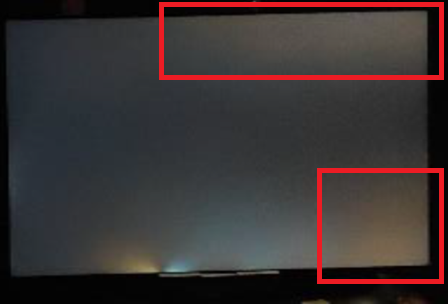
La filtración de luz se refiere a la distribución desigual de la retroiluminación, que se puede considerar un defecto si afecta significativamente la experiencia de visualización. En la siguiente imagen, se destaca un ejemplo de fuga de luz.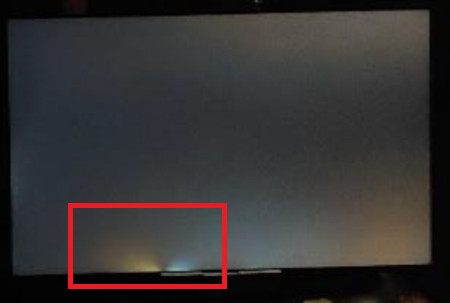
Monitores afectados:
- Monitor para juegos Alienware 25 AW2521H
- Monitor para juegos Alienware 25 AW2521HF
- Monitor para juegos Alienware 25 AW2521HFL
- Monitor para juegos Alienware 25 AW2523HF
- Monitor para juegos Alienware 27 4K de doble resolución AW2725QF
- Monitor para juegos Alienware 27 AW2721D
- Monitor para juegos Alienware 27 AW2723DF
- Monitor para juegos Alienware 27 AW2724DM
- Monitor para juegos Alienware 27 AW2724HF
- Monitor curvo para juegos Alienware 38 AW3821DW
- Monitor para juegos Alienware de 500 Hz AW2524H
- Monitor para juegos Alienware de 500 Hz AW2524HF
- Monitor curvo para juegos Dell 24 S2422HG
- Monitor Dell 24 Gaming G2422HS
- Dell 24 Monitor SE2425HM
- Monitor para videoconferencias Dell 24 C2422HE
- Monitor para juegos Dell 25 G2524H
- Monitor para juegos Dell 25 S2522HG
- Monitor para juegos Dell 27 G2722HS
- Monitor para juegos Dell 27 G2723H
- Monitor para juegos Dell 27 G2723HN
- Monitor para juegos Dell 27 G2724D
- Monitor para juegos Dell 27 G2725D
- Monitor para juegos Dell 27 S2721DGF
- Dell 27 Monitor SE2725HM
- Dell 27 Plus 4K Monitor S2725QS
- Dell 27 Plus 4K USB-C Monitor S2725QC
- Monitor para videoconferencias Dell 27 C2722DE
- Monitor para juegos Dell 32 4K UHD G3223Q
- Monitor para juegos Dell 32 G3223D
- Monitor curvo para videoconferencias Dell 34 C3422WE
- Dell C1422H
- Dell C2423H
- Dell C2723H Monitor
- Dell C5522QT
- Dell C6522QT
- Dell C8621QT
- Dell E2421HN
- Dell E2422H
- Dell E2422HN
- Dell E2422HS
- Dell E2722H
- Dell E2722HS
- Dell E2723HN
- Dell Gaming S2721HGF
- Dell P1424H
- Dell P2222H
- Dell P2223HC
- Dell P2225H
- Dell P2421
- Dell P2421D
- Dell P2421DC
- Dell P2422H
- Dell P2422HE
- Dell P2423D
- Dell P2423DE
- Dell P2424HEB
- Dell P2424HT
- Dell P2425
- Dell P2425E
- Dell P2425H
- Dell P2425HE
- Dell P2721Q
- Dell P2722H
- Dell P2722HE
- Dell P2723D
- Dell P2723DE
- Dell P2723QE
- Dell P2724DEB
- Dell P2725H
- Dell P2725HE
- Dell P3221D
- Dell P3222QE
- Dell P3223DE
- Dell P3223QE
- Dell P3421W
- Dell P3424WE
- Dell P3424WEB
- Dell P5525QC
- Dell P6524QT
- Dell P7524QT
- Dell P8624QT
- Monitor portátil Dell Pro 14 Plus P1425
- Dell Pro 24 Monitor E2425HM
- Monitor con base ajustable Dell Pro 24 E2425HSM
- Monitor táctil 4K Dell Pro 75 Plus P7525QT
- Dell S2421H
- Dell S2421HN
- Dell S2421HS
- Dell S2421HSX
- Dell S2421NX
- Dell S2422HZ
- Dell S2425H
- Dell S2425HS
- Dell S2721D
- Dell S2721DS
- Dell S2721H
- Dell S2721HN
- Dell S2721HS
- Dell S2721HSX
- Dell S2721NX
- Dell S2721Q
- Dell S2721QS
- Dell S2722DC
- Dell S2722DZ
- Dell S2722QC
- Dell S2725DS
- Dell S2725H
- Dell S2725HS
- Dell SE2423DS
- Dell SE2722HR
- Dell SE2723DS
- Dell U2421E
- Dell U2421HE
- Dell U2422H
- Dell U2424H
- Dell U2424HE
- Dell U2722D
- Dell U2723QE
- Dell U2723QX
- Dell U2724D
- Dell U2724DE
- Dell U3023E
- Dell U3223QE
- Dell U3223QZ
- Dell U3224KB
- Dell U3421WE
- Dell U3423WE
- Dell U3425WE
- Dell U3821DW
- Dell U3824DW
- Dell U4021QW
- Dell U4025QW
- Dell U4323QE
- Dell U4924DW
- Dell UP3221Q
- Monitor Dell UltraSharp 27 4K con concentrador Thunderbolt U2725QE
- Monitor Dell UltraSharp 32 4K con concentrador Thunderbolt U3225QE
Cause
- Brillo IPS:
- Cambios con el ángulo de visión y la distancia
- Afecta principalmente a las esquinas de la pantalla
- Presente en cierta medida en todos los paneles IPS
- Específico para IPS y tecnologías similares
- Fuga de luz:
- Permanece constante independientemente del ángulo de visión y la distancia
- Puede ocurrir en cualquier lugar a lo largo de los bordes o las esquinas
- No es inherente a ningún tipo de panel; Un problema de fabricación
- Puede ocurrir en cualquier tipo de panel LCD
Resolution
Para reducir el brillo de IPS, realice la siguiente configuración y los siguientes pasos:
Configuración inicial
- Coloque el monitor en la ubicación prevista a la altura de los ojos. La distancia mínima de visualización es generalmente de alrededor de la longitud de un brazo.
- Conecte todos los cables necesarios y encienda el monitor.
- Deje que el monitor se caliente durante unos 30 minutos antes de realizar cualquier ajuste.
- La iluminación ambiental debe estar ligeramente iluminada en lugar de estar oscura.
Ajuste de la configuración del monitor
- Ajuste el brillo del monitor a alrededor del 30 % al 50 % de su brillo máximo.
- Ajuste la configuración de contraste para mantener la claridad de la imagen sin sobresaturar las áreas brillantes.
- Si está disponible, ajuste la temperatura de color a una configuración cálida (alrededor de 6500 K) para ayudar a reducir la intensidad del resplandor.
Affected Products
Alienware 25 Gaming Monitor AW2523HF, Alienware 500Hz Gaming Monitor AW2524H, Alienware 500Hz Gaming Monitor AW2524HF, Alienware 27 Gaming Monitor AW2723DF, Alienware 27 Gaming Monitor AW2724DM, Alienware 27 Gaming Monitor AW2724HF
, Alienware 27 4K Dual-Resolution Gaming Monitor AW2725QF, Dell C2423H, Dell C2723H Monitor, Alienware 25 Gaming Monitor AW2521H, Alienware 25 Gaming Monitor AW2521HF, Alienware 25 Gaming Monitor AW2521HFL, Alienware 27 Gaming Monitor AW2721D, Alienware 38 Curved Gaming Monitor AW3821DW, Dell C1422H, Dell 24 Video Conferencing Monitor C2422HE, Dell 27 Video Conferencing Monitor C2722DE, Dell 34 Video Conferencing Curved Monitor C3422WE, Dell C5522QT, Dell C6522QT, Dell C8621QT, Dell E2421HN, Dell E2422H, Dell E2422HN, Dell E2422HS, Dell E2722H, Dell E2722HS, Dell P2222H, Dell P2421, Dell P2421D, Dell P2421DC, Dell P2422H, Dell P2422HE, Dell P2721Q, Dell P2722H, Dell P2722HE, Dell P3221D, Dell P3222QE, Dell P3421W, Dell S2421H, Dell S2421HN, Dell S2421HS, Dell S2421HSX, Dell S2421NX, Dell 24 Curved Gaming Monitor S2422HG, Dell S2422HZ, Dell 25 Gaming Monitor S2522HG, Dell S2721D, Dell 27 Gaming Monitor S2721DGF, Dell S2721DS, Dell S2721H, Dell Gaming S2721HGF, Dell S2721HN, Dell S2721HS, Dell S2721HSX, Dell S2721NX, Dell S2721Q, Dell S2721QS, Dell S2722DZ, Dell S2722QC, Dell U2421E, Dell U2421HE, Dell U2422H, Dell U2722D, Dell U3421WE, Dell U3821DW, Dell U4021QW, Dell UP3221Q, Dell Pro 24 Monitor E2425HM, Dell Pro 24 Adjustable Stand Monitor E2425HSM, Dell E2723HN, Dell 24 Gaming Monitor G2422HS, Dell 25 Gaming Monitor G2524H, Dell 27 Gaming Monitor G2722HS, Dell 27 Gaming Monitor G2723H, Dell 27 Gaming Monitor G2723HN, Dell 27 Gaming Monitor G2724D, Dell 27 Gaming Monitor G2725D, Dell 32 Gaming Monitor G3223D, Dell 32 4K UHD Gaming Monitor G3223Q, Dell P1424H, Dell Pro 14 Plus Portable Monitor P1425, Dell P2223HC, Dell P2225H, Dell P2423D, Dell P2423DE, Dell P2424HEB, Dell P2424HT, Dell P2425, Dell P2425E, Dell P2425H, Dell P2425HE, Dell P2723D, Dell P2723DE, Dell P2723QE, Dell P2724DEB, Dell P2725H, Dell P2725HE, Dell P3223DE, Dell P3223QE, Dell P3424WE, Dell P3424WEB, Dell P5525QC, Dell P6524QT, Dell P7524QT, Dell Pro 75 Plus 4K Touch Monitor P7525QT, Dell P8624QT, Dell S2425H, Dell S2425HS, Dell S2722DC, Dell S2725DS, Dell S2725H, Dell S2725HS, Dell 27 Plus 4K USB-C Monitor S2725QC, Dell 27 Plus 4K Monitor S2725QS, Dell SE2423DS, Dell 24 Monitor SE2425HM, Dell SE2723DS, Dell 27 Monitor SE2725HM, Dell U2424H, Dell U2424HE, Dell U2723QE, Dell U2723QX, Dell U2724D, Dell U2724DE, Dell UltraSharp 27 4K Thunderbolt Hub Monitor U2725QE, Dell U3023E, Dell U3223QE, Dell U3223QZ, Dell U3224KB, Dell UltraSharp 32 4K Thunderbolt Hub Monitor U3225QE, Dell U3423WE, Dell U3425WE, Dell U3824DW, Dell U4025QW, Dell U4323QE, Dell U4924DW
...
Article Properties
Article Number: 000318297
Article Type: Solution
Last Modified: 16 Sep 2025
Version: 2
Find answers to your questions from other Dell users
Support Services
Check if your device is covered by Support Services.