Odróżnianie poświaty IPS od wycieków światła w monitorze firmy Dell
Summary: Dowiedz się, jak zidentyfikować różnice między świeceniem i wyciekiem światła w monitorze firmy Dell z panelem IPS (IPS).
This article applies to
This article does not apply to
This article is not tied to any specific product.
Not all product versions are identified in this article.
Symptoms
Panel IPS Wh charakteryzuje się charakterystyczną cechą paneli IPS, gdzie pod pewnym kątem wokół krawędzi ekranu pojawia się słaba poświata. Nie jest to wada, a raczej wrodzona cecha technologii IPS. Na poniższej ilustracji przedstawiono dwa przykłady poświaty IPS.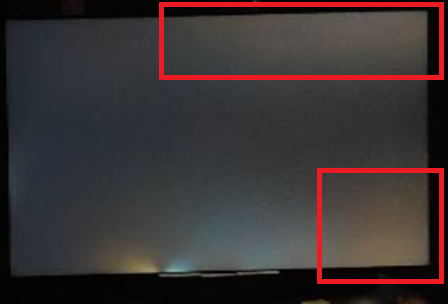
Wyciek światła odnosi się do nierównomiernego rozsyłu podświetlenia, który można uznać za wadę, jeśli znacząco wpływa na wrażenia wizualne. Na poniższej ilustracji przedstawiono przykład wycieku światła.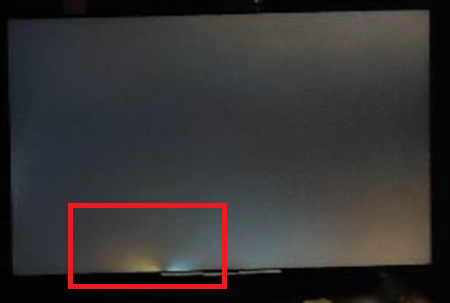
Narażone monitory:
- Monitor dla graczy Alienware 25 AW2521H
- Monitor dla graczy Alienware 25 AW2521HF
- Monitor dla graczy Alienware 25 AW2521HFL
- Monitor dla graczy Alienware 25 AW2523HF
- Monitor dla graczy Alienware 27 4K o podwójnej rozdzielczości AW2725QF
- Monitor dla graczy Alienware 27 AW2721D
- Monitor dla graczy Alienware 27 AW2723DF
- Monitor dla graczy Alienware 27 AW2724DM
- Monitor dla graczy Alienware 27 AW2724HF
- Monitor dla graczy Alienware 38 z zakrzywionym ekranem AW3821DW
- Monitor do gier Alienware 500Hz AW2524H
- Monitor do gier Alienware 500Hz AW2524HF
- Zakrzywiony monitor gamingowy Dell 24 S2422HG
- Monitor dla graczy Dell 24 G2422HS
- Dell 24 Monitor SE2425HM
- Monitor Dell 24 do wideokonferencji C2422HE
- Monitor dla graczy Dell 25 G2524H
- Monitor dla graczy Dell 25 S2522HG
- Monitor dla graczy Dell 27 G2722HS
- Monitor dla graczy Dell 27 G2723H
- Monitor dla graczy Dell 27 G2723HN
- Monitor dla graczy Dell 27 G2724D
- Monitor dla graczy Dell 27 G2725D
- Monitor dla graczy Dell 27 S2721DGF
- Dell 27 Monitor SE2725HM
- Dell 27 Plus 4K Monitor S2725QS
- Dell 27 Plus 4K USB-C Monitor S2725QC
- Monitor Dell 27 do wideokonferencji C2722DE
- Monitor do gier Dell 32 4K UHD G3223Q
- Monitor do gier Dell 32 G3223D
- Zakrzywiony monitor Dell 34 do wideokonferencji C3422WE
- Dell C1422H
- Dell C2423H
- Dell C2723H Monitor
- Dell C5522QT
- Dell C6522QT
- Dell C8621QT
- Dell E2421HN
- Dell E2422H
- Dell E2422HN
- Dell E2422HS
- Dell E2722H
- Dell E2722HS
- Dell E2723HN
- Dell Gaming S2721HGF
- Dell P1424H
- Dell P2222H
- Dell P2223HC
- Dell P2225H
- Dell P2421
- Dell P2421D
- Dell P2421DC
- Dell P2422H
- Dell P2422HE
- Dell P2423D
- Dell P2423DE
- Dell P2424HEB
- Dell P2424HT
- Dell P2425
- Dell P2425E
- Dell P2425H
- Dell P2425HE
- Dell P2721Q
- Dell P2722H
- Dell P2722HE
- Dell P2723D
- Dell P2723DE
- Dell P2723QE
- Dell P2724DEB
- Dell P2725H
- Dell P2725HE
- Dell P3221D
- Dell P3222QE
- Dell P3223DE
- Dell P3223QE
- Dell P3421W
- Dell P3424WE
- Dell P3424WEB
- Dell P5525QC
- Dell P6524QT
- Dell P7524QT
- Dell P8624QT
- Monitor przenośny Dell Pro 14 Plus P1425
- Dell Pro 24 Monitor E2425HM
- Monitor Dell Pro 24 z regulowaną podstawą E2425HSM
- Monitor dotykowy Dell Pro 75 Plus 4K P7525QT
- Dell S2421H
- Dell S2421HN
- Dell S2421HS
- Dell S2421HSX
- Dell S2421NX
- Dell S2422HZ
- Dell S2425H
- Dell S2425HS
- Dell S2721D
- Dell S2721DS
- Dell S2721H
- Dell S2721HN
- Dell S2721HS
- Dell S2721HSX
- Dell S2721NX
- Dell S2721Q
- Dell S2721QS
- Dell S2722DC
- Dell S2722DZ
- Dell S2722QC
- Dell S2725DS
- Dell S2725H
- Dell S2725HS
- Dell SE2423DS
- Dell SE2722HR
- Dell SE2723DS
- Dell U2421E
- Dell U2421HE
- Dell U2422H
- Dell U2424H
- Dell U2424HE
- Dell U2722D
- Dell U2723QE
- Dell U2723QX
- Dell U2724D
- Dell U2724DE
- Dell U3023E
- Dell U3223QE
- Dell U3223QZ
- Dell U3224KB
- Dell U3421WE
- Dell U3423WE
- Dell U3425WE
- Dell U3821DW
- Dell U3824DW
- Dell U4021QW
- Dell U4025QW
- Dell U4323QE
- Dell U4924DW
- Dell UP3221Q
- Monitor Dell UltraSharp 27 4K z koncentratorem Thunderbolt U2725QE
- Monitor Dell UltraSharp 32 4K z hubem Thunderbolt U3225QE
Cause
- Blask IPS:
- Zmienia się kąt widzenia i odległość
- Wpływa przede wszystkim na narożniki wyświetlacza
- Do pewnego stopnia obecne we wszystkich panelach IPS
- Specyficzne dla IPS i podobnych technologii
- Wyciek światła:
- Pozostaje stała niezależnie od kąta patrzenia i odległości
- Może wystąpić w dowolnym miejscu wzdłuż krawędzi lub narożników
- Nie jest to nieodłączne element danego typu panelu. Problem z produkcją
- Może wystąpić w każdym typie panelu LCD
Resolution
Aby zmniejszyć poświatę IPS, wykonaj następującą konfigurację i kroki:
Konfiguracja wstępna
- Umieść monitor w przewidzianym miejscu, na wysokości oczu. Minimalna odległość oglądania wynosi zazwyczaj mniej więcej na wyciągnięcie ręki.
- Podłącz wszystkie niezbędne, a następnie włącz monitor.
- Przed dokonaniem jakichkolwiek regulacji pozwól monitorowi się rozgrzać przez około 30 minut.
- Oświetlenie otoczenia powinno być lekko oświetlone, a nie ciemne.
Dostosowywanie ustawień monitora
- Ustaw jasność monitora na około 30–50% jego maksymalnej jasności.
- Dostosuj ustawienie kontrastu, aby zachować wyrazistość obrazu bez nadmiernego nasycania jasnych obszarów.
- Jeśli to możliwe, ustaw temperaturę barwową na ciepłe ustawienie (około 6500 K), aby zmniejszyć ostrość blasku.
Affected Products
Alienware 25 Gaming Monitor AW2523HF, Alienware 500Hz Gaming Monitor AW2524H, Alienware 500Hz Gaming Monitor AW2524HF, Alienware 27 Gaming Monitor AW2723DF, Alienware 27 Gaming Monitor AW2724DM, Alienware 27 Gaming Monitor AW2724HF
, Alienware 27 4K Dual-Resolution Gaming Monitor AW2725QF, Dell C2423H, Dell C2723H Monitor, Alienware 25 Gaming Monitor AW2521H, Alienware 25 Gaming Monitor AW2521HF, Alienware 25 Gaming Monitor AW2521HFL, Alienware 27 Gaming Monitor AW2721D, Alienware 38 Curved Gaming Monitor AW3821DW, Dell C1422H, Dell 24 Video Conferencing Monitor C2422HE, Dell 27 Video Conferencing Monitor C2722DE, Dell 34 Video Conferencing Curved Monitor C3422WE, Dell C5522QT, Dell C6522QT, Dell C8621QT, Dell E2421HN, Dell E2422H, Dell E2422HN, Dell E2422HS, Dell E2722H, Dell E2722HS, Dell P2222H, Dell P2421, Dell P2421D, Dell P2421DC, Dell P2422H, Dell P2422HE, Dell P2721Q, Dell P2722H, Dell P2722HE, Dell P3221D, Dell P3222QE, Dell P3421W, Dell S2421H, Dell S2421HN, Dell S2421HS, Dell S2421HSX, Dell S2421NX, Dell 24 Curved Gaming Monitor S2422HG, Dell S2422HZ, Dell 25 Gaming Monitor S2522HG, Dell S2721D, Dell 27 Gaming Monitor S2721DGF, Dell S2721DS, Dell S2721H, Dell Gaming S2721HGF, Dell S2721HN, Dell S2721HS, Dell S2721HSX, Dell S2721NX, Dell S2721Q, Dell S2721QS, Dell S2722DZ, Dell S2722QC, Dell U2421E, Dell U2421HE, Dell U2422H, Dell U2722D, Dell U3421WE, Dell U3821DW, Dell U4021QW, Dell UP3221Q, Dell Pro 24 Monitor E2425HM, Dell Pro 24 Adjustable Stand Monitor E2425HSM, Dell E2723HN, Dell 24 Gaming Monitor G2422HS, Dell 25 Gaming Monitor G2524H, Dell 27 Gaming Monitor G2722HS, Dell 27 Gaming Monitor G2723H, Dell 27 Gaming Monitor G2723HN, Dell 27 Gaming Monitor G2724D, Dell 27 Gaming Monitor G2725D, Dell 32 Gaming Monitor G3223D, Dell 32 4K UHD Gaming Monitor G3223Q, Dell P1424H, Dell Pro 14 Plus Portable Monitor P1425, Dell P2223HC, Dell P2225H, Dell P2423D, Dell P2423DE, Dell P2424HEB, Dell P2424HT, Dell P2425, Dell P2425E, Dell P2425H, Dell P2425HE, Dell P2723D, Dell P2723DE, Dell P2723QE, Dell P2724DEB, Dell P2725H, Dell P2725HE, Dell P3223DE, Dell P3223QE, Dell P3424WE, Dell P3424WEB, Dell P5525QC, Dell P6524QT, Dell P7524QT, Dell Pro 75 Plus 4K Touch Monitor P7525QT, Dell P8624QT, Dell S2425H, Dell S2425HS, Dell S2722DC, Dell S2725DS, Dell S2725H, Dell S2725HS, Dell 27 Plus 4K USB-C Monitor S2725QC, Dell 27 Plus 4K Monitor S2725QS, Dell SE2423DS, Dell 24 Monitor SE2425HM, Dell SE2723DS, Dell 27 Monitor SE2725HM, Dell U2424H, Dell U2424HE, Dell U2723QE, Dell U2723QX, Dell U2724D, Dell U2724DE, Dell UltraSharp 27 4K Thunderbolt Hub Monitor U2725QE, Dell U3023E, Dell U3223QE, Dell U3223QZ, Dell U3224KB, Dell UltraSharp 32 4K Thunderbolt Hub Monitor U3225QE, Dell U3423WE, Dell U3425WE, Dell U3824DW, Dell U4025QW, Dell U4323QE, Dell U4924DW
...
Article Properties
Article Number: 000318297
Article Type: Solution
Last Modified: 16 Sep 2025
Version: 2
Find answers to your questions from other Dell users
Support Services
Check if your device is covered by Support Services.