Como distinguir o brilho do IPS e o vazamento de luz em um monitor Dell
Summary: Saiba como identificar as diferenças entre o brilho de IPS (In-Plane Switching) e o vazamento de luz em um monitor Dell usando um painel IPS.
This article applies to
This article does not apply to
This article is not tied to any specific product.
Not all product versions are identified in this article.
Symptoms
O brilho IPS é uma característica dos painéis IPS, onde um brilho fraco aparece ao redor das bordas da tela quando visto de certos ângulos. Não é um defeito, mas sim uma característica inerente à tecnologia IPS. A imagem a seguir destaca dois exemplos de brilho IPS.
Vazamento de luz refere-se à distribuição irregular da luz de fundo, o que pode ser considerado um defeito se afetar significativamente a experiência de visualização. A imagem a seguir destaca um exemplo de vazamento de luz.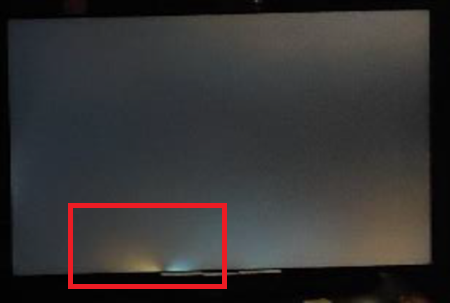
Monitores afetados:
- Monitor gamer Alienware 25 AW2521H
- Monitor gamer Alienware 25 AW2521HF
- Monitor gamer Alienware 25 AW2521HFL
- Monitor gamer Alienware 25 AW2523HF
- Monitor gamer Alienware 27 4K de resolução dupla AW2725QF
- Monitor gamer Alienware 27 AW2721D
- Monitor gamer Alienware 27 AW2723DF
- Monitor gamer Alienware 27 AW2724DM
- Monitor gamer Alienware 27 AW2724HF
- Monitor curvo para jogos Alienware 38 AW3821DW
- Monitor gamer Alienware de 500 Hz AW2524H
- Monitor gamer Alienware de 500 Hz AW2524HF
- Monitor gamer curvado Dell 24 S2422HG
- Monitor Dell 24 Gaming G2422HS
- Dell 24 Monitor SE2425HM
- Monitor Dell 24 para videoconferência C2422HE
- Monitor gamer Dell 25 G2524H
- Monitor gamer Dell 25 S2522HG
- Monitor gamer Dell 27 G2722HS
- Monitor gamer Dell 27 G2723H
- Monitor gamer Dell 27 G2723HN
- Monitor gamer Dell 27 G2724D
- Monitor gamer Dell 27 G2725D
- Monitor gamer Dell 27 S2721DGF
- Dell 27 Monitor SE2725HM
- Dell 27 Plus 4K Monitor S2725QS
- Dell 27 Plus 4K USB-C Monitor S2725QC
- Monitor Dell 27 para videoconferência C2722DE
- Monitor gamer 4K UHD Dell 32 G3223Q
- Monitor gamer Dell 32 G3223D
- Monitor curvado Dell 34 para videoconferência C3422WE
- Dell C1422H
- Dell C2423H
- Dell C2723H Monitor
- Dell C5522QT
- Dell C6522QT
- Dell C8621QT
- Dell E2421HN
- Dell E2422H
- Dell E2422HN
- Dell E2422HS
- Dell E2722H
- Dell E2722HS
- Dell E2723HN
- Dell Gaming S2721HGF
- Dell P1424H
- Dell P2222H
- Dell P2223HC
- Dell P2225H
- Dell P2421
- Dell P2421D
- Dell P2421DC
- Dell P2422H
- Dell P2422HE
- Dell P2423D
- Dell P2423DE
- Dell P2424HEB
- Dell P2424HT
- Dell P2425
- Dell P2425E
- Dell P2425H
- Dell P2425HE
- Dell P2721Q
- Dell P2722H
- Dell P2722HE
- Dell P2723D
- Dell P2723DE
- Dell P2723QE
- Dell P2724DEB
- Dell P2725H
- Dell P2725HE
- Dell P3221D
- Dell P3222QE
- Dell P3223DE
- Dell P3223QE
- Dell P3421W
- Dell P3424WE
- Dell P3424WEB
- Dell P5525QC
- Dell P6524QT
- Dell P7524QT
- Dell P8624QT
- Monitor portátil Dell Pro 14 Plus P1425
- Dell Pro 24 Monitor E2425HM
- Monitor com suporte ajustável Dell Pro 24 E2425HSM
- Monitor touchscreen Dell Pro 75 Plus 4K P7525QT
- Dell S2421H
- Dell S2421HN
- Dell S2421HS
- Dell S2421HSX
- Dell S2421NX
- Dell S2422HZ
- Dell S2425H
- Dell S2425HS
- Dell S2721D
- Dell S2721DS
- Dell S2721H
- Dell S2721HN
- Dell S2721HS
- Dell S2721HSX
- Dell S2721NX
- Dell S2721Q
- Dell S2721QS
- Dell S2722DC
- Dell S2722DZ
- Dell S2722QC
- Dell S2725DS
- Dell S2725H
- Dell S2725HS
- Dell SE2423DS
- Dell SE2722HR
- Dell SE2723DS
- Dell U2421E
- Dell U2421HE
- Dell U2422H
- Dell U2424H
- Dell U2424HE
- Dell U2722D
- Dell U2723QE
- Dell U2723QX
- Dell U2724D
- Dell U2724DE
- Dell U3023E
- Dell U3223QE
- Dell U3223QZ
- Dell U3224KB
- Dell U3421WE
- Dell U3423WE
- Dell U3425WE
- Dell U3821DW
- Dell U3824DW
- Dell U4021QW
- Dell U4025QW
- Dell U4323QE
- Dell U4924DW
- Dell UP3221Q
- Dell UltraSharp 27 4K Thunderbolt Hub Monitor U2725QE
- Dell UltraSharp 32 4K Thunderbolt Hub Monitor U3225QE
Cause
- Brilho IPS:
- Alterações no ângulo de visão e na distância
- Afeta principalmente os cantos da tela
- Presente até certo ponto em todos os painéis do IPS
- Específico para IPS e tecnologias similares
- Vazamento de luz:
- Permanece constante, independentemente do ângulo de visão e da distância
- Pode ocorrer em qualquer lugar ao longo das bordas ou cantos
- Não inerente a nenhum tipo de painel; Um problema de fabricação
- Pode ocorrer em qualquer tipo de painel LCD
Resolution
Para reduzir o brilho do IPS, execute a seguinte configuração e etapas:
Configuração inicial
- Coloque o monitor no local pretendido, na altura dos olhos. A distância mínima de visualização é geralmente em torno do comprimento de um braço.
- Conecte todos os cabos necessários e, em seguida, ligue o monitor.
- Deixe o monitor aquecer por cerca de 30 minutos antes de fazer qualquer ajuste.
- A iluminação ambiente deve estar levemente acesa, em vez de escura.
Ajustando as configurações do monitor
- Ajuste o brilho do monitor para cerca de 30% a 50% do brilho máximo.
- Ajuste a configuração de contraste para manter a nitidez da imagem sem saturar demais as áreas brilhantes.
- Se disponível, defina a temperatura de cor para uma configuração quente (cerca de 6500 K) para ajudar a reduzir a aspereza do brilho.
Affected Products
Alienware 25 Gaming Monitor AW2523HF, Alienware 500Hz Gaming Monitor AW2524H, Alienware 500Hz Gaming Monitor AW2524HF, Alienware 27 Gaming Monitor AW2723DF, Alienware 27 Gaming Monitor AW2724DM, Alienware 27 Gaming Monitor AW2724HF
, Alienware 27 4K Dual-Resolution Gaming Monitor AW2725QF, Dell C2423H, Dell C2723H Monitor, Alienware 25 Gaming Monitor AW2521H, Alienware 25 Gaming Monitor AW2521HF, Alienware 25 Gaming Monitor AW2521HFL, Alienware 27 Gaming Monitor AW2721D, Alienware 38 Curved Gaming Monitor AW3821DW, Dell C1422H, Dell 24 Video Conferencing Monitor C2422HE, Dell 27 Video Conferencing Monitor C2722DE, Dell 34 Video Conferencing Curved Monitor C3422WE, Dell C5522QT, Dell C6522QT, Dell C8621QT, Dell E2421HN, Dell E2422H, Dell E2422HN, Dell E2422HS, Dell E2722H, Dell E2722HS, Dell P2222H, Dell P2421, Dell P2421D, Dell P2421DC, Dell P2422H, Dell P2422HE, Dell P2721Q, Dell P2722H, Dell P2722HE, Dell P3221D, Dell P3222QE, Dell P3421W, Dell S2421H, Dell S2421HN, Dell S2421HS, Dell S2421HSX, Dell S2421NX, Dell 24 Curved Gaming Monitor S2422HG, Dell S2422HZ, Dell 25 Gaming Monitor S2522HG, Dell S2721D, Dell 27 Gaming Monitor S2721DGF, Dell S2721DS, Dell S2721H, Dell Gaming S2721HGF, Dell S2721HN, Dell S2721HS, Dell S2721HSX, Dell S2721NX, Dell S2721Q, Dell S2721QS, Dell S2722DZ, Dell S2722QC, Dell U2421E, Dell U2421HE, Dell U2422H, Dell U2722D, Dell U3421WE, Dell U3821DW, Dell U4021QW, Dell UP3221Q, Dell Pro 24 Monitor E2425HM, Dell Pro 24 Adjustable Stand Monitor E2425HSM, Dell E2723HN, Dell 24 Gaming Monitor G2422HS, Dell 25 Gaming Monitor G2524H, Dell 27 Gaming Monitor G2722HS, Dell 27 Gaming Monitor G2723H, Dell 27 Gaming Monitor G2723HN, Dell 27 Gaming Monitor G2724D, Dell 27 Gaming Monitor G2725D, Dell 32 Gaming Monitor G3223D, Dell 32 4K UHD Gaming Monitor G3223Q, Dell P1424H, Dell Pro 14 Plus Portable Monitor P1425, Dell P2223HC, Dell P2225H, Dell P2423D, Dell P2423DE, Dell P2424HEB, Dell P2424HT, Dell P2425, Dell P2425E, Dell P2425H, Dell P2425HE, Dell P2723D, Dell P2723DE, Dell P2723QE, Dell P2724DEB, Dell P2725H, Dell P2725HE, Dell P3223DE, Dell P3223QE, Dell P3424WE, Dell P3424WEB, Dell P5525QC, Dell P6524QT, Dell P7524QT, Dell Pro 75 Plus 4K Touch Monitor P7525QT, Dell P8624QT, Dell S2425H, Dell S2425HS, Dell S2722DC, Dell S2725DS, Dell S2725H, Dell S2725HS, Dell 27 Plus 4K USB-C Monitor S2725QC, Dell 27 Plus 4K Monitor S2725QS, Dell SE2423DS, Dell 24 Monitor SE2425HM, Dell SE2723DS, Dell 27 Monitor SE2725HM, Dell U2424H, Dell U2424HE, Dell U2723QE, Dell U2723QX, Dell U2724D, Dell U2724DE, Dell UltraSharp 27 4K Thunderbolt Hub Monitor U2725QE, Dell U3023E, Dell U3223QE, Dell U3223QZ, Dell U3224KB, Dell UltraSharp 32 4K Thunderbolt Hub Monitor U3225QE, Dell U3423WE, Dell U3425WE, Dell U3824DW, Dell U4025QW, Dell U4323QE, Dell U4924DW
...
Article Properties
Article Number: 000318297
Article Type: Solution
Last Modified: 16 Sep 2025
Version: 2
Find answers to your questions from other Dell users
Support Services
Check if your device is covered by Support Services.