如何打包和上傳 .NET Desktop Runtime 8.0 ARM64 以在 Microsoft Intune 中使用
Summary: 本文提供封裝和上傳 .NET Desktop Runtime 8.0 ARM64 以在 Microsoft Intune 中使用的相關資訊,作為 Dell 軟體解決方案的先決條件。
This article applies to
This article does not apply to
This article is not tied to any specific product.
Not all product versions are identified in this article.
Instructions
受影響的產品:
- Dell Pro AI Studio
將 .NET Desktop Runtime 8.0 ARM64 與 Microsoft Win32 內容準備工具打包並上傳 windowsdesktop-runtime-8.0.16-win-arm64.intunewin 若要在 Microsoft Intune 中使用,作為 Dell 軟體解決方案的先決條件,請遵循下列步驟:
先決條件
- 從 Microsoft 的 GitHub 下載 Microsoft Win32 內容準備工具
,並將其解壓縮到暫存資料夾 (例如:
C:\Temp) - 下載 .NET Desktop Runtime 8.0 ARM64 並將其放在臨時資料夾中 (例如,
C:\Temp\App)。 - 在臨時資料夾中,創建一個名為 「輸出」 的資料夾(例如,
C:\Temp\Output)。
使用 Microsoft Win32 內容準備工具建立 .intunewin 檔案:
- 以滑鼠右鍵按一下 Windows「開始」功能表,然後選取 終端機。

- 將終端機中的目錄變更為您解壓縮檔案的位置 (例如,輸入
cd C:\Temp\然後按下 Enter 鍵。
- 輸入
.\IntuneWinAppUtil.exe -c C:\Temp\App\ -s C:\Temp\App\windowsdesktop-runtime-8.0.16-win-arm64.exe -o C:\Temp\Output\,然後按下 Enter 鍵
將 windowsdesktop-runtime-8.0.16-win-arm64.intunewin 上傳至 Microsoft Intune:
- 開啟瀏覽器並前往 https://intune.microsoft.com/
- 按一下應用程式

- 按一下 所有應用程式

- 按一下 「建立」

- 在“選擇 應用類型 ”窗格的“應用類型”下,選擇 “Windows 應用 (Win32) ”,然後按兩下 “選擇”。

- 按一下 選取套用套件檔案 ,然後找到
windowsdesktop-runtime-8.0.16-win-arm64.intunewin在步驟 3 中創建。然後按一下確定。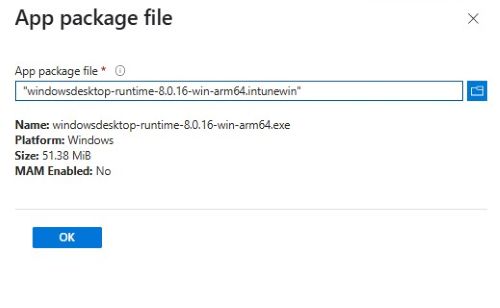
- 在“應用資訊”頁上,輸入“名稱”、“說明”、“發行者”和任何其他詳細資訊。然後按一下下一步。

- 在程式頁面上輸入下列資訊,然後按一下 下一步。
- 安裝命令:
windowsdesktop-runtime-8.0.16-win-arm64.exe /install /quiet /norestart - 解除安裝命令:
windowsdesktop-runtime-8.0.16-win-arm64.exe /install /quiet /norestart
- 安裝命令:
- 在需求畫面上,設定 作業系統架構和最低作業系統的任何必要需求,然後按一下 下一步。

- 在「偵測規則」上,選取 手動設定偵測規則 ,然後按一下 新增

- 在偵測規則窗格中,輸入下列資訊,然後按一下 確定。
- 規則類型:MSI
- 微星產品代碼:
{D9DEF3B8-AE28-49DA-8B86-5AF3A842455A}注意:請確認您使用的產品代碼,因為這些代碼可能會在較新版本中更新。
- 返回「檢測規則」頁,按兩下 一步。

- 在相依性上,按一下 下一步。

- 在「取代」上,按 一下下一步。

- 在「指派」上,為您的環境選取任何必要的組態,然後按一下 下一步。

- 在 「查看 + 建立 」上,確認您的組態,然後按一下 建立。

Affected Products
Dell Pro AI StudioProducts
Dell Client Device Manager, Dell Trusted DeviceArticle Properties
Article Number: 000322783
Article Type: How To
Last Modified: 22 May 2025
Version: 2
Find answers to your questions from other Dell users
Support Services
Check if your device is covered by Support Services.