PowerEdge: 16G fail to process One-Time Boot through iDRAC
Summary: One-Time Boot option selected through iDRAC fails.
This article applies to
This article does not apply to
This article is not tied to any specific product.
Not all product versions are identified in this article.
Symptoms
This failure symptom requires a specific setup configuration. This issue affects all AMD and Intel based 16th Generation servers.
The configuration setup requires the following setup:
- BIOS Boot Mode set to UEFI
- One network adapter enabled for Preboot Execution Environment (PXE) boot
- All bootable devices except one network adapter removed from bootable devices
- Boot Option disabled for one network adapter
This setup configuration locks down all bootable devices and allows a user to control when a network adapter can PXE boot. It prevents a server from booting to any other device until a user interacts.
In order to experience the issue, a user must log in to the iDRAC user interface and navigate to Configuration – BIOS Settings and expand "Boot Settings." Next, “One-Time Boot" is selected. Set the One-Time Boot Device list to "Enabled" and select the PXE enabled network adapter in the "UEFI Boot Sequence Device.”
- Note: The PXE enabled network adapter is the only device available when the configuration is set exactly as noted.
Figure 1: One-Time Boot
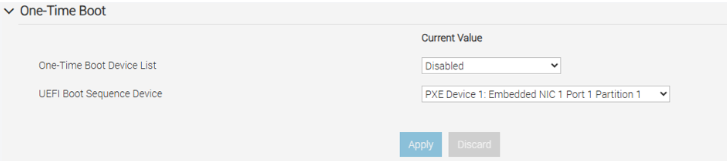
Upon applying this configuration and rebooting, the server fails to boot from the PXE device. The server results in finding no boot device at all and present the following message:
Figure 2: No boot device
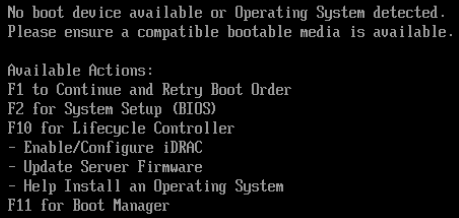
Note: This failure is only experienced when iDRAC is used process One-Time Boot. The issue is not experienced if selecting F11 for Boot Manager and selecting the PXE enabled network adapter.
Cause
BIOS dependency issue
Resolution
This issue is resolved in the following BIOS versions:
- 2.7.5 (or newer) for Intel based servers
- 1.13.1 (or newer) for AMD based servers
- 1.8.0 (or newer) for C6615
Workarounds:
- Use F11 Boot Manager
- Enable more than one PXE device and disable all boot options. This causes more than one device to be present in the UEFI Boot Sequence Device list. Select only the intended network adapter.
Affected Products
PowerEdge R260, PowerEdge R360, PowerEdge R660, PowerEdge R660xs, PowerEdge R6615, PowerEdge R6625, PowerEdge R760, PowerEdge R760XA, PowerEdge R760xd2, PowerEdge R760xsProducts
PowerEdge R7615, PowerEdge R7625, PowerEdge R860, PowerEdge R960Article Properties
Article Number: 000322795
Article Type: Solution
Last Modified: 21 Nov 2025
Version: 3
Find answers to your questions from other Dell users
Support Services
Check if your device is covered by Support Services.