NetWorker:创建保留锁定设备时 DD 主机身份验证失败
Summary: 无法为 NetWorker 上的 Data Domain 设备启用保留锁定。
This article applies to
This article does not apply to
This article is not tied to any specific product.
Not all product versions are identified in this article.
Symptoms
在启用保留锁定 (RL) 期间观察到以下错误:
Unable to perform authentication for DD host <DD-FQDN>, user <username>, port <3009>, Mtree <mtreename>: Unable to send a request: SSL peer certificate or SSH remote key was not OK ().Cause
以前,添加 Cloud Tier 设备时,使用 DD Cloud Tier 设备创建向导导入管理证书。
但是,由于该管理证书现在已过时,DD 无法对其进行身份验证,因此收到错误。
创建管理证书后,在备份/克隆期间不会使用该证书,这就是 NetWorker 无法识别它(尽管它已过时)的原因。
Resolution
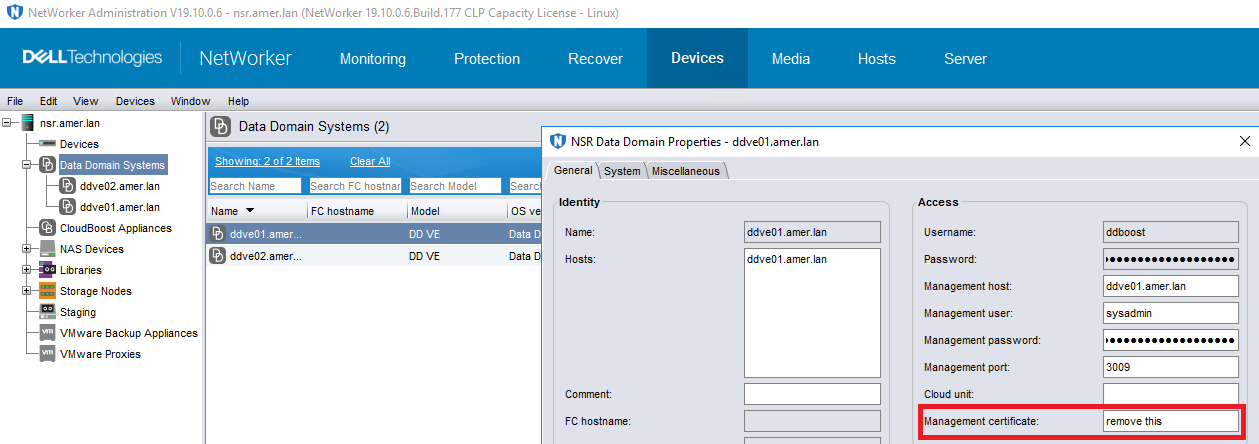
要解决此问题,请删除NMC > Device > Data Domain SystemsDD > PropertiesGeneral >> Management certificate下的证书。
Additional Information
工程团队确认,已针对未来方法和未来 NetWorker 版本中的修复提交了 EPIC。
Affected Products
NetWorker FamilyArticle Properties
Article Number: 000331924
Article Type: Solution
Last Modified: 13 Jun 2025
Version: 1
Find answers to your questions from other Dell users
Support Services
Check if your device is covered by Support Services.