ZIP Extraction Failure for Large VHD Files Using Windows Explorer
Summary:
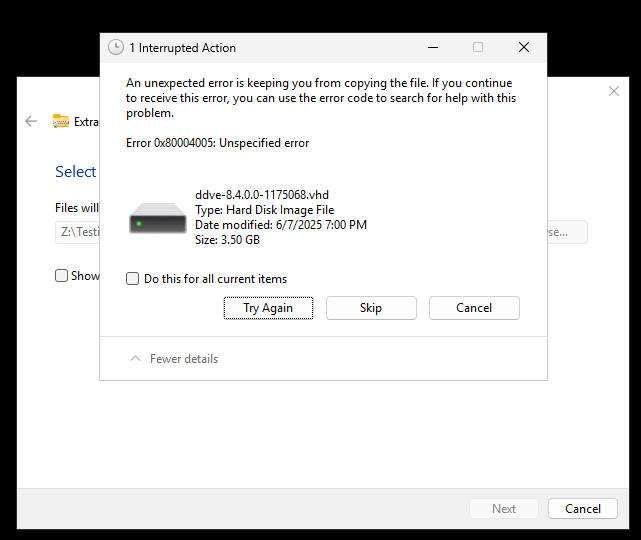
When attempting to extract a large ZIP files using Windows File Explorer, the extraction process fails with an unspecified error: Error 0x80004005: Unspecified error
Data error:
.vhd
...
This article applies to
This article does not apply to
This article is not tied to any specific product.
Not all product versions are identified in this article.
Symptoms
-
File Explorer completes the extraction process but displays "Data error" during the process.
-
The
.vhd(Virtual Hard Disk) file fails to extract or copy correctly. -
ZIP size and contents appear normal.
-
No issue observed using PowerShell or third-party extraction tools.
Cause
Windows File Explorer has limitations when handling large .ZIP archives containing large VHD files (typically >3GB). This often results in incomplete extraction or copy failures due to:
-
File size limitations in the integrated extractor
-
Compression inconsistencies
-
Lack of robust error correction during extraction
Resolution
To extract these ZIP files successfully, use one of the following alternative methods:
PowerShell Command
Example
(Microsoft/Third Party Tool) PowerShell: Expand-Archive -Path "C:\8.4\ddve-hyperv-8.4.0.0-1175068.zip" -DestinationPath "C:\8.4\Extracted\"
Other Extraction tools
Check for a company approved professional extract utility to Extract/Expand the file.
Third party UI and CLI tools
Affected Products
Storage Integrator, Data Domain Virtual Edition, PowerProtect Data Domain Management Center, PowerPath for WindowsArticle Properties
Article Number: 000334778
Article Type: Solution
Last Modified: 16 Feb 2026
Version: 2
Find answers to your questions from other Dell users
Support Services
Check if your device is covered by Support Services.