Unisphere for PowerMax: Disk Group 512 ENCAPSDG
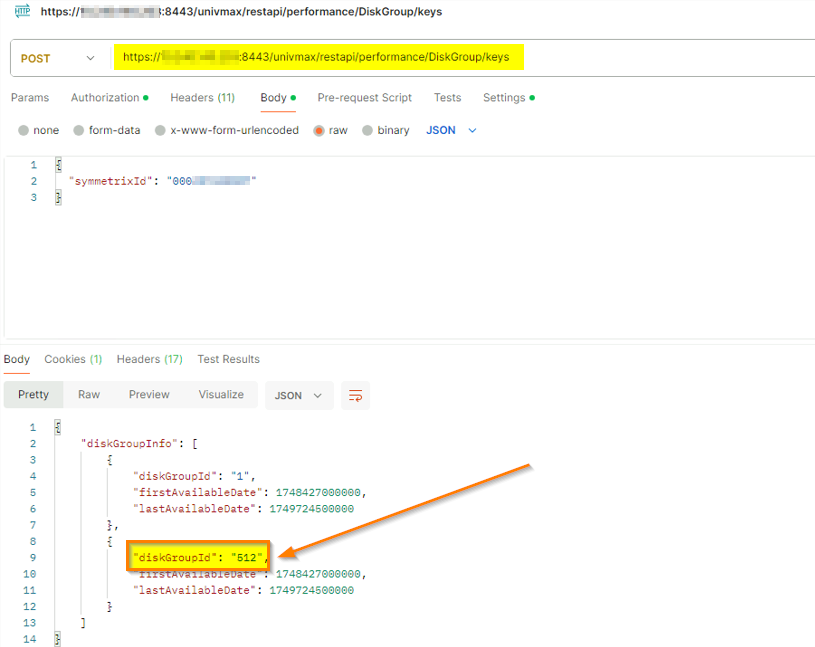
Summary: DiskGroupId 512 is returned from a RestAPI and Solutions Enabler command. Unisphere for PowerMax v9.2.x Solutions Enabler v9.2.x
This article applies to
This article does not apply to
This article is not tied to any specific product.
Not all product versions are identified in this article.
Symptoms
RestAPI Endpoint for List Disk Group Keys returns diskGroupId 512:
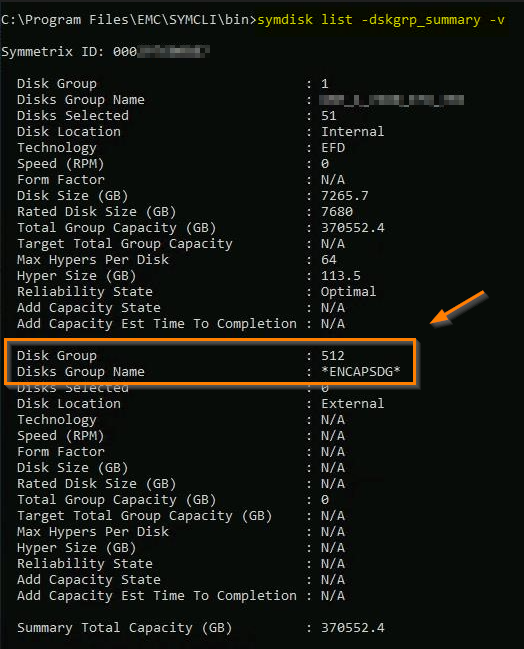
The Disk Group also shows in CLI output using command:
symdisk list -dskgrp_summary -v
Cause
DX-type emulation is mainly used for representing external storage devices.
This was used for FAST.X (Fully Automated Storage Tiering for External storage - no longer supported) feature that allows PowerMax to extend its tiering and data services to external arrays.
With a VMAX3 array attached to external storage, FAST.X virtualized an external array's SCSI logical units as VMAX disks called eDisks which required Directors with DX emulation.
The presence of this emulation can be checked using the following command:
symcfg list -DX ALL
Symmetrix ID: 000123456789 (Local)
S Y M M E T R I X D I R E C T O R S
Ident Type Engine Cores Ports Status ----- ------------ ------ ----- ----- ------
DX-1F EDISK 1 7 4 Online DX-2F EDISK 1 7 4 Online
The two DX directors above are configured with DX emulation.
That diskgroup is empty as seen in the output of:
symdisk list -sid 000123456789 -dskgrp_summary
Symmetrix ID: 000123456789
Disk Group Disk Hyper Capacity----------------------- ---------------------- ------ --------------------- Flgs Speed Size Size Total FreeNum Name Cnt LT (RPM) (MB) (MB) (MB) (MB)----------------------- ---------------------- ------ ---------------------
1 DISK-GRP_1_ 51 IE 0 7440111 116252 379445674 0512 *ENCAPSDG* 0 -- N/A N/A N/A 0 0 ---------- ----------Total 379445674 0
Legend: Disk (L)ocation: I = Internal, X = External, - = N/A (T)echnology: C = SCM, E = EFD, F = FC, S = SATA, - = N/A
It is expected to have an external empty Disk Group for this emulation type DX.
Resolution
Working as designed.
This Disk Group can be ignored.
Article Properties
Article Number: 000337102
Article Type: Solution
Last Modified: 16 Feb 2026
Version: 4
Find answers to your questions from other Dell users
Support Services
Check if your device is covered by Support Services.