Blue Screen Errors on the Alienware 15 DA15260, Alienware 15 DA15265, and Dell 14 Premium DA14250
Summary: Learn about 0x10E VIDEO_MEMORY_MANAGEMENT_INTERNAL, 0x1E KMODE_EXCEPTION_NOT_HANDLED, and 0x50 PAGE_FAULT_IN_NONPAGED_AREA blue screen errors on the Alienware 15 DA15260, Alienware 15 DA15265, and Dell 14 Premium DA14250. ...
This article applies to
This article does not apply to
This article is not tied to any specific product.
Not all product versions are identified in this article.
Symptoms
The computer shows one of the following blue screen error messages:
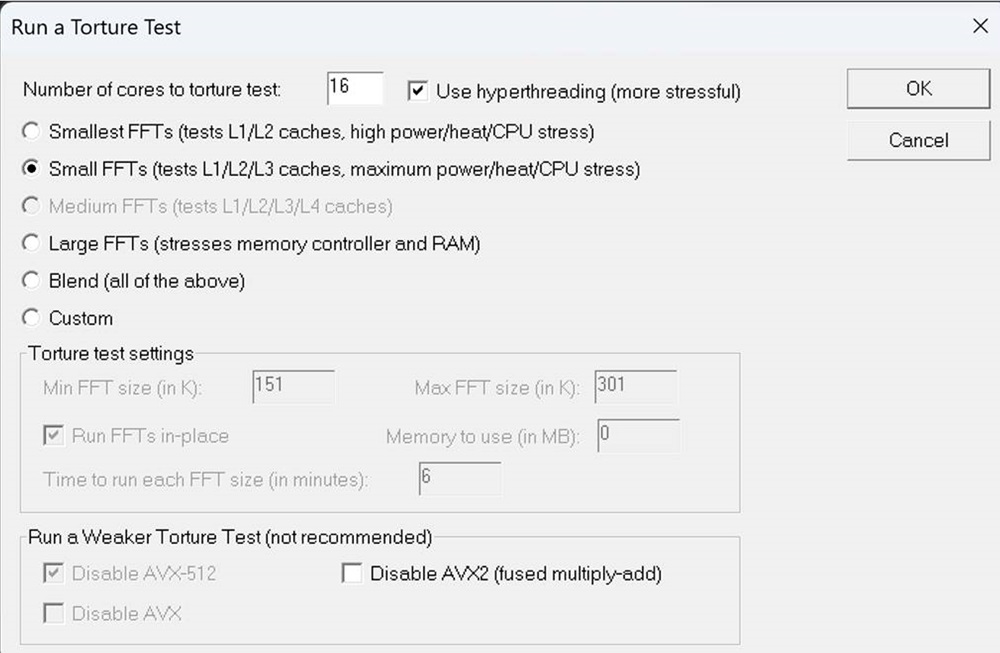
- Error 0x10E: "VIDEO_MEMORY_MANAGEMENT_INTERNAL" may be seen when running a test with Prime95.
- Error 0x1E: "KMODE_EXCEPTION_NOT_HANDLED" may be seen when running a test with Cinebench.
- Error 0x50: "PAGE_FAULT_IN_NONPAGED_AREA" may be seen when connecting Miracast.
Affected Platforms:
- Alienware 15 DA15260
- Alienware 15 DA15265
- Dell 14 Premium DA14250
Cause
- A limitation of Prime95 causes 0x10E "VIDEO_MEMORY_MANAGEMENT_INTERNAL" when running a Prime95 test.
- A BIOS issue causes 0x1E "KMODE_EXCEPTION_NOT_HANDLED" when running a Cinebench test and 0x50 "PAGE_FAULT_IN_NONPAGED_AREA" when connecting Miracast.
Resolution
Resolution for 0x10E "VIDEO_MEMORY_MANAGEMENT_INTERNAL" when running a Prime95 test
Note: This resolution applies to the following affected platforms:
- Alienware 15 DA15260
- Alienware 15 DA15265
- Dell 14 Premium DA14250
Select Small FFTs (tests L1/L2/L3 caches, maximum power/heat/CPU stress).
Resolution for 0x1E "KMODE_EXCEPTION_NOT_HANDLED" when running a Cinebench test or 0x50 "PAGE_FAULT_IN_NONPAGED_AREA" when connecting Miracast
Note: This resolution applies to only the Dell 14 Premium DA14250.
Updating to BIOS version 1.1.0 or later and updating to Intel Management Engine Components Installer version 2547.8.50.0 or later on the computer resolves the issue. To download and install the BIOS, refer to BIOS Update Guide. To download and install the Intel Management Engine Components Installer, refer to the Driver Update Guide.
Affected Products
Alienware 15 DA15260, Alienware 15 DA15265, XPS 14 (Dell 14 Premium) DA14250Article Properties
Article Number: 000338046
Article Type: Solution
Last Modified: 28 May 2026
Version: 5
Find answers to your questions from other Dell users
Support Services
Check if your device is covered by Support Services.