SET 스위치의 Intel X710 어댑터가 다른 제조업체 또는 모델로 보고되는 경우
Summary: 이 문서에서는 Intel X710 어댑터를 SET(Switch Embedded Teaming) 팀의 구성원으로 사용할 때 Microsoft 클러스터 유효성 검사 보고서에서 보고하는 조건에 대해 설명합니다.
This article applies to
This article does not apply to
This article is not tied to any specific product.
Not all product versions are identified in this article.
Symptoms
- Windows Server Hyper-V 클러스터(2019, 2022 및 2025)는 SET(Switch Embedded Teaming)와 함께 사용하도록 구성됩니다.
- 인텔 X710 어댑터는 SET 팀의 구성원으로 구성됩니다.
- 클러스터 유효성 검사 보고서가 생성되면 "네트워크" 및 "스위치 활성화 팀 구성 확인" 범주에 다음 경고가 반환됩니다.
Not all adapters associated with SET Switch 'SwitchName' on Node 'NodeName' are the same Manufacturer and Model
다음 이후에 나타납니다.
Unable to verify that all adapters associated with SET Switch 'SwitchName' on Node 'NodeName' are of the same RDMA Technology type, some adapters are reporting 'Device Default' or not reporting data at all.
아래 그림 1은 경고 메시지를 보여줍니다.
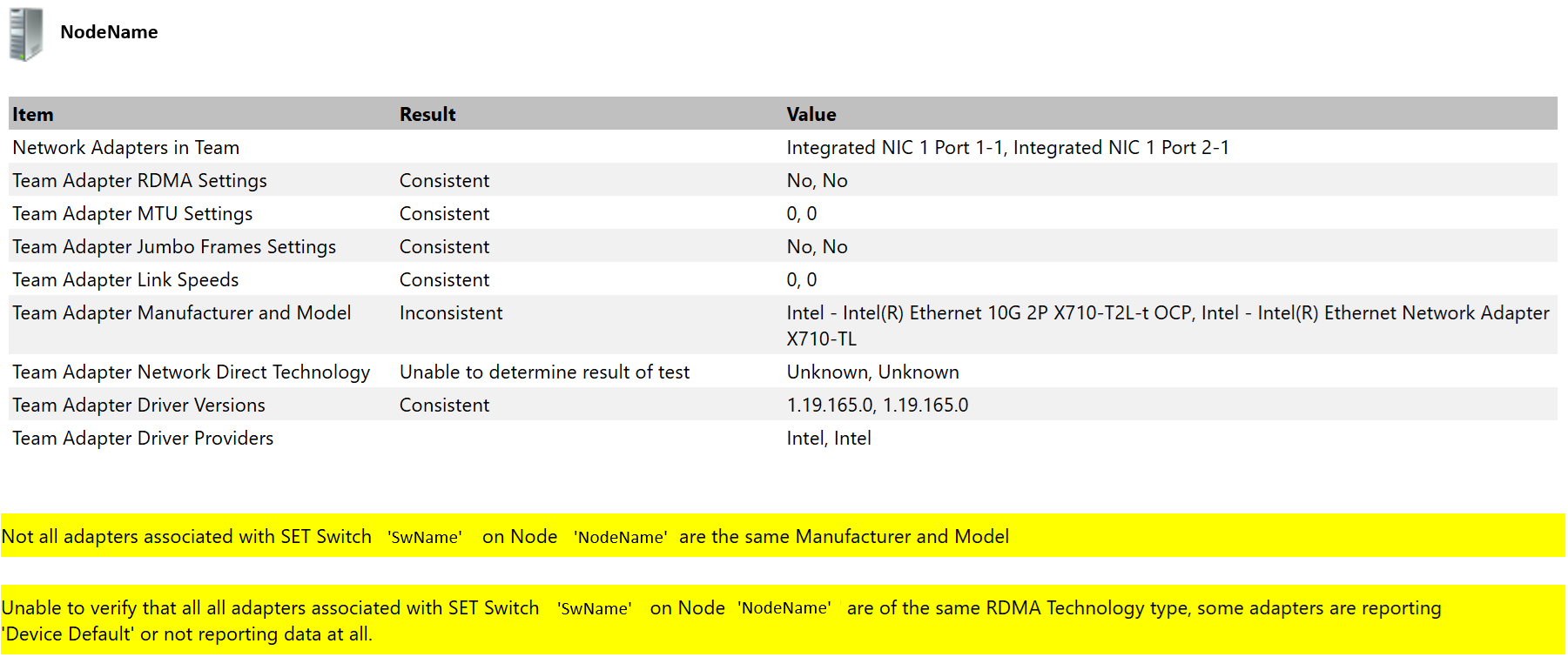
- 경고는 클러스터 검증 보고서에만 반환되며 클러스터 작업이나 워크로드에 뚜렷한 영향을 미치지 않습니다.
Cause
이는 2017년 인텔에서 문서화한 알려진 상태입니다.
- 인텔 이더넷 컨트롤러 X710/XXV710/XL710에서 사용할 수 있는 700 시리즈 사양 문서에서 정오표로 인정되었습니다.

다음은 관련 정보가 포함된 이 문서의 스크린샷입니다.
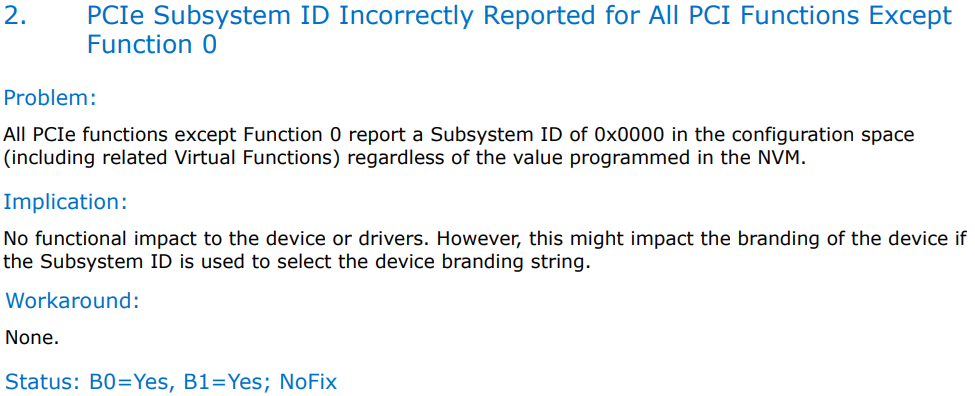
- 다음 정보는 인텔 X710 사용자 가이드에서 확인할 수 있습니다.
"일부 인텔 X710 기반 디바이스는 하위 디바이스 ID 0x0000를 보고하며 일반 브랜딩 문자열을 표시할 수 있습니다. 포트 0은 올바른 하위 공급업체 ID를 보고하고 올바른 브랜딩 문자열을 표시합니다."

Resolution
이 동작을 변경할 계획은 없습니다. 이 조건은 클러스터 작업에 영향을 미치지 않으며 경고를 무시해도 됩니다.
해결 방법으로 Intel X710 어댑터는 SET 팀의 구성원이 아닌 개별 어댑터로 작동할 수 있습니다.
이 문서는 Windows Server(2016, 2019, 2022 및 2025)에 적용됩니다.
Azure Local의 경우 Intel X710 네트워크 어댑터를 사용할 때 네트워크 ATC NetIntent를 만들 때 물리적 NIC가 대칭인지 유효성 검사 실패를 참조하세요.
Affected Products
Microsoft Windows Server 2016, Microsoft Windows Server 2019, Microsoft Windows Server 2022, Microsoft Windows Server 2025Article Properties
Article Number: 000340107
Article Type: Solution
Last Modified: 08 Aug 2025
Version: 3
Find answers to your questions from other Dell users
Support Services
Check if your device is covered by Support Services.