SET 交換器中的 Intel X710 配接卡會回報為不同的製造商或機型
Summary: 本文說明以 Switch Embedded Teaming (SET) 團隊成員身分使用 Intel X710 介面卡時,Microsoft叢集驗證報告所報告的狀況。
This article applies to
This article does not apply to
This article is not tied to any specific product.
Not all product versions are identified in this article.
Symptoms
- Windows Server Hyper-V 叢集 (2019、2022 和 2025) 已設定為與交換器內嵌組合 (SET) 搭配使用。
- Intel X710 網路介面卡設定為 SET 團隊的成員。
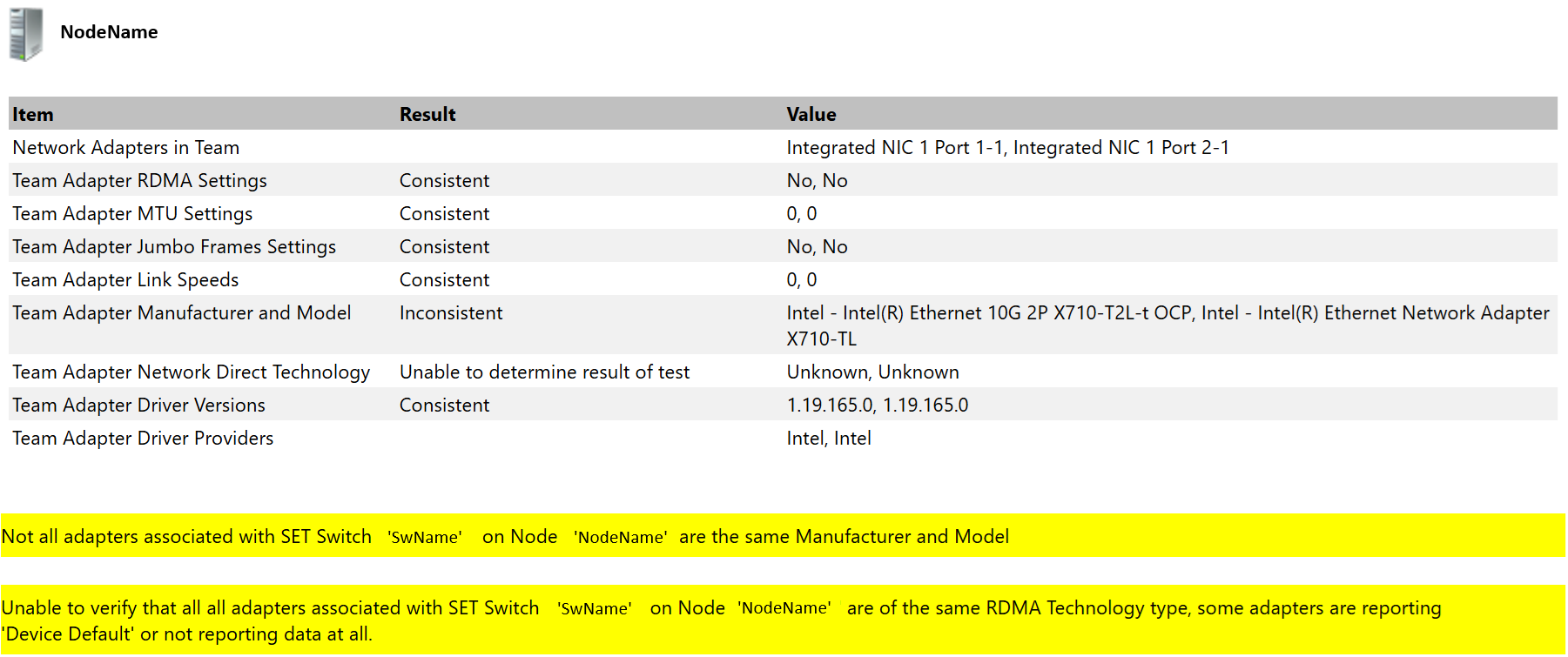
- 產生叢集驗證報告時,「網路」和「驗證交換器已啟用成組組態」類別下會傳回下列警告:
Not all adapters associated with SET Switch 'SwitchName' on Node 'NodeName' are the same Manufacturer and Model
其次:
Unable to verify that all adapters associated with SET Switch 'SwitchName' on Node 'NodeName' are of the same RDMA Technology type, some adapters are reporting 'Device Default' or not reporting data at all.
下面的圖 1 示例了警告消息:
- 僅在群集驗證報告中返回警告,對群集操作及其工作負載沒有明顯影響。
Cause
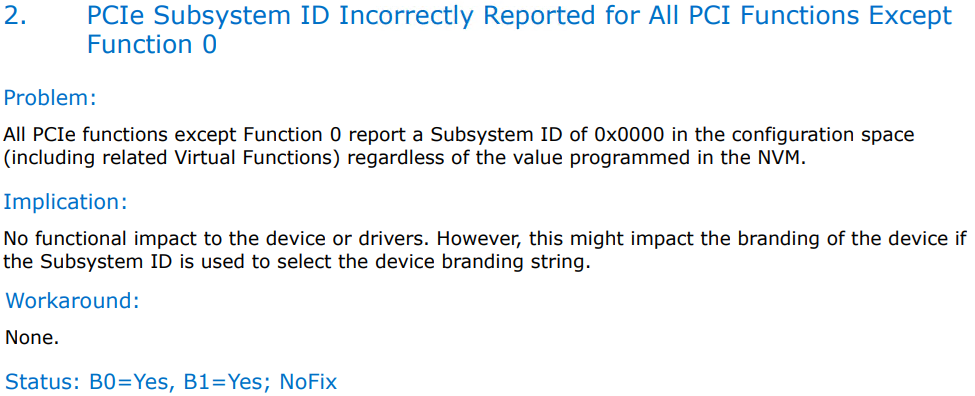
這是英特爾在 2017 年記錄的已知條件:
- 在 Intel 乙太網路控制器 X710/XXV710/XL710 提供 700 系列規格文件中已確認為錯誤。

以下是本文件的螢幕擷取畫面,包含相關資訊:
- Intel X710 使用者指南中提供下列資訊:
「某些 Intel X710 型裝置會報告子裝置 ID 為 0x0000,並可能顯示一般品牌字串。埠 0 報告正確的次供應商 ID 並顯示正確的品牌字串。

Resolution
沒有計劃更改此行為。此狀況對叢集操作無害,且警告可放心忽略。
因應措施是,Intel X710 網路介面卡可作為個別網路介面卡使用,而非以 SET 團隊成員的身分運作。
本文適用於 Windows Server (2016、2019、2022 和 2025)。
若為 Azure 本機,請參閱 使用 Intel X710 網路介面卡建立網路 ATC NetIntent 時驗證實體 NIC 是否對稱失敗
Affected Products
Microsoft Windows Server 2016, Microsoft Windows Server 2019, Microsoft Windows Server 2022, Microsoft Windows Server 2025Article Properties
Article Number: 000340107
Article Type: Solution
Last Modified: 08 Aug 2025
Version: 3
Find answers to your questions from other Dell users
Support Services
Check if your device is covered by Support Services.