La barre de son Dell SB725 n’émet aucun son lorsqu’elle est connectée à un écran Dell
Summary: Cet article explique comment connecter une barre de son Dell SB725 à un ordinateur Dell auquel est connecté un écran Dell.
This article applies to
This article does not apply to
This article is not tied to any specific product.
Not all product versions are identified in this article.
Symptoms
Il se peut que la barre de son Dell SB725 ne contienne aucun son lorsqu’elle est connectée au port USB d’un écran Dell.
Appareil concerné :
- Barre de son de conférence Dell Pro Premium SB725
Cause
Si le câble USB montant de l’écran n’est pas connecté à l’ordinateur Dell, aucune donnée audio n’est envoyée entre l’ordinateur et l’écran Dell.
Resolution
Câble USB montant
Si l’écran est connecté à l’ordinateur à l’aide d’une connexion HDMI ou DisplayPort, le câble USB montant de l’écran Dell doit être connecté à l’ordinateur pour alimenter la barre de son.
Branchez le câble USB montant fourni avec l’écran Dell à l’écran et branchez l’autre extrémité du câble à l’ordinateur.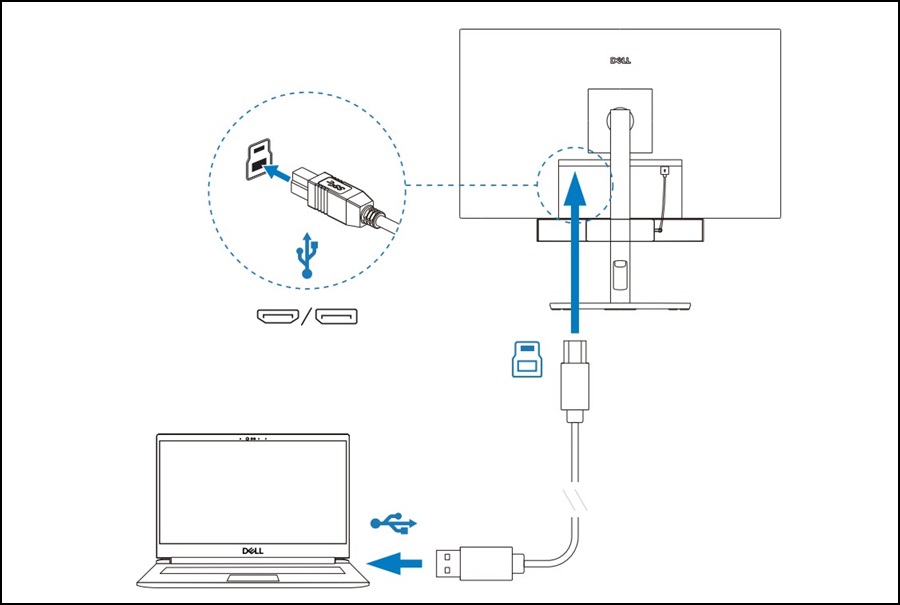
Remarque : Assurez-vous que l’écran Dell est compatible avec la barre de son. Vous trouverez une liste de compatibilité sur la page produit de la barre de son, faites défiler vers le bas jusqu’à Caractéristiques techniques et dans la section Divers.
Barre de son de conférence Dell Pro Premium - SB725 Caractéristiques techniques
Barre de son de conférence Dell Pro Premium - SB725 Caractéristiques techniques
Affected Products
Dell P2222H, Dell P2422H, Dell P2422HE, Dell P2721Q, Dell P2722H, Dell P2722HE, Dell P3221D, Dell P3222QE, Dell P3421W, Dell Pro Premium Conferencing Soundbar SB725, Dell U2421E, Dell U2422H, Dell U2422HE, Dell U2422HX, Dell U2722D, Dell U2722DE
, Dell U2722DX, Dell P2223HC, Dell P2225H, Dell P2422HA, Dell P2423, Dell P2423D, Dell P2423DE, Dell P2425, Dell Pro 24 Plus QHD Monitor P2425D, Dell Pro 24 Plus QHD USB-C Hub Monitor P2425DE, Dell P2425E, Dell P2425H, Dell P2425HE, Dell P2723D, Dell P2723DE, Dell P2723QE, Dell Pro 27 Plus QHD Monitor P2725D, Dell Pro 27 Plus QHD USB-C Hub Monitor P2725DE, Dell P2725H, Dell P2725HE, Dell Pro 27 Plus 4K USB-C Hub Monitor P2725QE, Dell P3223DE, Dell P3223QE, Dell Pro 32 Plus QHD USB-C Hub Monitor P3225DE, Dell Pro 32 Plus 4K USB-C Hub Monitor P3225QE, Dell P3424WE, Dell Pro 34 Plus USB-C Hub Monitor P3425WE, Dell U2424H, Dell U2424HE, Dell U2723QE, Dell U2723QX, Dell U2724D, Dell U2724DE, Dell UltraSharp 27 4K Thunderbolt Hub Monitor U2725QE, Dell U3023E, Dell U3223QE, Dell UltraSharp 32 4K Thunderbolt Hub Monitor U3225QE
...
Article Properties
Article Number: 000350991
Article Type: Solution
Last Modified: 15 Sep 2025
Version: 3
Find answers to your questions from other Dell users
Support Services
Check if your device is covered by Support Services.