BIOS 更新锁定在启用了 DASH 支持的 Dell Pro 上
Summary: 了解在更新 BIOS 时,如果启用了 DASH 支持的 Dell Pro Micro QCM1255、Dell Pro 轻薄 QCS1255 或 Dell Pro 塔式QCT1255锁定,该怎么办。
This article applies to
This article does not apply to
This article is not tied to any specific product.
Not all product versions are identified in this article.
Symptoms
A Dell Pro Micro QCM1255开始, Dell Pro Slim QCS1255或 Dell Pro Tower QCT1255 启用 DASH 支持时,可能会在 BIOS 更新屏幕上锁定。BIOS 更新屏幕显示“更新固件 - 请勿关闭系统电源。刷新进度 100% - 固件更新成功。”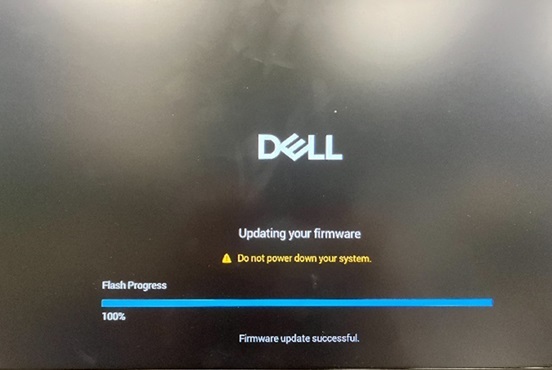
DASH 支持位于 BIOS 中的“高级设置”、“ 系统管理”和“ DASH 支持”下。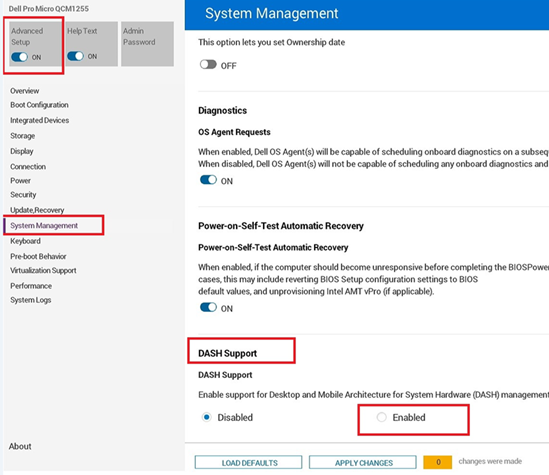
计算机在手动重新引导后引导。BIOS 版本已成功更新。BIOS 更新完成后,计算机预计将自动重新启动。
受影响的平台:
Dell Pro Micro QCM1255Dell Pro Slim QCS1255Dell Pro Tower QCT1255
Cause
BIOS 编码问题导致此行为。
Resolution
短期解决方法
如果计算机仍然卡在 BIOS 更新屏幕上,请按照下列步骤作:
- 按住电源按钮约 25 秒,直至计算机关闭。
- 如果计算机未关机,请拔下电源线,然后将其重新插入。
- 按电源按钮以重新打开计算机。
长期解决方案
在计算机上更新到 BIOS 版本 1.6.2 或更高版本可解决此问题。要下载并安装 BIOS,请参阅 BIOS 更新指南。
Affected Products
Dell Pro Micro QCM1255, Dell Pro Slim QCS1255, Dell Pro Tower QCT1255Article Properties
Article Number: 000355943
Article Type: Solution
Last Modified: 13 Nov 2025
Version: 4
Find answers to your questions from other Dell users
Support Services
Check if your device is covered by Support Services.