PowerScale: Jak wyłączyć isi ipmi
Summary: Aby wyłączyć funkcję isi ipmi, wszystkie ustawione opcje muszą być wyłączone.
This article applies to
This article does not apply to
This article is not tied to any specific product.
Not all product versions are identified in this article.
Instructions
Aby wyłączyć funkcję isi ipmi, wszystkie ustawione opcje muszą być wyłączone.
# isi ipmi features modify <feature-name> --enabled=false  # You must do this for each feature you enabled
# isi ipmi network modify --clear ranges
# isi ipmi network modify --delete-config
# isi ipmi settings modify --enabled=false
W przypadku włączenia funkcji Serial Over LAN w węźle PowerScale z kontrolerem iDRAC należy przywrócić domyślne ustawienia systemu BIOS dla każdego węzła: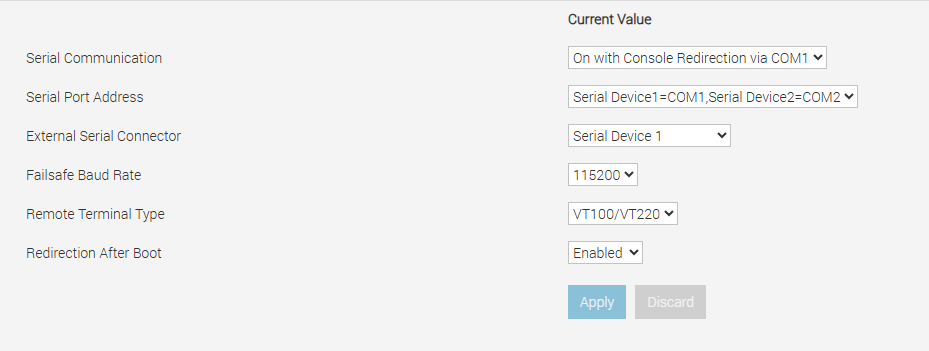
Zmiana systemu BIOS wymaga ponownego uruchomienia węzła.
Affected Products
PowerScale, Isilon Gen6.5, Isilon Gen6Article Properties
Article Number: 000356898
Article Type: How To
Last Modified: 15 Aug 2025
Version: 1
Find answers to your questions from other Dell users
Support Services
Check if your device is covered by Support Services.