I notebook Alienware Area 51 mostrano una maggiore velocità della ventola in modalità silenziosa di Alienware Command Center
Summary: Ulteriori informazioni sulla velocità della ventola visualizzata in Alienware Command Center (AWCC) su un notebook Alienware Area 51.
This article applies to
This article does not apply to
This article is not tied to any specific product.
Not all product versions are identified in this article.
Symptoms
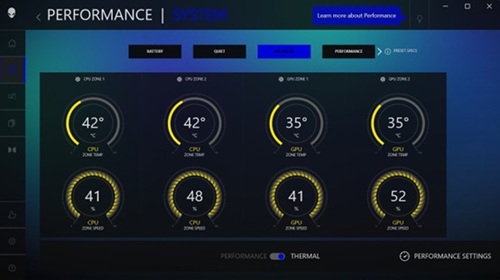
Le velocità della ventola possono essere superiori in modalità silenziosa rispetto alla modalità di bilanciamento in AWCC. In modalità Quiet, la velocità della ventola può essere compresa tra il 5% e il 10% superiore rispetto alla modalità di bilanciamento quando il computer è in stato di inattività.
- Balance Mode:
- Quiet Mode:
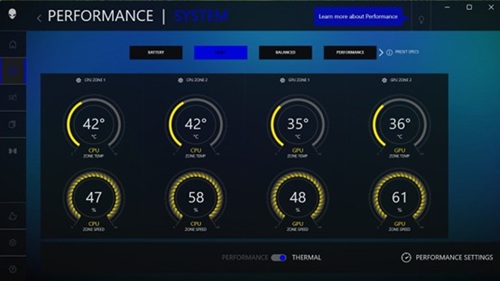
Piattaforme interessate:
- Alienware 16 Area-51 AA16250
- Alienware 18 Area-51 AA18250
Cause
Viene applicata una curva della ventola errata.
Resolution
L'aggiornamento del BIOS versione 1.8.0 o successiva sul computer risolve il problema. Per scaricare e installare il BIOS, consultare la Guida all'installazione e al download dell'aggiornamento del BIOS e UEFI di Dell.
Affected Products
Alienware 16 Area-51 AA16250, Alienware 18 Area-51 AA18250Article Properties
Article Number: 000365056
Article Type: Solution
Last Modified: 29 Oct 2025
Version: 2
Find answers to your questions from other Dell users
Support Services
Check if your device is covered by Support Services.