SupportAssist for Home PCs version 4.10.1 and 4.10.5 Cannot Open Successfully and Recommends Restarting the Computer
Summary: Learn why SupportAssist Consumer version 4.10.1 and 4.10.5 cannot open successfully and recommend restarting the computer.
This article applies to
This article does not apply to
This article is not tied to any specific product.
Not all product versions are identified in this article.
Symptoms
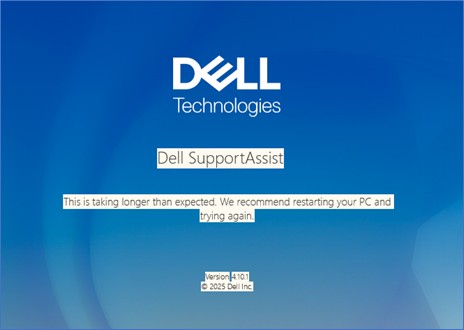
SupportAssist Consumer version 4.10.1 and 4.10.5 may not open successfully and shows the following message:
This is taking longer than expected. We recommend restarting your PC and trying again.
Affected Software:
- SupportAssist for Home PCs version 4.10.1
- SupportAssist for Home PCs version 4.10.5
Cause
This is due to the glitch in the codes not supporting contrast them other than None.
Resolution
Note: Before starting the update, perform the following:
- Back up all personal data. For more information, refer to Back Up and Recovery.
- Connect the AC adapter if updates are being run on a laptop.
- Ensure that power remains connected if updates are being run on a desktop.
Perform one of the following steps to resolve the issue:
- Updating the SupportAssist for Home PCs to version 4.10.6 or later on the computer resolves the issue. To download and install SupportAssist for Home PCs, refer to SupportAssist for Home PCs.
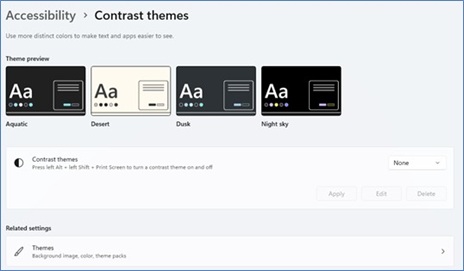
- Update the Contrast Themes from Settings to Default value as None.
- Open Settings. Click Accessibility and expand Contrast themes.
- Select None from the dropdown and Apply.
Affected Products
Chromebox, Alienware, Dell Pro All-in-One, Dell Pro Max Micro, Dell Pro Max Slim, Dell Pro Max Tower, Dell Pro Micro, Dell Pro Slim, Dell Pro Tower, Dell Slim, Dell Tower, Inspiron, OptiPlex, Vostro, XPS, G Series, Chromebook, G Series, Alienware
, Dell Plus, Dell Pro, Dell Pro Max, Dell Pro Plus, Dell Pro Premium, Inspiron, Latitude, Dell Pro Rugged, Vostro, XPS, Dell Pro Max Micro FCM2250, SupportAssist for Home PCs
...
Article Properties
Article Number: 000396036
Article Type: Solution
Last Modified: 26 Nov 2025
Version: 1
Find answers to your questions from other Dell users
Support Services
Check if your device is covered by Support Services.