家用電腦專用的 SupportAssist 4.10.1 和 4.10.5 版無法成功開啟,建議您將電腦重新開機
Summary: 瞭解 SupportAssist 消費者版本 4.10.1 和 4.10.5 無法成功開啟的原因,並建議將電腦重新開機。
This article applies to
This article does not apply to
This article is not tied to any specific product.
Not all product versions are identified in this article.
Symptoms
SupportAssist 消費者版本 4.10.1 和 4.10.5 可能無法成功開啟,並顯示下列訊息:
This is taking longer than expected. We recommend restarting your PC and trying again.
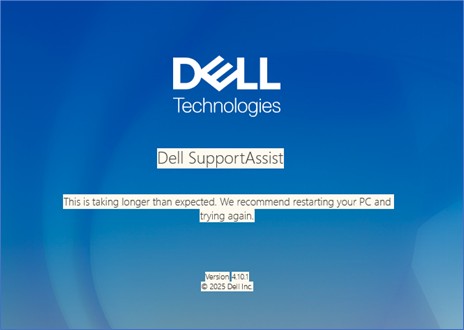
受影響的軟體:
- 家用電腦專用的 SupportAssist 4.10.1 版
- 家用電腦專用的 SupportAssist 4.10.5 版
Cause
這是因為代碼中的故障不支援對比它們,而不是 None。
Resolution
注意:開始更新之前,請先執行下列步驟:
- 備份所有個人資料。如需更多資訊,請參閱 備份與還原。
- 如果在筆記本電腦上執行更新,請連接交流電變壓器。
- 如果更新是在桌上型電腦上執行,請確定電源保持連接。
執行下列其中一個步驟以解決問題:
- 在電腦上將家用電腦專用的 SupportAssist 更新至 4.10.6 版或更新版本,便可解決此問題。若要下載和安裝家用電腦專用的 SupportAssist,請參閱家用電腦專用的 SupportAssist。
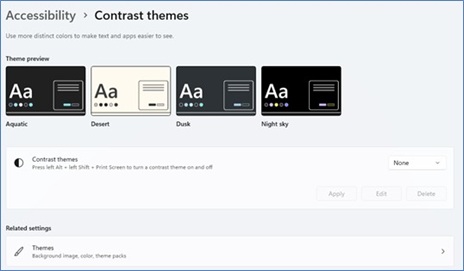
- 將對比度主題從設定更新為預設值無。
- 開啟「設定」。按一下 輔助功能, 然後展開 對比度主題。
- 從下拉式清單中選取 無 並 套用。
Affected Products
Chromebox, Alienware, Dell Pro All-in-One, Dell Pro Max Micro, Dell Pro Max Slim, Dell Pro Max Tower, Dell Pro Micro, Dell Pro Slim, Dell Pro Tower, Dell Slim, Dell Tower, Inspiron, OptiPlex, Vostro, XPS, G Series, Chromebook, G Series, Alienware
, Dell Plus, Dell Pro, Dell Pro Max, Dell Pro Plus, Dell Pro Premium, Inspiron, Latitude, Dell Pro Rugged, Vostro, XPS, Dell Pro Max Micro FCM2250, SupportAssist for Home PCs
...
Article Properties
Article Number: 000396036
Article Type: Solution
Last Modified: 26 Nov 2025
Version: 1
Find answers to your questions from other Dell users
Support Services
Check if your device is covered by Support Services.