Avamar: How to download the latest Avamar Client update packages from the server
Summary: This article provides information about updating the Avamar Client download packages on the Server along with the instructions to install them. This article is not intended to show you how to download or install the Avamar Client software on a Client. Review the appropriate manual for instructions to do that. ...
This article applies to
This article does not apply to
This article is not tied to any specific product.
Not all product versions are identified in this article.
Symptoms
Avamar Workflow Package (Avp) packages explained
There are three different packages to serve different purposes and scenarios:
There are three different packages to serve different purposes and scenarios:
- UpgradeClientDownloads - <version_number>.avp Client Upgrade package file
- Prior to version 7.1, the ClientDownloads application was automatically applied as part of the Avamar Server upgrade. Beginning with version 7.1 and all later versions, the Client Download page upgrade is optional.
- The upgrade engineer can initiate the ClientDownloads upgrade before disengaging from an Avamar Server upgrade, unless the ClientDownloads has already been upgraded, or the customer does not want to do the ClientDownloads upgrade.
- Example: A "replication only" Server may not require to be the repository.
- After the installation, the utility node also acts as a repository for the Client's installation files which are then available on the "Downloads page" accessed from the Avamar home page (https://hostname_or_IP_of_utility_node).
Note: The ClientDownloads avp package also updates the Client Plugin Catalog to give Server supportability to the newly installed Client version (see the third bullet below).
- Avamar_Client_Installers - <version_number>.avp Client Installer and Push Client Installers
- This package is customer installable and is the only Client Avp package that is not launched from the AVI user interface. It installs automatically when it is "dropped" into path /data01/avamar/repo/packages/ of the Utility node.
- The Avamar Client Manager uses the Client_Installers to push upgraded previously deployed clients.
Note: The Client_Installers avp package also updates the Client Plugin Catalog to give Server supportability to the newly installed Client version (see the third bullet below).
- UpgradeClientPluginCatalog - <version_number>.avp Client Plugin Catalog Upgrades
- This package is customer installable, and the installation process is faster than the other two packages.
- This optional avp package is typically installed as a stand-alone and as a temporary option, to allow an older Avamar Server to backup newer Clients. For example, an Avamar Server that is running on version 19.4.0 and an Avamar Client that is running on version 19.7.0.
- In other words, this is useful for the forward supportability of some Clients when we have no time or intention to install the full ClientDownloads avp package yet.
Cause
There in an Avamar Server option to allow an older Avamar Server to backup newer Clients due to forward supportability. For example, an Avamar Server that is running on version 19.4.0 and an Avamar Client that is running on version 19.7.0.
Resolution
All supported install and upgrade files are posted on the Avamar Server Support page. Select the version number for the required file and download the avp package that is required for your specific purpose.
- To find an avp package, follow article Avamar: How to find and download a product hotfix, patch, install or upgrade package from the Dell Support website
- To install an avp package, follow article How to install an Avamar .avp hotfix using Avamar Installer (AVI)
Once a version is selected, the corresponding packages are displayed.
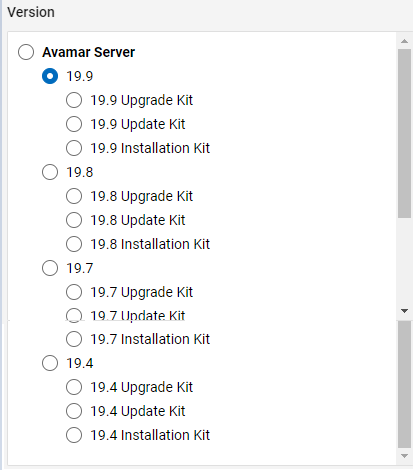
Figure 1: Avamar Server Support Page
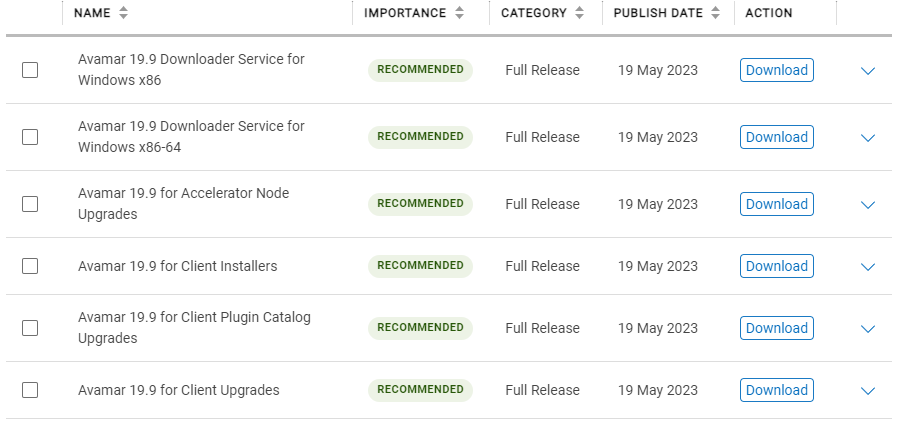
Figure 2: Corresponding Avamar Packages
Affected Products
AvamarArticle Properties
Article Number: 000067225
Article Type: Solution
Last Modified: 08 Oct 2024
Version: 15
Find answers to your questions from other Dell users
Support Services
Check if your device is covered by Support Services.