Dell Encryption Agent Reporting a Different Hostname in Dell Data Security Server Console
Yhteenveto: This article provides steps to correct an issue with inventory reporting as the wrong hostname with Windows clients.
Tämä artikkeli koskee tuotetta
Tämä artikkeli ei koske tuotetta
Tämä artikkeli ei liity tiettyyn tuotteeseen.
Tässä artikkelissa ei yksilöidä kaikkia tuoteversioita.
Oireet
Affected Products:
- Dell Encryption
- Dell Endpoint Security Suite Enterprise
Affected Operating Systems:
- Windows
Syy
Dell Data Security products can report the wrong hostname during inventory uploads to the server if there is a different hostname in the hosts file before the current hostname.
Tarkkuus
- Edit the hosts file located at C:\Windows\System32\drivers\etc.
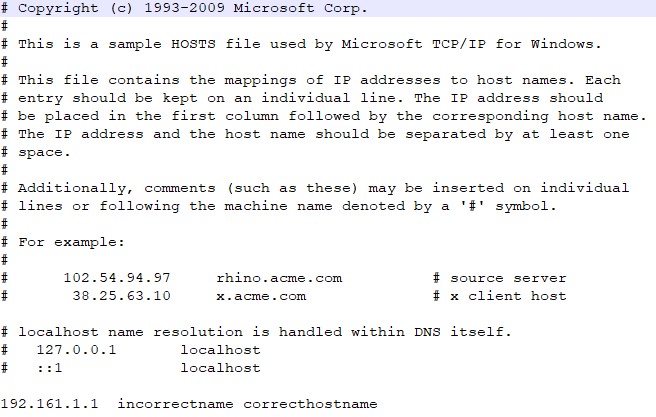
- Change the order to reflect the current hostname to be the first entry in the hosts file.
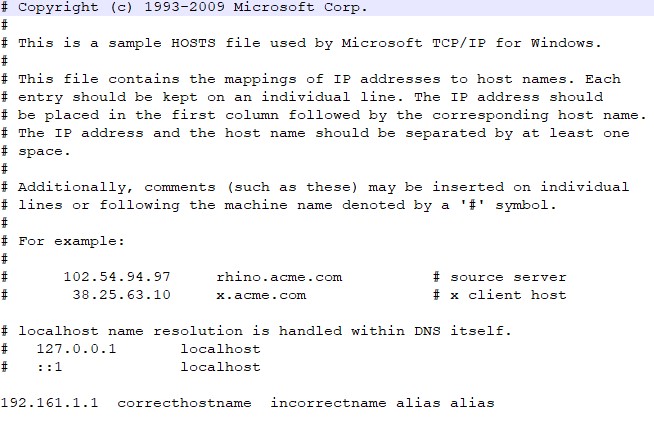 Note: You can still have other aliases in the hosts file that have to be after the current hostname.
 - When finished, click File > Save.
- The hostname will change within the server upon the next inventory upload.
To contact support, reference Dell Data Security International Support Phone Numbers.
Go to TechDirect to generate a technical support request online.
For additional insights and resources, join the Dell Security Community Forum.
Tuotteet, joihin vaikutus kohdistuu
Dell Encryption, Dell Endpoint Security Suite EnterpriseArtikkelin ominaisuudet
Artikkelin numero: 000187320
Artikkelin tyyppi: Solution
Viimeksi muutettu: 02 kesäk. 2026
Versio: 6
Etsi vastauksia kysymyksiisi muilta Dell-käyttäjiltä
Tukipalvelut
Tarkista, kuuluuko laitteesi tukipalveluiden piiriin.