Dell Management Server Virtual Core Server가 없음 알림
Résumé: 이메일 수신자는 Dell Management Server Virtual을 v11.4로 배포 또는 업그레이드하고 이메일 알림을 활성화할 때 매시간 오류 알림을 받습니다.
Cet article concerne
Cet article ne concerne pas
Cet article n’est associé à aucun produit spécifique.
Toutes les versions du produit ne sont pas identifiées dans cet article.
Symptômes
영향을 받는 제품:
- Dell 관리 서버 가상
영향을 받는 버전:
- v11.4
영향을 받는 운영 체제:
- Linux
수신된 이메일의 예:
Automatically generated alert from Dell Security Management Server Virtual – Service: Dell Core Server - HTTP / Event: Does not exist
Action: restart
Host: Server Hostname
Description: process is not running
Service: Dell Core Server - HTTP
Event: Does not exist
Cause
Dell Management Server Virtual 구성 요소의 상태를 확인하는 서비스가 다음과 같은 이유로 코어 서버를 수신 대기 중인 것으로 감지하지 못합니다. netstatnet-tools 패키지의 일부인 가 설치되어 있지 않습니다.
Résolution
- Dell Management Server Virtual 관리 콘솔에 로그인합니다.
참고:
- Dell Security Management Server Virtual의 기본 자격 증명은 다음과 같습니다.
- 사용자 이름:
delluser - 비밀번호:
delluser
- 사용자 이름:
- 관리자는 제품의 가상 어플라이언스 메뉴에서 기본 비밀번호를 변경할 수 있습니다.
- Main Menu에서 Launch Shell을 선택하고 키를 누릅니다.
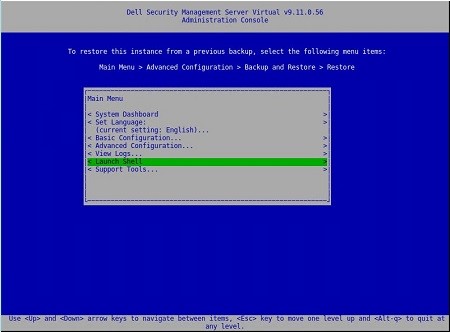
- 사용자를 다음으로 변경
dellsupport명령으로su dellsupport
 참고:
참고:- Dell Security Management Server Virtual의 기본 자격 증명은 다음과 같습니다.
- 사용자 이름:
dellsupport - 비밀번호:
dellsupport
- 사용자 이름:
- 관리자는 제품의 가상 어플라이언스 메뉴에서 기본 비밀번호를 변경할 수 있습니다.
- Dell Security Management Server Virtual의 기본 자격 증명은 다음과 같습니다.
- 의 암호를 확인합니다.
dellsupport사용자로 합니다.

- 상태 확인
netstat명령으로netstat --version. - 만약
netstat가 설치되지 않은 경우 다음 오류가 표시됩니다.

- 다음 명령을 실행합니다.
sudo apt install net-toolsNet Tools를 설치합니다. - 실행
netstat --version다시 확인하여 확인합니다.netstat이제 설치되었습니다.

- 유형
exitEnter 키를 눌러 로그아웃합니다.dellsupport.

- 유형
exitEnter 키를 눌러 셸에서 Main Menu로 로그아웃합니다.

Produits concernés
Dell EncryptionPropriétés de l’article
Numéro d’article: 000202891
Type d’article: Solution
Dernière modification: 14 Sep 2026
Version: 3
Trouvez des réponses à vos questions auprès d’autres utilisateurs Dell
Services de support
Vérifiez si votre appareil est couvert par les services de support.