No Video or Low Resolution When Using Picture in Picture or Picture by Picture With HDMI
Résumé: This article provides information about the Dell U3425WE monitor having no video or low resolution when using picture in picture (PIP) or Picture by Picture (PBP) while connected using HDMI. ...
Cet article concerne
Cet article ne concerne pas
Cet article n’est associé à aucun produit spécifique.
Toutes les versions du produit ne sont pas identifiées dans cet article.
Symptômes
Affected Products:
- Dell U3425WE Monitor
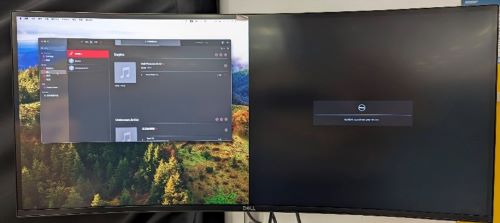

Cause
When PIP or PBP is on, the computer may read the wrong HDMI EDID and cause no video or low resolution through the HDMI signal.
Résolution
When PIP or PBP is on, check if the dock is using HDMI in one of the connections. If yes, Dell Technologies recommends replacing HDMI with one of the alternative connections below:
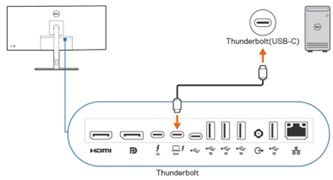
Change to Thunderbolt (USB-C) connection:
- Connect Thunderbolt (USB-C) to Monitor Thunderbolt directly.
- Change the connection for PIP or PBP in the monitor’s OSD to Thunderbolt (USB-C).
DisplayPort connection:
- Connect DisplayPort to monitor DisplayPort directly.
- Change the connection for PIP/PBP in the monitor’s OSD to DP

Produits concernés
Dell U3425WEPropriétés de l’article
Numéro d’article: 000223576
Type d’article: Solution
Dernière modification: 24 avr. 2025
Version: 4
Trouvez des réponses à vos questions auprès d’autres utilisateurs Dell
Services de support
Vérifiez si votre appareil est couvert par les services de support.