介面上的 Dell Security Management Server 虛擬升級失敗。d
Riepilogo: 升級 Dell Security Management Server Virtual Appliance 失敗,並出現引用 interfaces.d 目錄的錯誤。
Questo articolo si applica a
Questo articolo non si applica a
Questo articolo non è legato a un prodotto specifico.
Non tutte le versioni del prodotto sono identificate in questo articolo.
Sintomi
受影響的產品:
- Dell Security Management Server Virtual
受影響的版本:
- v10.2.9 至 v10.2.11
受影響的作業系統:
- Linux
Dell Security Management Server 虛擬升級停止,並出現訊息 「無法從備份檔案還原: 而這會在嘗試還原 etc/network/interfaces 目錄中的檔案之後發生。
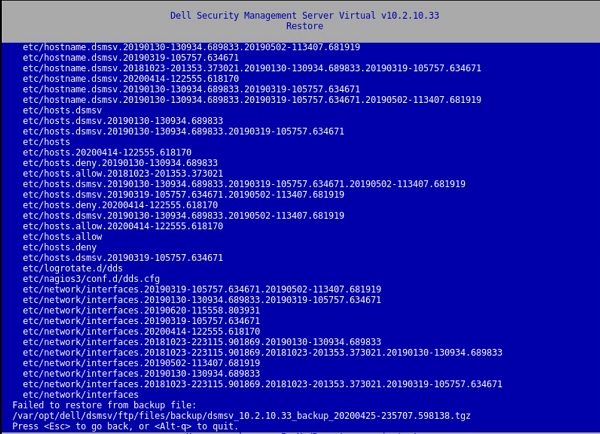
圖 1:(僅限英文)還原傳回失敗,無法從備份檔還原:
按下按鍵會導致視窗出現:
[Errno 21] Is a directory:
‘/etc/network/interfaces.d’.
/var/log/messages 檔案中也會出現此錯誤:
![[Errno 21]是目錄:「/etc/network/interfaces.d」](https://supportkb.dell.com/img/ka06P000000Put7QAC/ka06P000000Put7QAC_zh_TW_6.jpeg)
圖 2:(僅限英文版) [Errno 21] Is a directory: ‘/etc/network/interfaces.d’
Causa
不適用
Risoluzione
若要解決此問題,請依照指示重新命名 interfaces.d 目錄。
- 登入 Dell Security Management Server Virtual Console。
- 選取 Dell Security Management Server Virtual 管理主控台中的啟動 Shell。
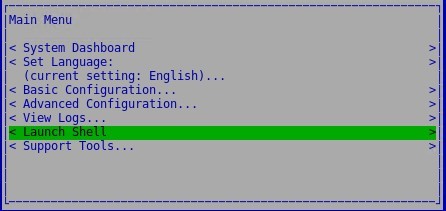
圖 3:(僅限英文版) 啟動 Shell
- 使用命令
su dellsupport切換至dellsupport使用者帳戶。

圖 4:(僅限英文)切換至 dellsupport
- 提供
dellsupport使用者的密碼。根據預設,密碼為dellsupport。

圖 5:(僅限英文)輸入密碼
- 使用下列命令重新命名 interfaces.d 目錄:
sudo mv /etc/network/interfaces.d /etc/network/interfaces.old

圖 6:(僅英文) 輸入 sudo mv /etc/network/interfaces.d /etc/network/interfaces.old
- 輸入
exit或使用ctrl-d兩次退出 Shell,然後透過使用者介面執行升級。
如要聯絡支援部門,請參閱 Dell Data Security 國際支援電話號碼。
請前往 TechDirect,以線上產生技術支援要求。
如需更多深入見解與資源,請加入 Dell 安全性社群論壇。
Informazioni aggiuntive
Video
Prodotti interessati
Dell EncryptionProprietà dell'articolo
Numero articolo: 000131146
Tipo di articolo: Solution
Ultima modifica: 06 lug 2023
Versione: 10
Trova risposta alle tue domande dagli altri utenti Dell
Support Services
Verifica che il dispositivo sia coperto dai Servizi di supporto.