PowerStore: How to Configure WinSCP to Maintain Executable Permissions for Service Script Uploads
Riepilogo: This article provides step-by-step instructions on how to maintain executable permissions for an injectable service script when uploading it to a PowerStore appliance using WinSCP.
Questo articolo si applica a
Questo articolo non si applica a
Questo articolo non è legato a un prodotto specifico.
Non tutte le versioni del prodotto sono identificate in questo articolo.
Istruzioni
NOTE: This is only required if the uploading packages are in the ZIP format. If the package being uploaded is a TAR file, this is not required.
Perform the following steps to configure WinSCP to maintain executable permissions for an injectable service script when uploading it to a PowerStore appliance.
- Using WinSCP, establish a Secure Copy Protocol (SCP) connection to a node on the PowerStore appliance as (service).
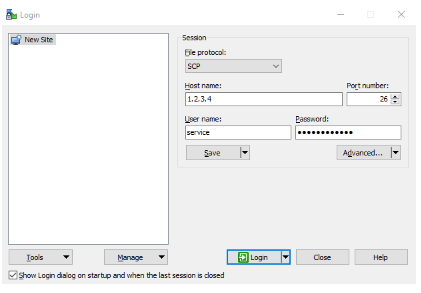
- Go to the left pane of WinSCP to the folder with the file to upload and select one or more files.

- Click the Upload button above the left pane to open the upload dialog box.

- Click Transfer settings:
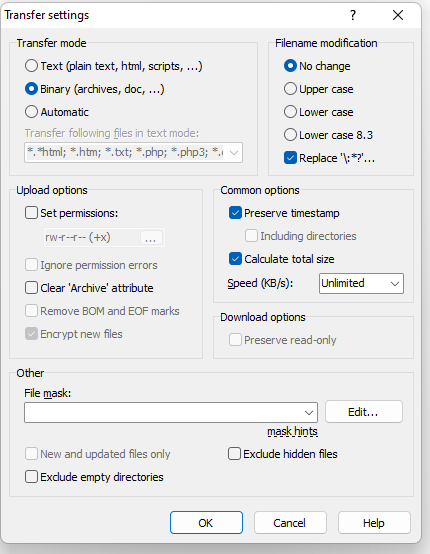
- Check the box for Set permissions and replace rw-r--r-- (+x) with 0777. It changes to rwxrwxrwx when anywhere else is clicked in the window.

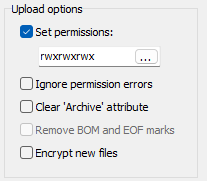
- Click OK on the Transfer settings window and the Upload options window to upload files with proper permissions.
- Verify that the file is uploaded with full permission in the right pane.

This uploads the selected one or more files without making permanent changes to the WinSCP app that have to be reverted.
Prodotti interessati
PowerStore, PowerStore 1000X, PowerStore 1000T, PowerStore 3000X, PowerStore 3000T, PowerStore 5000X, PowerStore 5000T, PowerStore 500T, PowerStore 7000X, PowerStore 7000TProdotti
PowerStore 9000X, PowerStore 9000T, PowerStore Employee and PartnerProprietà dell'articolo
Numero articolo: 000197471
Tipo di articolo: How To
Ultima modifica: 04 set 2024
Versione: 4
Trova risposta alle tue domande dagli altri utenti Dell
Support Services
Verifica che il dispositivo sia coperto dai Servizi di supporto.