Data Domain DD6400: Hinzufügen einer Ersatzfestplatte auf DD6400
Riepilogo: Dieser Artikel dient als Referenz für das Hinzufügen einer Ersatzfestplatte zu einem DD6400-Modell.
Questo articolo si applica a
Questo articolo non si applica a
Questo articolo non è legato a un prodotto specifico.
Non tutte le versioni del prodotto sono identificate in questo articolo.
Istruzioni
Andere Data Domain-Produkte mit einer Ersatzfestplatte mit unbekanntem "U" können "Disk Unfail" sein, um sie als Ersatz zu verwenden. Speicherpoolprodukte wie DD6400 akzeptieren nur den Befehl "storage add", um eine neue Festplatte zum System hinzuzufügen.
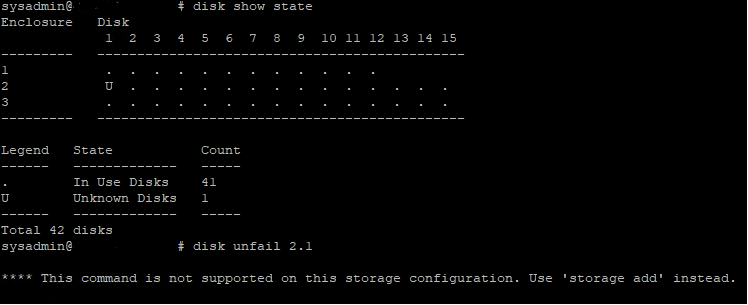
Abbildung 1: Data Domain CLI – Disk Show State, Disk Unfail
Abbildung 1: Data Domain CLI – Disk Show State, Disk Unfail
- Nachfolgend finden Sie den CLI-Befehl zum Hinzufügen eines Ersatzbetriebssystems (1.1 und 1.2) oder einer Datenfestplatte zum DD6400.
- Führen Sie den Befehl storage add force disk aus, um eine Ersatzfestplatte zum System hinzuzufügen, wobei disk die Nummer der Ersatzfestplatte ist.
# storage add force disk 2.1

The 'storage add force' command will make the disk available to the
        filesystem. Any existing data on this will be lost.
        Are you sure? (yes|no) [no]: yes

Checking storage requirements...done
Adding disk 2.1 to the system...done

Updating system information...done

Disk 2.1 successfully added to the system
- Verwenden Sie den folgenden Befehl, um zu überprüfen, ob das Data Domain-System das Festplattenlaufwerk erkennt. In der Befehlsanzeige sollte der Festplattenstatus "spare" oder "reconstructing" sein.
# disk show state

Enclosure   Disk
             1  2  3  4  5  6  7  8  9  10 11 12 13 14 15
---------   ----------------------------------------------
1            .  .  .  .  .  .  .  .  .  .  .  .
2            v  .  .  .  .  .  .  .  .  .  .  .  .  .  .
---------   ----------------------------------------------

Legend   State             Count
------   ---------------   -----
.        In Use Disks      26
v        Available Disks   1
------   ---------------   -----
Total 27 disks

Estimated total time remaining for reconstruction (minutes) 874
- Im Folgenden sind die CLI-Befehle zum Hinzufügen einer Ersatzfestplatte zum DD6400-Cache-Tier (1.3 und 1.4) aufgeführt.
- Führen Sie den Befehl storage add disk 1. aus, um das Laufwerk wieder zum Cache-Tier hinzuzufügen, wobei die Nummer der Festplatte aus der Hardwarefehlerwarnmeldung ist.
- Führen Sie den Befehl filesys expand aus, um die neue Cache-Festplatte als verwendet festzulegen.
Prodotti interessati
DD6400 ApplianceProdotti
Data DomainProprietà dell'articolo
Numero articolo: 000214343
Tipo di articolo: How To
Ultima modifica: 18 mag 2026
Versione: 5
Trova risposta alle tue domande dagli altri utenti Dell
Support Services
Verifica che il dispositivo sia coperto dai Servizi di supporto.